
WISMO and Order Automation in Instagram and Facebook DMs
How to automate 'where is my order' replies in Instagram and Facebook DMs, which tools can see order data, and how to turn a DM into an order without retyping
WISMO automation in Instagram and Facebook DMs means a “where is my order?” message gets the real answer without a person typing it. Five things have to happen: the message is recognised as an order question however it’s worded, the customer is identified, the order is looked up in the store, the status goes back in the thread within Meta’s 24-hour messaging window, and anything that isn’t routine goes to a person with the order already attached.
The fourth step is the one most tools can’t do. Answering the question needs live order data, and most social inboxes don’t have it. So the first decision isn’t which chatbot to buy. It’s where the order data will come from.
This post covers how a WISMO flow works in DMs, which kinds of tool can see orders, how to turn a DM into an order without anyone retyping it, and how to cut the number of order questions in the first place. It’s written for agencies running social for online stores, where order DMs spike every time a campaign or a sale lands.
How a WISMO flow works in DMs
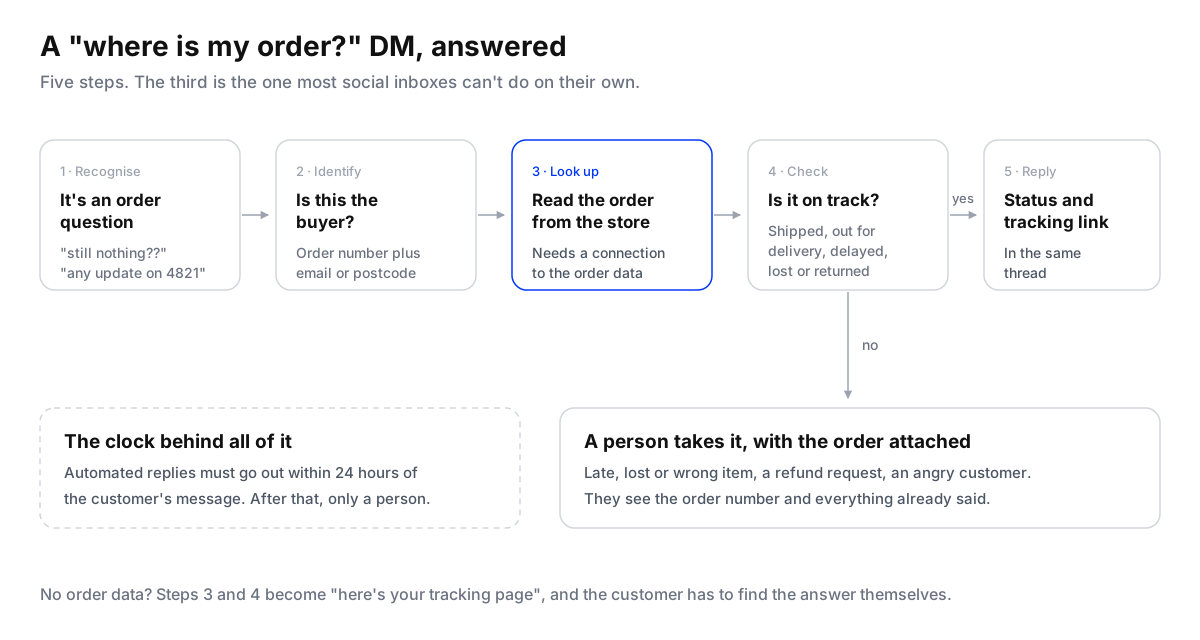
Recognise it by meaning, not keyword. Customers rarely write “WISMO”. They write “still nothing??”, “my parcel was meant to come Tuesday”, “any update on 4821” or the same thing in Arabic. A keyword list catches some of these and misses the rest, and it also fires on messages that only look similar (“where is my order button on your site?”). An AI agent reads the intent, which is why most WISMO builds now use one rather than a trigger list.
Identify the customer before you say anything about the order. An Instagram handle isn’t proof of who placed an order. Ask for the order number plus something only the buyer knows, such as the email or postcode on the order. Gorgias’s AI Agent on Instagram and Messenger goes further and sends a six-digit code to the email or phone on file before it discusses an order.
Look the order up. This needs a connection to the store or the shipping system. Without it, the best any tool can do is send the customer to a tracking page.
Reply inside the window. Meta gives a business 24 hours to answer a message through its API. An order question sent at 10pm Friday has to be answered before 10pm Saturday by anything automated. After that only a person can reply, as a human agent message within seven days.
Hand off what isn’t routine. A late parcel, a lost one, a wrong item, a refund request or an angry customer goes to a person. The handoff should carry the order number and what the agent already said, so nobody asks the customer twice. How to set those rules is covered in smart escalations for AI agents.

Which tools can see the order
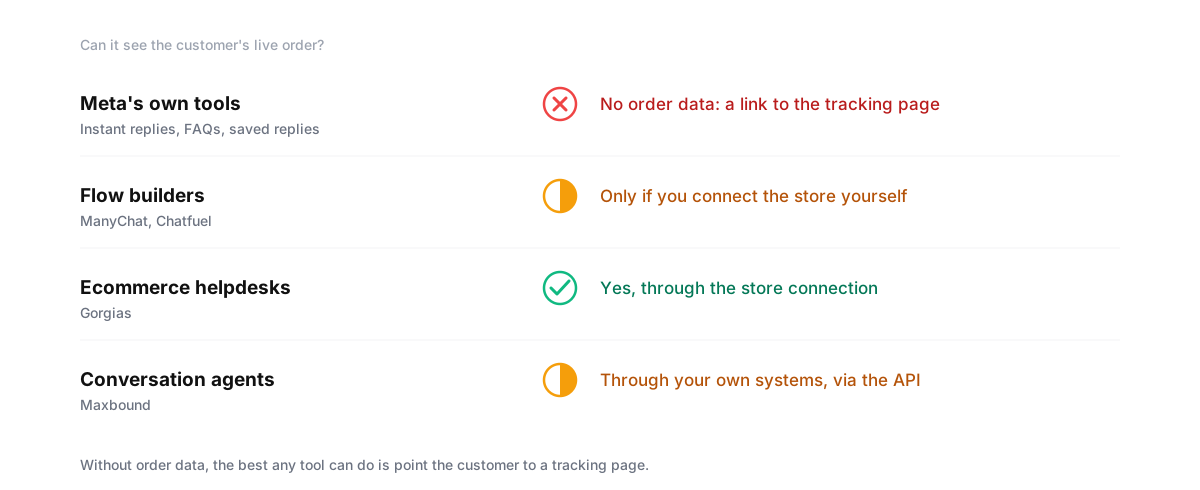
The honest split is before and after the order. Questions before the order (price, size, stock, delivery areas, “does this come in black?”) come as comments under ads and posts, and they decide whether a sale happens. Questions after the order are mostly WISMO, returns and refunds, and they need the order record. Maxbound’s own comparison says it plainly: Gorgias owns post-purchase, Maxbound owns pre-purchase, and stores running heavy paid social often use both.
If you’d rather keep one tool, Maxbound’s API lets the store’s systems hand the agent the order and account context it needs, and its MCP server lets your own Claude or ChatGPT agent work the conversations and CRM in plain language. In a client’s own mobile app, the in-app chat already knows the signed-in customer’s account and orders.
Turning a DM into an order
The other half of DM automation runs the opposite way: a conversation that should become an order. Someone asks about a product in a DM, asks a size question, says “I’ll take two”. If the order then has to be typed into the store by hand, someone on the client’s team does data entry for every sale that starts in a DM.
There are two safe ways to close it.
- Send them to checkout. The agent answers the questions, then sends the product page or a checkout link with the size picked. The customer pays on the store, and the store creates the order. This is the simplest and needs no integration.
- Capture the order and push it. For stores that take orders in chat (common for made-to-order goods, food and anything paid on delivery), the agent asks for the item, size, quantity, name, phone and delivery address, saves them to the contact in the CRM, and your system creates the order from that record through the API.
Set up DM-to-order capture for a client
- List what an order needsWrite down every field the store needs to create an order: item, variant, quantity, name, phone, address, payment method. Nothing more.
- Teach the agent the catalogueGive it the product list, sizes, prices, delivery areas and delivery times as knowledge, so it answers from the client's facts.
- Collect the fields in the conversationAsk for missing details one question at a time, then read the whole order back to the customer and ask them to confirm.
- Save it as a structured recordStore the confirmed order on the contact in the CRM, not only in the chat log, so a system can read it.
- Create the order from the recordHave the store's system create the order from that record through the API, or have a person approve it first while you build trust.
- Send the confirmation backReply in the same thread with the order number, so a later WISMO question starts with it.
Start with a person approving each captured order, the way you’d start any agent with replies a person approves. Move to automatic creation once a few weeks of approvals show the agent gets the fields right.
Cut the order questions before they’re asked
The cheapest WISMO reply is the one nobody has to send. Before automating the answer, reduce the question:
- Send tracking without being asked. Make sure the store’s shipping confirmation goes out with a working tracking link. Order DMs from people who never got one, or can’t find it, are the easiest ones to remove.
- Say the delivery time where people decide. On the product page, in the checkout and in the ad’s first comment. “Delivered in 2 to 4 working days in the UAE” answers a question before the order exists.
- Use Instagram’s FAQs. A professional account can show up to four questions when someone opens a chat, each with an automatic answer. “Where is my order?” pointing to the tracking page is a good one.
- Warn early when something slips. If a campaign sold more than the warehouse can ship this week, post a story and message the buyers first. One message out beats hundreds coming in.
What to measure
Before you build anything, count a week of the client’s DMs and label each one: order question, pre-sale question, complaint, other. Then track these each month:
- Order DMs per week, and per hundred orders shipped. This shows whether the prevention work is helping.
- Share answered without a person. For WISMO, this is the number the automation is for.
- Time to first answer, automated and human, and how many order questions were still open when Meta’s 24-hour window closed.
- Handoffs, and the reason for each. A reason that keeps coming up is the next thing to fix.
- Orders captured from DMs, for clients who take orders in chat.
Sentiment analytics helps with the third kind of DM: it shows when frustration about delivery is rising before it turns into public comments.
Where Maxbound fits
Maxbound is an AI operating system for agencies. For online stores it covers the conversations before and around the order: AI agents trained on each client’s catalogue and policies answer comments under ads and DMs on Instagram and Facebook, plus WhatsApp, website chat and in-app chat; they qualify buyers, capture contacts and orders into the built-in CRM, and hand anything sensitive to your team in one omnichannel inbox. The agents learn each brand’s voice from your team’s edits (self-improving AI). Order data comes in through the API or your own agents over MCP; Maxbound doesn’t refund or edit Shopify orders itself. If you’re comparing reply tools for Instagram and Facebook, read the best tools to automate Instagram and Facebook replies.