Best Way to Automate Instagram and Facebook Replies
Which tool to automate Instagram and Facebook comment and DM replies depends on what the replies are. What Meta allows, what to check, and how to test tools
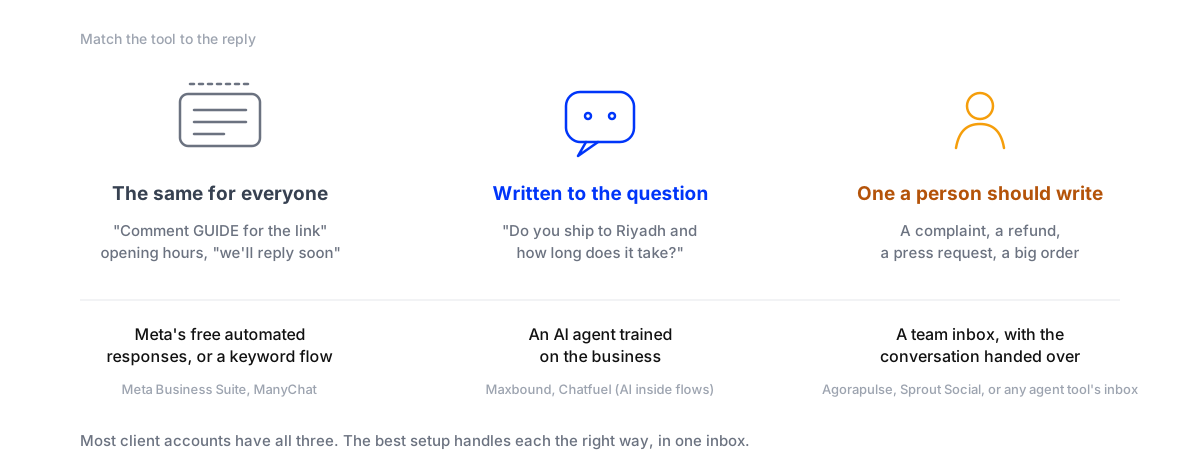
The best tool to automate Instagram and Facebook replies is the one that matches what the replies actually are. If everyone gets the same answer (“comment GUIDE and we’ll send it”), Meta’s free tools or a keyword flow builder will do. If people ask real questions about price, sizes, delivery or bookings, you need an AI agent trained on the business, because no keyword list can answer a question you didn’t predict. And if a reply needs judgement, such as a complaint or a big deal, a person should write it, in an inbox that puts it in front of them.
Most client accounts have all three. So the practical answer for an agency is a setup where an agent answers the questions, campaigns keep their keyword flows, and people get the conversations that need them, all in one inbox per client. Below: what Meta allows on each platform, what to check before you pay, and a one-week test that settles it on the client’s own messages instead of a demo.
Three kinds of reply, three kinds of tool
For the full list of tools and when to choose each, see Instagram DM automation tools, compared by who writes the reply and ManyChat alternatives.
What Meta allows, on Instagram and on Facebook
Every legitimate tool runs on the same Meta rules, so learn them once. They’re nearly identical across the two platforms.
| Public reply to a comment | Yes | Yes |
| Private reply to a commenter | One message, within 7 days of the comment | One message, within 7 days, with a link to the comment |
| Where the private reply lands | Inbox if they follow you, Requests if not | Messenger |
| Further messages | Only if they reply, inside 24 hours of their reply | Only if they reply, inside the 24-hour window |
| Free automation | Up to four FAQs in the app; instant replies and away messages in Business Suite | Instant replies, away messages and FAQs in Business Suite |
| Free comment filtering | Hidden Words | Blocked words, up to 1,000 per Page |
Two consequences shape every setup. The first private message has to carry the whole answer, because you may not get a second. And because Instagram puts private replies from accounts people don’t follow into Requests, a public reply that says “check your message requests” saves a lot of “I never got it”.
Meta Business Suite’s automated responses cover the “same for everyone” replies on both platforms for free. Turn them on for every client before paying for anything. Then the question is what’s left over.
What to check before you pay
- It connects through Meta’s official API. The client connects their account with Meta’s own login. Never give a tool a password or install a browser extension that sends messages: Instagram’s terms forbid collecting information in an automated way without permission.
- It handles comments and DMs, in public and in private. Some tools only send a DM when a keyword matches. Comments under ads need public answers too, and spam hidden.
- It answers questions you didn’t script. Test this with your client’s real messages, not the vendor’s examples. One unexpected question shows the difference between a keyword flow and an agent.
- A person can take over, with the thread. Check where a handed-off conversation lands, who is told, and whether they see what the bot already said.
- Leads go somewhere useful. A name, a phone number and what they want, saved as a contact you can filter and export, or sent to the client’s CRM, not left in a chat log.
- Each client is separate. Its own knowledge, voice, inbox and report, so one client’s prices never appear in another’s replies.
- Your team doesn’t need the client’s password. In Meta Business Suite, the client can give your agency partner access to the Page and Instagram account, including permission to respond to messages.
- You know what you’re billed for. Contacts stored, seats, tickets or a price per client workspace. Work out what each means at your client’s volume.
Test it on the client’s own messages for a week
A demo shows the questions the vendor chose. A week on a real account shows the ones your client’s customers ask.
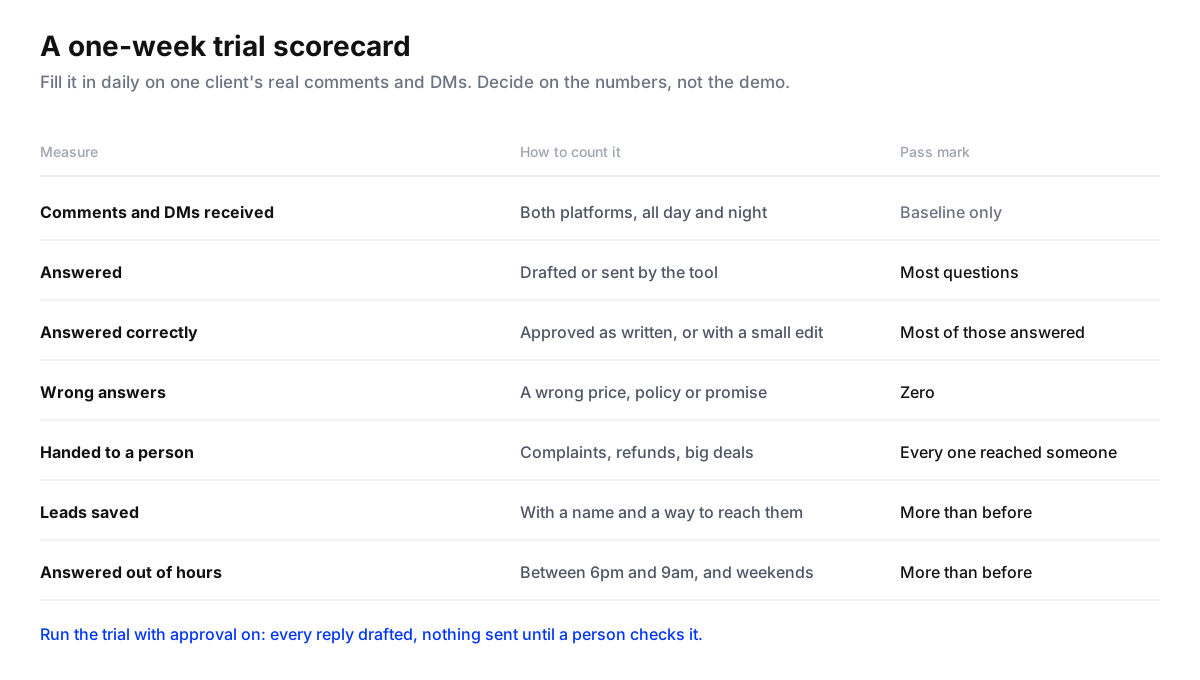
Trial a reply automation tool on one client account
- Count a normal week firstBefore connecting anything, log a week of comments and DMs on Instagram and Facebook: how many, how many got an answer, how fast, and how many came outside office hours.
- Connect one client through Meta's loginUse a client with steady volume. Connect through the tool's official Meta login, and give your team partner access instead of passwords.
- Train it on the client's real factsPrices, sizes, delivery areas and times, booking rules, the policies people ask about. For a keyword tool, write the flows for the client's top five questions.
- Run it with approval onLet it draft every reply and have a person approve, edit or take over. Nothing goes out unchecked during the trial.
- Fill in the scorecard dailyAnswered, answered correctly, handed to a person, wrong answers, leads saved. Note every question it couldn't answer.
- Decide on the numbersKeep the tool if it answered most questions correctly, made no wrong promises, and every handoff reached a person. Then let it send on its own, one kind of question at a time.
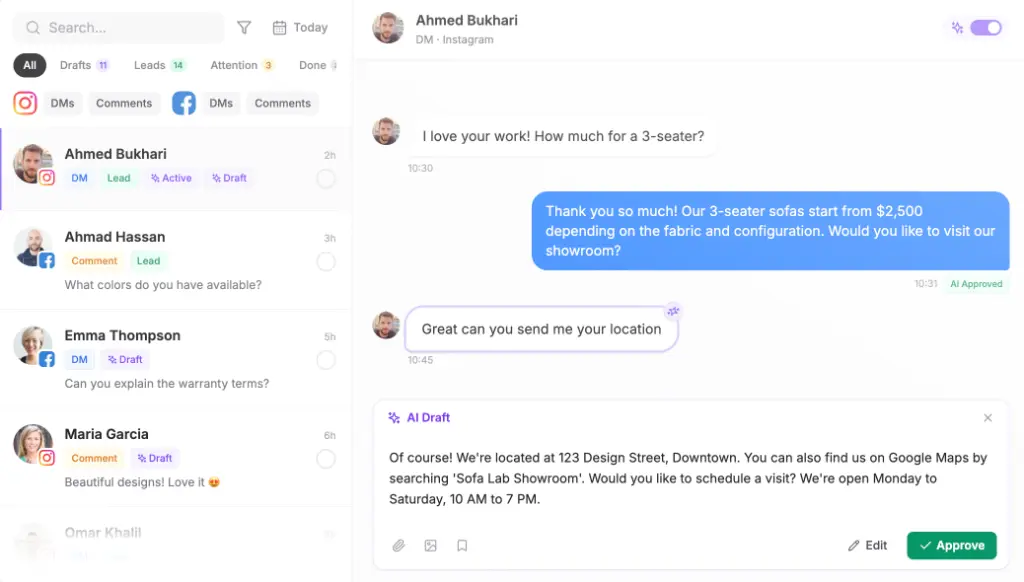
Running the trial with drafts is also how you start for real. How to set that up, and when to let replies go out on their own, is in how to set up a human-in-the-loop workflow.
Working out whether it pays
Compare tools on what each saved lead costs, not on the monthly fee.
- Cost per lead = the tool’s monthly cost for that client ÷ leads saved from comments and DMs in the month.
- Hours given back = replies sent without a person × the minutes a person took per reply ÷ 60.
- Out-of-hours answered = questions answered between 6pm and 9am, which nobody answered before.
The third number is often the one that wins the argument. In our study of 1,788 public comments on 178 businesses’ Instagram and Facebook posts, 53% of the comments nobody answered arrived outside 9am to 6pm (the study). A tool that only helps people type faster does nothing for those.
What to report to the client
Clients care about outcomes, so lead the monthly report with them: questions answered, how fast, how many outside office hours, leads saved with their contact details, and conversations your team handled personally. Add two or three real exchanges, with names hidden. A reply to a real customer at 11pm makes the case better than any chart.
Where Maxbound fits
Maxbound is an AI operating system for agencies. For Instagram and Facebook it does the middle row of the first table: an AI agent per client, trained on the client’s site, documents and past conversations, answers comments and DMs, moves buying questions into a private reply, hides spam and abuse, and saves the person as a contact (comment to DM to CRM). Conversations it shouldn’t decide go to your team in one inbox, with the thread. The same agent answers on WhatsApp, website chat and the client’s own app. Each client is a separate workspace with its own report, priced per workspace on the pricing page. It doesn’t do social listening, publish to X or LinkedIn, or act on Shopify orders; for order questions, read WISMO and order automation in DMs. More on how agencies use it is on the marketing agencies page.