How to Reply to Instagram Comments on Client Ads
Comments under ads are paid-for questions, often hidden from the profile. Where to find them, how to triage them, what to reply in public and by DM, and how
To reply to comments on a client’s Instagram ads, first find them: ads that were never posted to the profile keep their comments under the ad itself, so checking the profile misses them. Then triage every comment into four kinds: answer buying questions in public and continue by DM, pass complaints to a person, hide spam and competitor links, and leave the rest with a like or a short thanks. Do it within hours, not days, because the ad keeps showing the unanswered question to everyone it reaches.
Comments under ads are the most expensive comments a client gets: they paid for every person who saw the ad. A “price?” left unanswered there is paid-for interest going nowhere.
Find the comments first
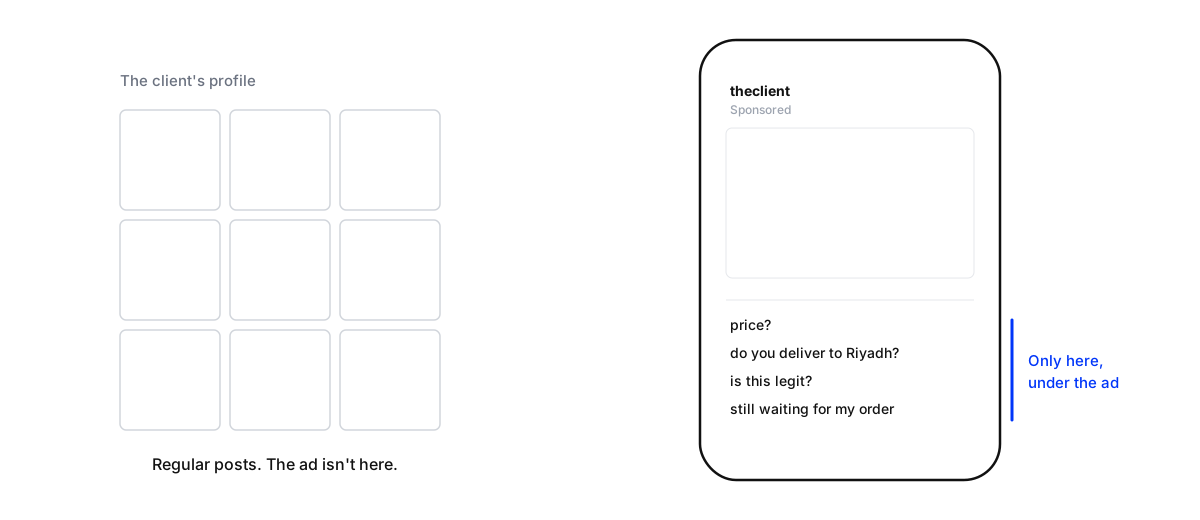
Many ads are made without being posted to the profile. Their comments don’t appear on any post in the grid, so a community manager scrolling the profile never sees them. Meta lets you review the comments on your ads from Ads Manager, and a shared inbox that pulls in ad comments puts them beside everything else.
Two habits keep ad comments together. When you duplicate an ad into new ad sets, Ads Manager can carry the existing reactions, comments and shares over to the copy, so a question answered once stays answered instead of being asked again under each copy. And building ads from an existing post keeps them on that post’s thread.
Triage every comment
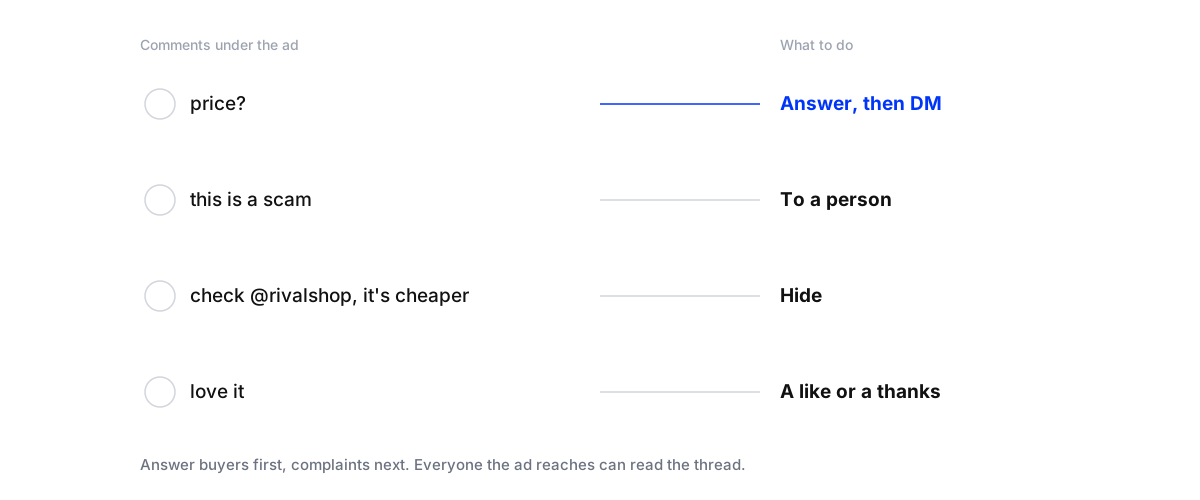
Buying questions (price, sizes, delivery, “where can I buy”): a short public answer, then the details in a private message. Meta allows one private reply to each comment, within seven days of the comment, so make the first message complete.
Complaints and accusations (“scam”, “never arrived”, “rubbish quality”): to a person, fast. Reply once in public, calmly and specifically, and move the details to a private message. Under an ad, a complaint is read by everyone the ad reaches, and so is the reply.
Spam, abuse and competitors’ links: hide them. On Facebook, a hidden comment stays visible to the person who wrote it and their friends, which avoids most arguments, and hidden comments can be restored.
Praise and tags: a like, or a short thanks. Don’t send a sales DM to someone who said “love it”.

What to say
A price question, in public: “It’s 240 AED, with free delivery in the UAE. Sent you the sizes by message!”
A complaint, in public: “Sorry to hear that. Can you send us your order number by message? We’ll sort it today.”
A doubter (“is this legit?”): “Fair question! We’ve been delivering across the UAE since 2019. Happy to answer anything by message.”
Write these with the client before the campaign launches, so nobody improvises an answer under a live ad. The details, such as the founding year above, have to be the client’s real ones.
Why speed matters more under ads
A comment on an ordinary post is seen mostly in the hours after posting. A comment on an ad is shown again to everyone the ad reaches next, for as long as the campaign runs. An unanswered “is this legit?” keeps asking its question in front of every new viewer, with no answer underneath. And ads run in the evenings and at weekends, when teams don’t. In our study of 1,788 comments on 178 businesses’ Instagram and Facebook posts, 53% of the comments nobody answered arrived outside 9am to 6pm (Maxbound comment response study). Under a running ad, those are hours when new people are still reading.
When the comments turn against the ad
Sometimes an ad attracts a pile-on: a delivery problem, a price people think is too high, or a topic that splits the audience. Don’t argue, and don’t hide genuine criticism, because people notice and screenshot it. Reply once, calmly, with what you’re doing about it, and move individual cases to private messages. Tell the client the same day, with the comments in front of them. If the problem is real and growing, pausing the ad for a day costs less than paying to show the argument to more people.
Across many clients
Keep one inbox and one set of agreed answers per client, and the same triage for all of them. The rules travel; the answers don’t. An account manager covering several campaigns should be able to open any client’s ad comments, see what’s waiting, and know exactly what each kind of comment gets.
Before the campaign goes live
Prepare to answer comments on a client's ad campaign
- Collect the answersPrice, sizes, delivery areas and times, returns, where to buy, and the offer's end date. Agree them with the client.
- Agree who handles complaintsName a person on the client's side for refunds and decisions, and how fast they'll respond.
- Turn on filteringHide offensive words and add the competitors' names and common spam phrases.
- Make sure ad comments reach the inboxCheck that comments on unpublished ads appear wherever your team answers, not just in Ads Manager.
- Watch the first hoursKeep someone on the comments for the first hours after launch, when the first questions and complaints set the tone.
Report it alongside the ad results
Ad reports show clicks and cost per result. Add what happened in the comments: questions received, how many were answered and how fast, leads saved from comments and DMs, and complaints handled. People who asked under an ad rarely fill in a form, so their leads often don’t appear in the ad platform’s numbers at all. Counting them changes how the campaign looks. The client report guide covers the rest of the report.
Where Maxbound fits
Maxbound brings a client’s Instagram and Facebook comments, ad comments included, into one inbox with their DMs. Its AI agents, trained on the client’s own facts, answer buying questions in public and by private message, hide spam and competitor links, and pass complaints to your team with the thread attached. Every buyer is saved in the CRM. Built for agencies running paid social; see Maxbound for advertising agencies, or start on the Maxbound homepage. Connections use Meta’s official APIs, including replies to comments.