
Best Agency Management Software With AI Agents
Seven agency tools compared by the layer they fix, what their AI actually does, and what to test before you buy, with a note on who each one suits.
Two agencies can buy something sold as agency management software with AI agents this month and end up with completely different things.
One gets a workspace that answers a client’s Instagram comments, qualifies the buyer and saves the contact with the channel attached. The other gets a better timesheet with a chat box bolted on.
The best pick depends on which layer of your agency you’re fixing. For the record layer — hours, budgets, resourcing — Productive and Scoro do more than anything sold on its agents. For the action layer — comments answered, DMs qualified, contacts saved while the team is offline — Maxbound is built for that and not much else yet.
Maxbound is my product, so weigh that. This page still says where a rival is the better buy, and where Maxbound is not the answer.
What is the best agency management software with AI agents?
There is no single best, and the split is not creative versus performance versus SEO. Agency management software with AI agents divides by layer: the layer that records what your team did, and the layer that does the work.
The record layer holds timesheets, budgets, briefs, tickets and resourcing. It answers “did this retainer make money?”, and for fifteen years it was the whole category.
The action layer holds the client’s channels and the replies. It answers “who answered the customer?”, and until recently the honest answer was a person, or nobody.
Most agencies need both. The expensive mistake is buying one and expecting the other.

Why a record layer can’t quietly become an action layer
A record layer is built around people typing. Someone logs the hours, someone moves the card, someone closes the ticket. Agents work around the typing, so a tool designed to capture human input has nothing to capture once the agent has done the job.
OpenAI’s guide to building agents sets out what an agent actually needs: data tools that fetch context, action tools that let it do something, and orchestration tools that route between them. Hold any vendor up against that list. Many supply data — search your docs, summarise a record. Far fewer supply actions inside the client’s own channels, and fewer still supply the orchestration that decides when a human takes over.
MIT Sloan’s breakdown of agent projects puts 80% of the work in data engineering, governance, stakeholder alignment and workflow integration. That figure should change how you buy. A tool already sitting on the client’s channels, holding the brand voice and the conversation history is doing the 80% before your agent writes a word.
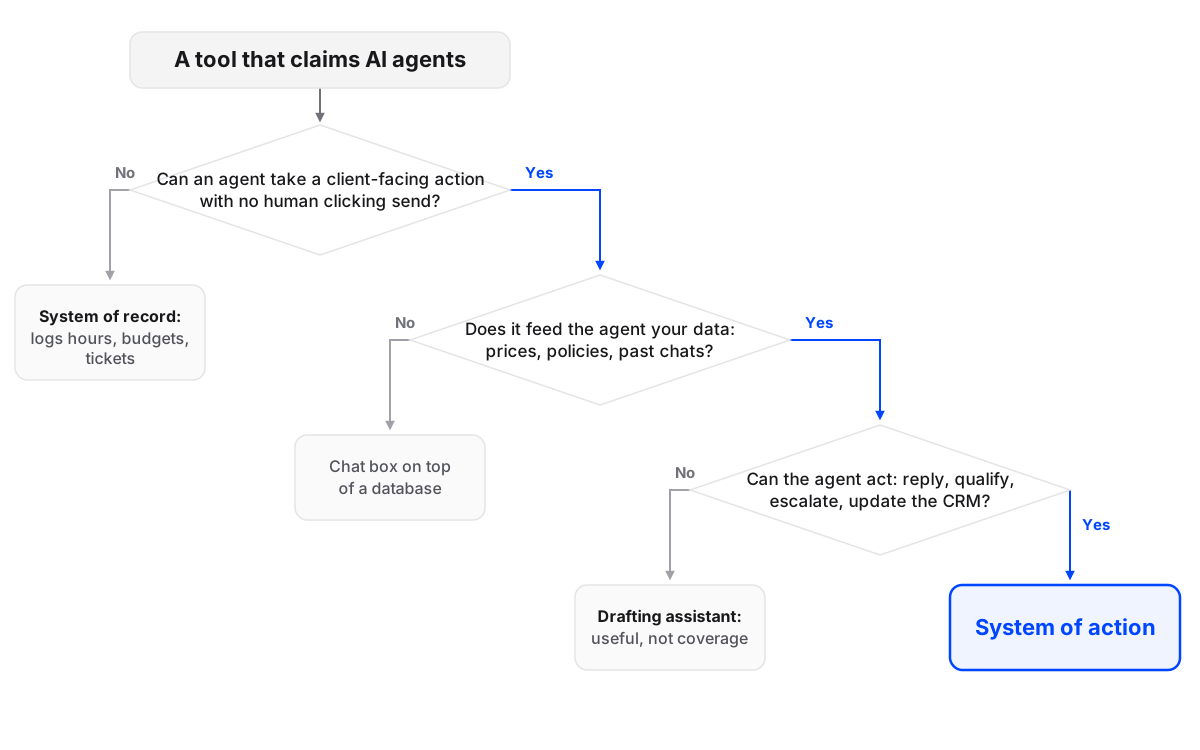
How do you tell a real agent from an AI feature?
Ask whether the agent can send a reply without a person clicking approve, and where it gets its answers. Those two questions sort the field faster than any feature list.
Run the rest as a short test.
- Can it act unattended? If every reply waits for approval, you have bought a drafting assistant. Useful for regulated clients, not coverage at 11pm. Maxbound runs both modes and you pick per client.
- What does it read? Editable knowledge, past conversations, or both. “Trained on your data” with no visible source is a black box.
- What can it do besides reply? Qualify, tag, save the contact, start a follow-up, escalate. A replying agent that cannot save a phone number is a demo.
- Who gets the handoff? A named person, a named inbox, and the thread attached.
- Can you see its work? Logs, resolution counts and sentiment per client, inside the tool rather than in a PDF somebody emails you.
Where does an agent fit into the stack you already run? Two ways. It lives inside the workspace that owns the channels, or it lives in the window your team already has open. Maxbound exposes an MCP server so Claude or ChatGPT can read and act on the workspace from where your team already works, instead of adding a fourteenth tab.
Which tools are worth a shortlist?
Seven, grouped by the layer each one fixes. Prices say “not stated” wherever I could not verify them from a source I can point at, because roundup prices go stale and a wrong number costs you more than a blank one.
| Tool | Layer it fixes | Best for | Price stated in sources | Acts without a human? |
|---|---|---|---|---|
| Productive | Record | Client profitability, time, resourcing | Not stated | No client-facing agents stated |
| Scoro | Record | Budgets, quotes, financial reporting | Not stated | Not stated |
| Monday.com | Record | Visual boards, team workflows | Not stated | Automation rules; agents not stated |
| Hootsuite | Publishing and social inbox | Scheduling and triage across accounts | Not stated | Not stated |
| ManyChat | Conversation automation | Keyword comment-to-DM flows | Not stated | Flows you build run on triggers |
| GoHighLevel | Record plus lead gen | SMB lead gen, subaccounts, booking | Not stated | Workflow automation; agents not stated |
| Maxbound | Action | Comment and DM answering, qualification, CRM | Plan and credit based | Yes, with approval mode available |
Productive
Best for: agencies that cannot tell whether each retainer actually makes money.
Price: not stated in the sources I could verify — ask for a quote.
Does well: time tracking, budgets, resourcing and utilisation with client profitability at the centre of the product.
Falls short: a record layer shows that a comment needed an answer. It will not answer it.
Verdict: the right buy when your problem is not knowing where the hours went.
Scoro
Best for: agencies that run on budgets, quotes and monthly reporting.
Price: not stated.
Does well: financial performance tracking, real-time budgeting and business reporting in one place.
Falls short: same layer limit; anything agent-related is not stated in what I could check.
Verdict: a finance-first record layer, and a fine partner to an action layer bought separately.
Monday.com
Best for: teams that want boards everyone can see, set up in an afternoon.
Price: not stated.
Does well: visual project boards and automation across client work, with a low learning curve.
Falls short: general purpose. You build the agency process yourself, and it is not a social channel tool.
Verdict: good if you will do the configuration work and want one board for everything.
Hootsuite
Best for: agencies whose core job is publishing and triaging across many client accounts.
Price: not stated.
Does well: scheduling, approvals and a social inbox for comments and DMs, organised per account.
Falls short: an inbox is a queue a person works through. Nothing in the sources I checked says an agent answers in it for you.
Verdict: a strong publishing tool. Not the same thing as coverage.
ManyChat
Best for: e-commerce and local clients where a keyword trigger does the job — someone comments “price”, the flow DMs the catalogue.
Price: not stated.
Does well: comment-to-DM flows on Instagram and Facebook, quick to build and easy to explain to a client.
Falls short: flows run on the triggers you wrote. A thread that goes sideways needs a much bigger flow or a person.
Verdict: excellent at what it is for; the ceiling shows once you run it across a dozen clients.
GoHighLevel
Best for: agencies selling lead generation, follow-up and booking to small businesses.
Price: not stated — verify on the vendor’s page before you quote it to a client.
Does well: subaccounts per client, CRM, funnels, calendars and follow-up in one place, priced around agency use.
Falls short: broad by design, so depth varies by area, and agent behaviour beyond workflow automation is not stated in what I could check.
Verdict: the default for SMB lead-gen agencies. It is a CRM first, not a social inbox.
Maxbound
Best for: marketing, advertising, performance and lead-gen agencies that want the conversation layer handled per client.
Price: plan and credit based.
Does well: agents answer comments and DMs across Instagram, Facebook, WhatsApp, website and in-app chat, qualify leads, save contacts to a built-in CRM, and escalate to a shared inbox when unsure. Post scheduling to Instagram, Facebook, TikTok and YouTube sits in the same workspace. Official Meta Tech Provider, API, MCP server.
Falls short: project management, budgets and timesheets are not in the product today — that is where the platform is going, not what it does. If you need a profit and loss per retainer this week, buy Productive as well.
Verdict: pick it when the work you want off your desk is client conversations.
The same record-layer pattern shows up at enterprise scale in Kantata, Screendragon and Air. They are not in the table because nothing I could check states their agent behaviour, and I would rather leave a gap than fill it with a guess.
What software can a social media agency use to schedule posts and answer comments in one place?
Hootsuite, Sprout Social and Sendible are the standard answers, and reasonably so: publishing and a social inbox in one interface, per client, with approvals built in. All three are shaped for a person working a queue.
If you want the comments answered rather than queued, the shape changes. Scheduling and answering have to share a workspace, because the agent reading a comment needs the post it sits under, the client’s prices and the last few messages in the thread.
Comment-to-DM is the clearest example of the mechanism. Someone comments “price?” under a client’s ad. The agent answers in public where a public answer helps, opens a private DM, asks the two questions that qualify the lead, and turns that public comment into a saved contact with the channel and the owner attached.
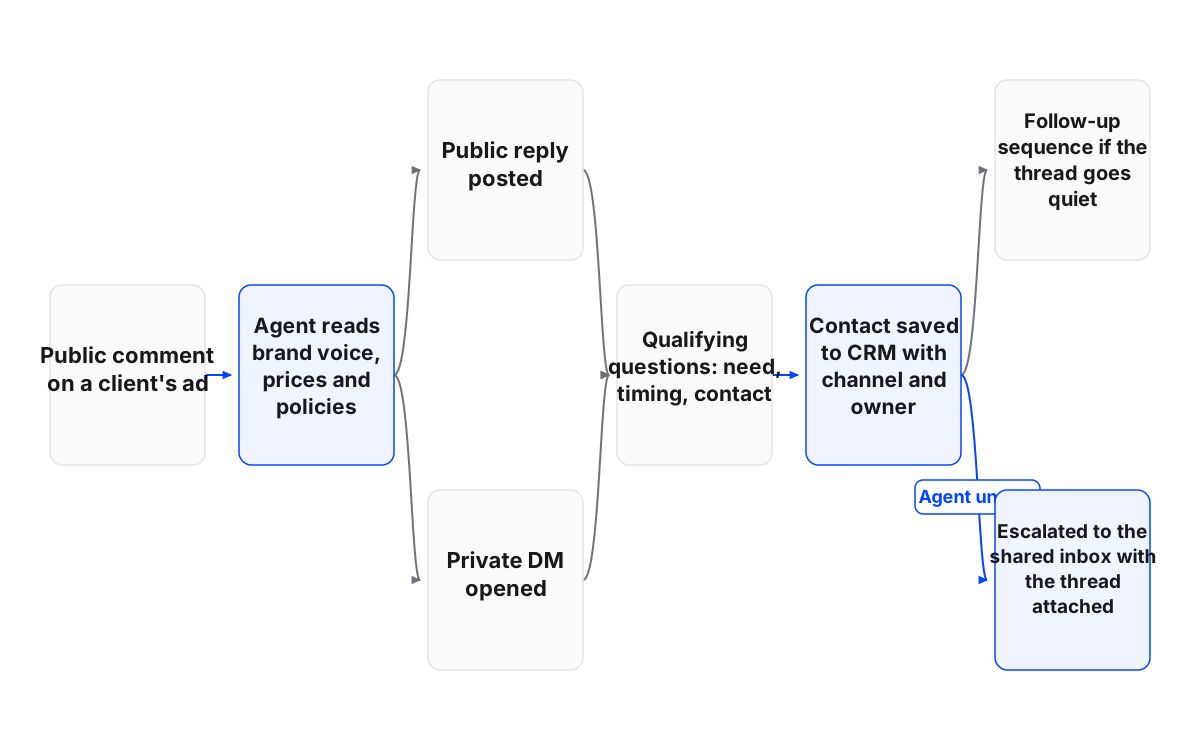
All of this runs through each platform’s official APIs and its own login — Instagram’s comment and messaging endpoints, WhatsApp Business Platform, Meta Business Suite permissions. That is why the Meta Tech Provider badge is worth checking rather than skimming past.
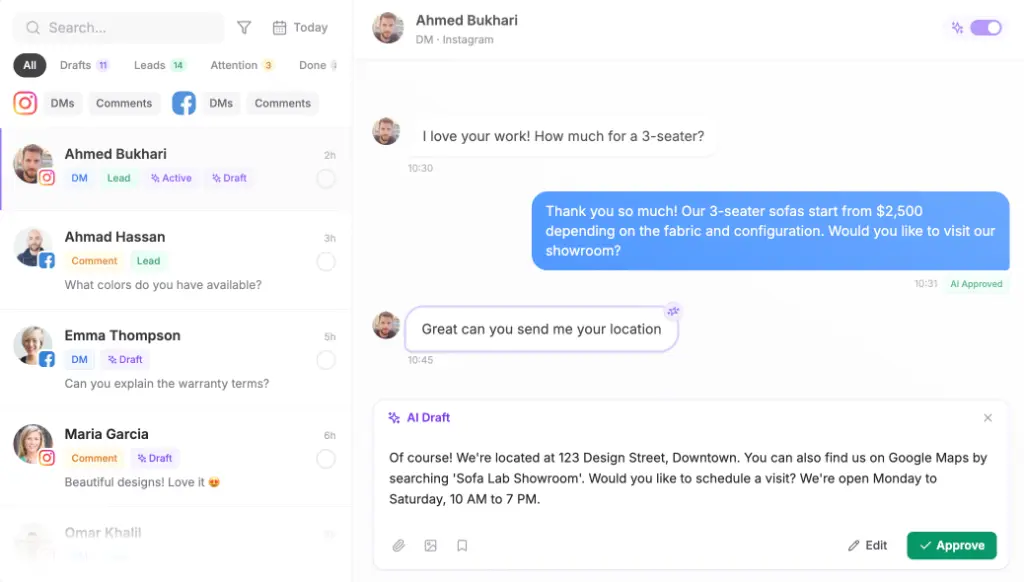
Approval mode is the setting most agencies switch on first. The agent writes the reply, a person sends it. You keep the speed and drop the risk while you learn what the agent gets wrong.
What is the best all-in-one platform for marketing agencies?
GoHighLevel is the honest default if you sell lead generation, follow-up and booking to small businesses, because a client subaccount, a calendar, a funnel and a sequence in one login is a real advantage for that offer. All-in-one is a buying preference though, not a strategy.
One vendor means one data model, one login and one bill. It also means you accept that vendor’s depth in each area, and depth varies more inside an all-in-one than between two specialists. Once the second tool earns its subscription, a marketing agency software stack of two honest tools beats one tool doing half of each.
How is agency software with AI agents priced?
Record-layer tools price per seat, which charges you more as you add people. Agent layers tend to price as a plan plus credits, because every reply, summary and follow-up spends model calls.
Both models are honest. Comparing a per-seat figure with a credits figure and calling one cheaper is not. Work out cost per client per month on your own volume before you sign — the pricing page sets out what a credit buys — and add the integration time behind that MIT Sloan figure, because a cheap tool nobody configured costs more than the dear one that worked.
How should an agency handle client data with AI agents?
Connect each channel through the platform’s own login so no password reaches the vendor, keep a separate workspace per client, and get encryption and GDPR compliance in writing. Anything less and you are explaining a breach to a client who trusted you with their audience.
Maxbound connects through each platform’s official login, keeps a separate workspace for every client, is an official Meta Tech Provider, and encrypts data in transit with TLS. That is encryption over the wire, not end-to-end, and the security page says so plainly.
Then think about behaviour, not just storage. McKinsey found 80% of organisations already reporting risky behaviour from AI agents, as Arthur’s summary of that finding sets out. Autonomy without approval, escalation rules and comment moderation is where that risk usually comes from.
What should an agency do this week?
Audit your own inbox before you sit through a demo. Pick one client, pull thirty days of comments and DMs, and count four things: how many arrived outside office hours, how many never got a reply, how many asked the same five questions, and how many became a saved contact. That count is your business case, and it persuades a client better than any vendor slide.
Run a one-week action audit
- Tag ten client tasksList the ten client-facing tasks your team repeats most and mark each one record or action.
- Count out-of-hours arrivalsPull thirty days of one client's comments and DMs and count how many landed outside your office hours.
- Write one escalation sentenceFinish this line: hand the thread to a person when ____. Refunds, complaints, legal questions and untrained prices are the usual answers.
- Run one client in approval modeTurn the agent on for a single client with human approval on every reply, and let it draft for seven days.
- Review the editsRead every edit a person made to an AI draft. Those edits are the training material, not the model.
Then paste this reply shape into the agent’s instructions, so it has a structure and not a personality:
Thanks for [specific detail they mentioned] — [the direct answer, one line].
Two quick questions so I get you the right option:
1. [question tied to the offer, not to a form]
2. [timing or budget question]
Common mistakes, in the order they happen: going fully automatic before the agent has run a single simulated conversation; letting it quote prices that were never in its knowledge base; skipping the escalation rule, so the first difficult message becomes an argument in public; and one shared workspace for every client, which blends brand voices and reports into a mess.
When not to do this. If a client gets a handful of DMs a week and each one is worth thousands, keep a person on send and let the agent draft. If the client’s sector needs compliance sign-off on every outgoing message, buy drafting mode and staff the queue properly.
Which one should you choose?
If your problem is that you cannot see where the hours go, buy Productive or Scoro and stop reading about agents for a quarter.
If your problem is that a client’s customers get answered three days late, or never, buy the action layer. For an agency running inbound for a dozen clients, that is the marketing agency setup Maxbound is built around.
If you want one vendor for everything, wait. Project management for agency work is where Maxbound is heading, not what it ships today, and I would rather you bought a timesheet from someone else this quarter than bought mine for the wrong reason.
The verdict on a page like this is never a winner. It is a sentence you can say out loud to your partner: we are fixing the conversation layer first, or we are fixing the numbers first. Pick one, buy for it, and revisit in six months when the other one starts costing you again.