What to Put in a Social Media Report for Clients
What to put in a social media report for clients: outcomes first, response times, what happened and next month's plan, with a one-page template to copy.
A social media report for clients should fit on one page and open with what the client’s business got from social: enquiries, leads, bookings or sales. Next comes how fast people were answered, then two or three plain sentences on what happened, then what the agency will do next month. Reach, impressions and follower counts belong in the report, but below the outcomes, never above them.
Clients renew on results they can feel. A month of bookings from Instagram and WhatsApp with nothing left unanswered is a reason to keep paying. A rise in impressions isn’t, unless you can show what it turned into. This page covers how to build that one page, every month, for every client, without losing an afternoon to it.
What is a social media report for clients?
A client social media report is the monthly document that shows a client what their social accounts did for the business and what the agency plans next. It’s a different document from an internal marketing report. Flippingbook describes agency client reports as clean, branded and visual-first, built around big wins and clear ROI, while in-house reports are data-dense and full of month-over-month and year-over-year benchmarks.
That split explains most bad agency reports. They’re in-house reports sent to a client: twenty charts, no verdict. The owner reading it wants one answer. Is the retainer paying off?
So decide who reads it before you build it. A clinic founder skimming on a phone reads differently from a marketing manager who forwards it to a board. Monthly suits most retainers, because a month is long enough to see a trend and judge a campaign.
What should a client social media report include?
A client social media report should include five parts, in this order: three outcome numbers, response time, what happened, next month’s actions, then the supporting metrics. Pick the three outcome numbers for what the client sells:
-
For a shop: enquiries answered, leads saved, sales from social.
-
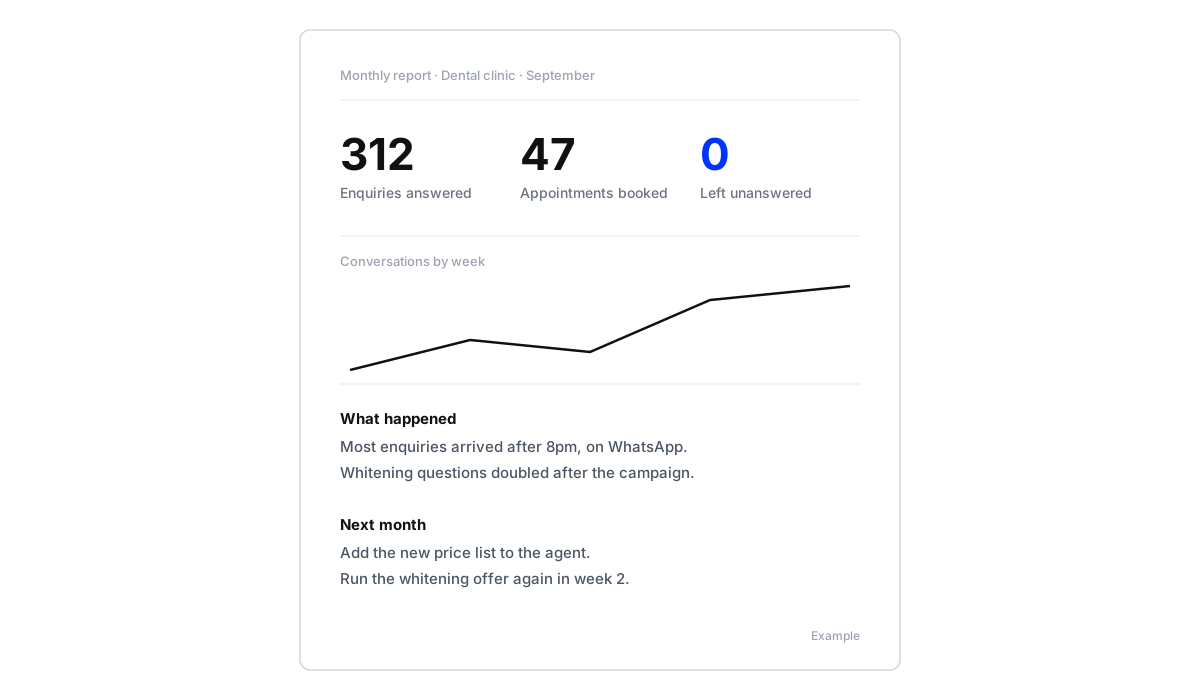
For a clinic or salon: enquiries answered, appointments booked, enquiries left unanswered.
-
For a restaurant: bookings, messages answered, reviews or complaints handled.
“Left unanswered” earns its place. A zero there is something a client feels, especially one who remembers the last agency leaving messages for days.
Agree the three numbers with the client when the retainer starts, and keep them the same every month. Headline numbers that change each time can’t show progress. And a client who chose the numbers reads them as their own measure of whether the work pays off, not as the agency marking its own homework.
How fast were people answered?
Response time is the number behind the outcomes. Show the median time to a first reply, split by channel (WhatsApp, Instagram DMs and comments, Messenger, website chat), and how many messages arrived outside office hours and were still answered.
Maxbound’s comment response study looked at how many comments businesses answer in the thread and how long people wait when they do. Most clients have never seen their own number. Showing it, month after month, is how they come to value the work they never see: the messages answered at night and at weekends.
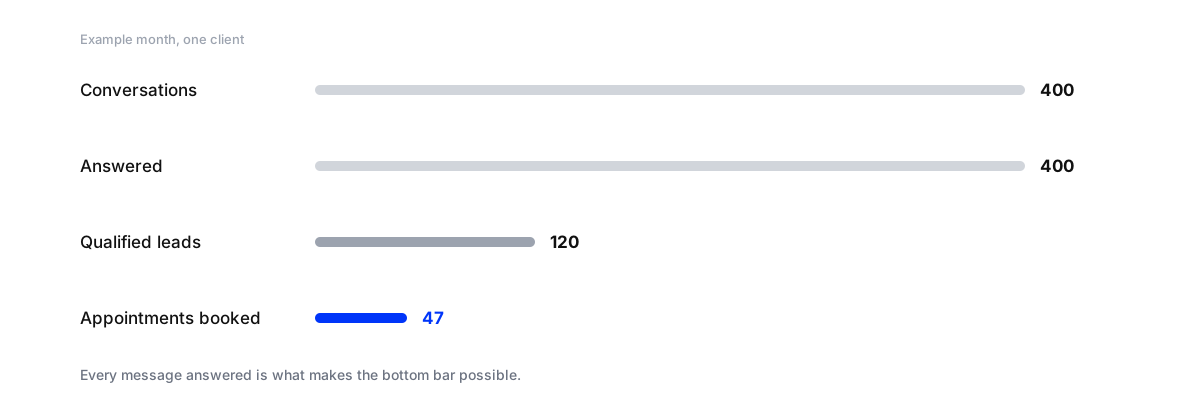
A funnel like this one is the clearest single chart in the report. Conversations in, answered, qualified, booked. Each step is a place the client can see the agency working.
Which reach and engagement metrics still belong?
Reach, impressions, engagement rate and audience growth still belong, in the second half of the page. They show whether more people are seeing the brand. They just don’t prove the brand made money.
Three rules keep that half useful:
-
Stay on the client’s goals. Keep the report focused on your client’s KPIs, not on every metric Meta Business Suite exports.
-
Explain every movement. A follower number with no reason attached is noise. Say what likely moved it: a giveaway, a quiet fortnight, a Reel that travelled.
-
Show top posts with the why. Two or three best posts, with a line on why each worked, so the client stops asking for more of the content that didn’t.
If you compare against competitors, pick ones with a similar presence. A local coffee shop gains nothing from a chart next to Starbucks.
What happened, in three sentences
Numbers say what. A few plain sentences say why. Write what the client would tell their own boss:
-
“Most enquiries arrived after 8pm, on WhatsApp.”
-
“Whitening questions doubled after the campaign started.”
-
“Two delivery complaints were resolved within the day.”
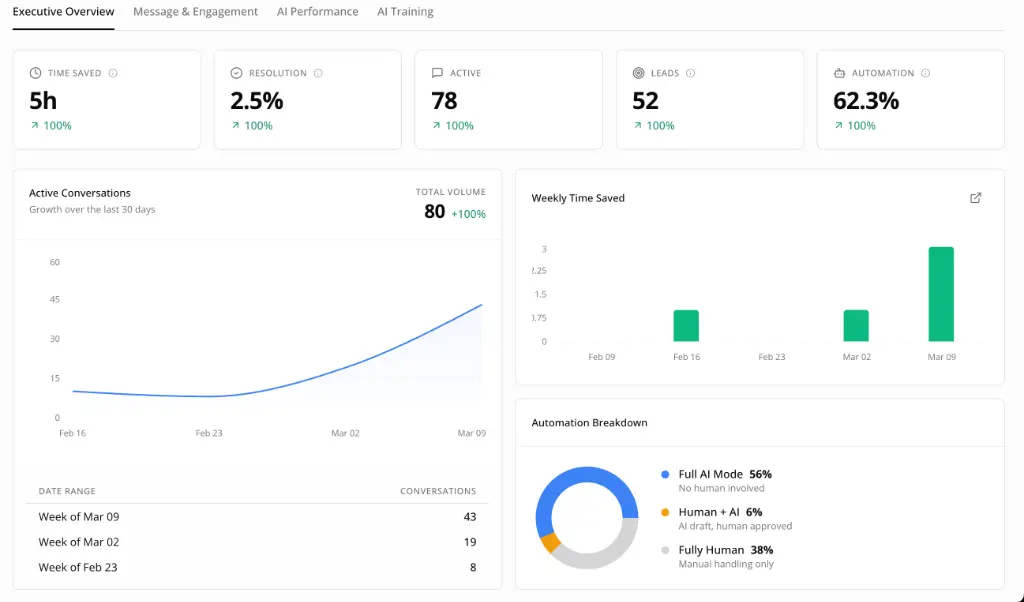
Sentiment analytics is where these sentences come from. Maxbound shows the sentiment and topics of each client’s conversations across every channel, with the trend against the previous period, so you write from data rather than memory.
Then show one real conversation, with the customer’s name hidden. A question at 11pm answered in seconds and turned into a booking. A complaint handled well in public. Clients forward these. A chart is easy to skim past; a conversation with their own customer isn’t.
How do you add the client’s own sales data?
Social metrics stop at the DM. The sale often happens somewhere else: at the till, in the clinic chair, on a call with the sales team. A report that ignores that undersells the work.
Ask the client for one number each month: the sales or bookings they can trace to someone who messaged. Then match it against the leads you hold. In Maxbound, every lead an agent qualifies is saved to that client’s CRM from the conversation, with its details, so you have a named list to hold up against the client’s own bookings. Agencies that keep their own systems can read the CRM through Maxbound’s API instead of exporting.
One matched number beats any chart. “Of the leads we saved, this many booked” is the sentence that renews retainers.
How do you report a bad month without losing the client?
Say it plainly, on the first page. Sales dip, a campaign flops, a complaint goes public. The report is where trust is kept or lost.
Give it three parts: what happened in one or two sentences, what you did about it, and what changes next month. “Enquiries fell by a third after the price rise; we answered every one, most asked about the old price, so next month we’ll address it in the first comment of each post” starts a far better conversation than a report that leads with impressions to hide the drop. A bad month you explain is easier to get through together than one the client finds on their own.
Flat months need the same honesty. Don’t dress them up. Name the one thing you’ll change, and the number it should move.
How should you report on paid social?
Comments and messages under ads are leads the client paid for, so count them: how many came in, how many were answered and how quickly, and how many became leads or bookings. Add those to the ad platform’s own lead count. People who asked a question under an ad never filled in a form, so the combined cost per lead often reads better than the ad report alone.
The same numbers show the client why answering comments on their ads quickly is part of the job, not an extra.
How do you turn the report into a review meeting?
Turn the report into a short monthly call that starts with last month’s promises, not this month’s charts. One practitioner on Reddit leads with what we did, what we learned and what we’ll do next before any metrics, and the same order works on a call.
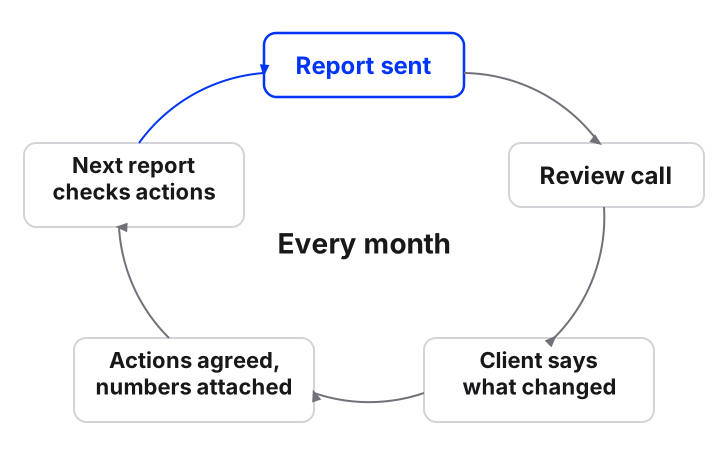
Copy this agenda:
-
Last month’s actions. Done or not, and what each moved.
-
The three numbers. This month beside last month.
-
One real conversation. Read it together.
-
One question for the client. “What changed in the business this month?” New prices, new stock, a staff change. The agent’s knowledge needs to know.
-
Next month’s actions. Two or three, each tied to a number, written as clear next steps based on SMART goals.
Step four is the part most agencies skip. The client’s answer becomes next month’s work: “Add the new price list to the agent’s knowledge, so fewer questions get handed to the team.” A report that ends in a plan becomes a conversation about next month, not about the fee.
A one-page template you can copy
-
Header: client, month, date sent.
-
Top row: the three agreed outcome numbers, with last month beside each.
-
Response: median first-reply time by channel; after-hours messages answered; messages left unanswered.
-
Funnel: conversations, answered, qualified, booked or sold.
-
What happened: three sentences.
-
One conversation: name hidden.
-
Reach and growth: reach, engagement, follower change with the reason, top two posts and why.
-
Last month’s actions: done or not.
-
Next month: two or three actions, each with the number it should move.

What to cut
-
Every metric the platform offers. Pick the five that matter to this client.
-
Charts with no point. If a chart doesn’t change what anyone does, drop it.
-
Jargon. “Engagement rate” means little to most owners. “People who replied” does.
-
Pages. Two minutes to read is the target. Detail goes in an appendix nobody has to open.
Build a monthly social media report for a client
- Pick three outcome numbersChoose them for what the client sells: sales, bookings or leads, plus enquiries answered and left unanswered. Agree them at the start of the retainer.
- Add response timeMedian time to first reply by channel, and how many messages outside office hours were answered.
- Match the client's salesAsk for the bookings or sales they can trace to people who messaged, and hold them against the leads saved.
- Write what happenedThree plain sentences on patterns, spikes and problems handled, plus one real conversation.
- Set next month's actionsTwo or three, each tied to the number it should move, and open next month's report with whether they were done.
- Keep it to one pagePut anything else in an appendix, and send it on the same day every month.
What should a social media management tool for agencies give you for reporting?
A social media management tool for agencies should produce the report from the same place the client’s conversations are handled, kept separate per client. When social media inbox management and reporting live in different tools, someone copies numbers between them every month, and that’s where the afternoon goes.
| What to check | Why it matters | In Maxbound |
|---|---|---|
| Clients kept apart | One client’s numbers must never appear in another’s report | Each client is its own workspace; nothing crosses between them |
| Outcomes, not just activity | The top row is leads and bookings | Counts what came in, what the agent handled and what it turned into, including qualified leads |
| Response times by channel | The number behind the outcomes | Reply and resolution times for every client and channel |
| Topics and sentiment | Feeds the three sentences | Sentiment and topics with the trend against the previous period |
| This month beside last | Progress needs a comparison | Built in, without a spreadsheet |
| A finished report | Clients want a document | Branded PDF for any client and date range |
Maxbound’s analytics count every conversation per client across WhatsApp, Instagram, Facebook, website chat and in-app chat. Pick a client and a date range, or ask for the report in a sentence, in Maxbound or from Claude or ChatGPT through the MCP server, and Maxbound produces a branded PDF from the same numbers. On the white-label plan you can remove “Powered by Maxbound”, so the report carries only your agency’s brand.
Maxbound suits marketing agencies whose clients sell through conversations: enquiries, bookings and leads arriving by WhatsApp, Instagram and Facebook. It doesn’t suit an agency whose reporting centres on LinkedIn, X or Threads, or on calls and SMS, because Maxbound doesn’t cover those. Pricing is per workspace, with AI credits included and a 7-day free trial; there’s no free plan. If reporting is one of the hours you’re trying to win back across retainers, see how to scale agency retainers without hiring.