Sentiment Analysis for Social Media Comments and DMs
Sentiment analysis labels each comment and message by mood, so the urgent and unhappy ones reach a person first and you can see when frustration is rising. How
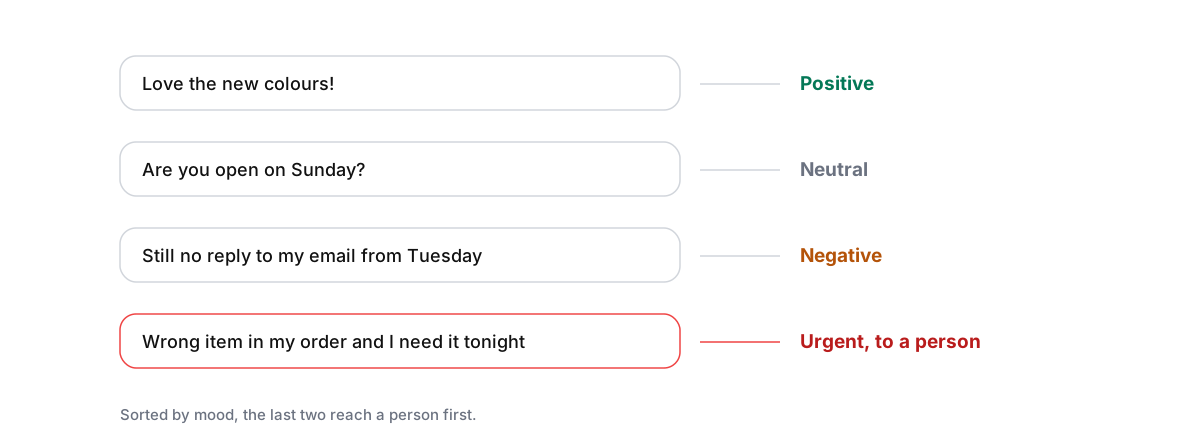
Sentiment analysis labels each comment and message by mood, usually positive, neutral or negative, sometimes with an extra label for urgent. It’s useful for three things: getting the unhappy and urgent messages to a person first, spotting when frustration is rising and finding out why, and showing a client how their customers feel month to month.
It’s a signal, not a verdict. It reads words, so it can miss sarcasm and mixed feelings, and a label alone tells you nothing about the cause. Used as a filter and a trend, it saves time. Used as a score to report and forget, it doesn’t.
Use 1: answer the right messages first
On a busy day, the inbox is mostly questions and thanks, and the one angry message can sit anywhere in a long list. The few messages that matter most, an angry customer or something urgent, sit among them. Sorting by sentiment brings those to the top, so a person sees them in minutes instead of whenever they scroll that far.
This is also how an AI agent decides when to step back. An upset or urgent message is one of the clearest reasons to hand a conversation to a person rather than answer it automatically; see smart escalations.

Use 2: see a problem building
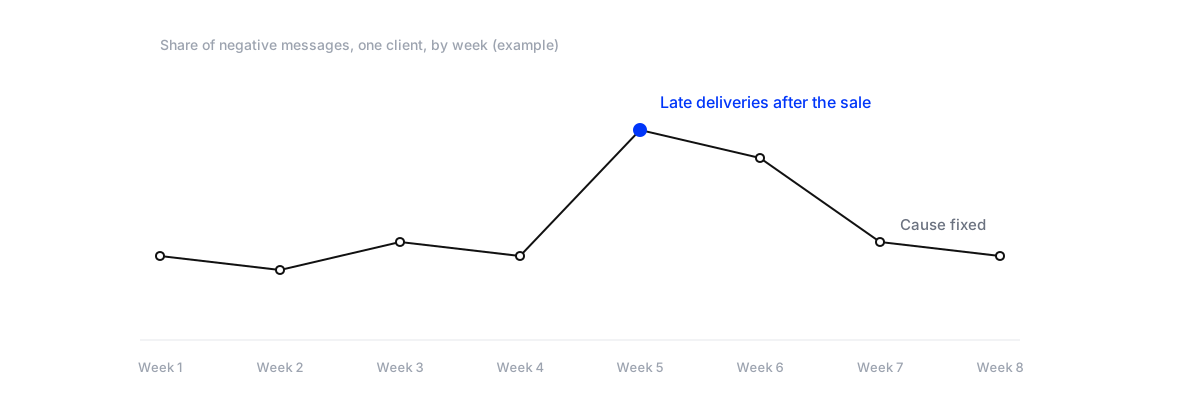
One unhappy comment is a customer. A week where the share of negative messages doubles is a problem with the business: late deliveries after a sale, a price change, a broken link, a new policy. Watching the share of negative messages each week, per client, shows these early, often before the client has noticed.
When it jumps, read the messages behind it. The label tells you something changed; the messages tell you what.
Reading a spike
Five questions get to the cause quickly. When did it start, to the day? Which channel: comments, DMs or WhatsApp? Is it under one post or ad, or everywhere? Which words keep coming back: “delivery”, “refund”, “price”, “link”? And is it many people, or one person posting many times? A spike under a single ad is usually about that ad’s offer or audience. A spike across every channel is usually about the business: stock, delivery or a change customers didn’t expect.
Decide what “urgent” means for each client
Urgent is the most useful label and the one that varies most. For a clinic, it’s anything about symptoms or medication. For a shop, it’s a wrong or missing order the customer needs soon. For a restaurant, it’s an allergy question or a booking for tonight. For any client, it’s a safety concern or a threat to post publicly about a bad experience. Write the client’s list down, tell the people who pick up urgent messages, and check in the weekly sample that the right messages are getting the label.
Public and private are different
A negative DM is a conversation with one person. A negative comment is a conversation everyone can read. The comment needs a calm, specific public reply quickly, then the details in a private message. Under an ad, it’s being shown to every new person the ad reaches, so it moves to the top of the queue. Don’t hide genuine criticism; hide abuse and spam.
Use 3: put mood in the client’s report
A line in the monthly report showing the mix of positive, neutral and negative messages, with one sentence on why it moved, tells a client something reach and likes never do. Keep it simple: the mix, the change from last month, and the cause. A good month isn’t the one with no negative messages; it’s the one where every negative message was answered and the cause behind a spike was found and fixed. Saying so in the report shows the client that their customers’ complaints are being handled, not hidden, which is usually what they worry about most when they hand over their social accounts. More on reports in what to put in a social media report for clients.
Know its limits
- Sarcasm. “Great, another week waiting for my order” reads as positive word by word.
- Mixed messages. “Love the product, hate the delivery” is both. The label picks one.
- Language. Slang, dialect and messages that switch between Arabic and English trip up any model. Check a sample in each language your client gets.
- Neutral isn’t happy. Most questions are neutral. Unanswered, a neutral question can turn negative.
Emojis are hard too: the same face can be a joke or a complaint depending on what came before it. So read a sample every week. If the labels are often wrong for a client, rely on them for sorting, and not for the report.
Use sentiment analysis for a client's comments and DMs
- Sort the inbox by moodHave urgent and negative messages shown first, and decide who answers them and how fast.
- Hand them to peopleLet the AI agent answer routine positive and neutral messages, and pass urgent and upset ones to a person.
- Watch the weekly negative shareTrack it per client. When it jumps, read the messages behind it and find the cause.
- Check the labelsRead twenty labelled messages a week, especially in each language the client gets.
- Report the mixAdd the monthly mix and one sentence on why it moved to the client's report.
Other tools follow the same idea: Sprout Social, for example, classifies messages as positive, negative, neutral or unknown in its inbox. What matters is less the labels than what your team does with them.
Where Maxbound fits
Maxbound labels incoming messages positive, neutral, negative or urgent, across a client’s Instagram, Facebook, WhatsApp, website chat and in-app chat, all in one inbox. Urgent and upset conversations can go straight to your team, while the agent answers routine questions in the client’s voice, which it learns from your edits (self-improving AI). The analytics show each client’s conversations, what was resolved and what the agent handled. Replies can wait for a person’s approval; see setting up a human-in-the-loop workflow. Each client is its own workspace; see Maxbound for marketing agencies.