How to Run High-Volume Instagram DM Campaigns Safely
What Meta actually limits in Instagram comment-to-DM campaigns, what is only folklore, and how to run a viral campaign for a client without reports or blocks.
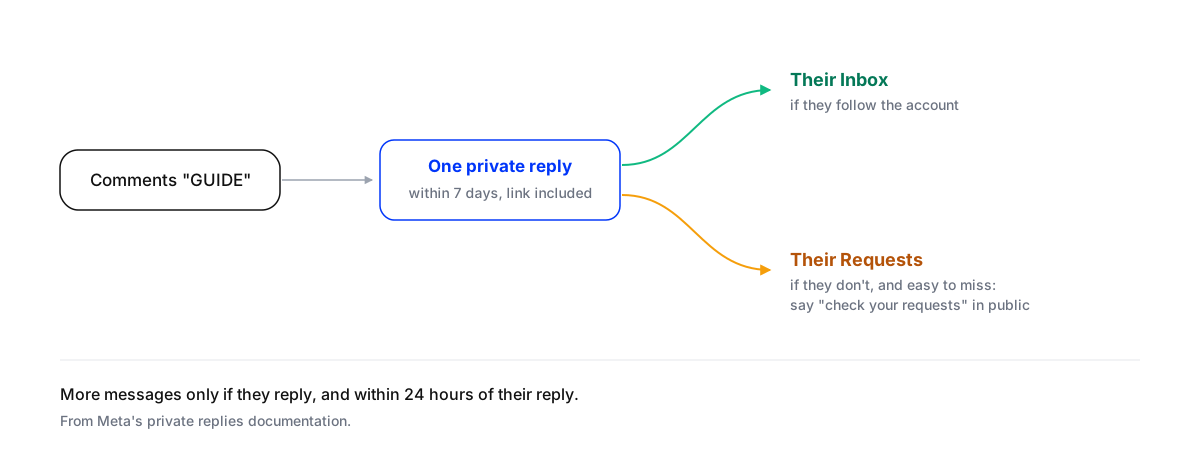
A high-volume Instagram comment-to-DM campaign stays safe when it does three things: it sends through Meta’s official API, it stays inside the rules Meta actually publishes, and it gives people so little reason to report it that they don’t. The published rules are short. A business can send one private reply to each comment, within seven days of the comment. It can only follow up if the person writes back, and then within 24 hours. And an app can send 750 private replies an hour for each account.
Most “how to avoid an Instagram ban” advice adds rules Meta never wrote, such as random delays or a daily cap of 200 messages. This post separates what is documented from what is folklore, shows what a viral post does to the 750-an-hour limit, and gives a checklist for running a campaign for a client from launch to the morning after.
What Meta actually documents
These are the rules a comment-to-DM campaign runs on, from Meta’s own developer documentation.
| Rule | What it says | Source |
|---|---|---|
| Private replies | One message to the person who commented, sent within 7 days of the comment. On Instagram Live, only while the broadcast is live. | Meta: private replies |
| Where it lands | In the person’s Inbox if they follow the account; in their message Requests if they don’t. | Meta: private replies |
| Follow-ups | Only if the person replies, and within 24 hours of their reply. | Meta: private replies |
| Messaging window | 24 hours to answer a message a person sends you. A person (not automation) can reply up to 7 days later as a human agent. | Meta: messaging, human agent |
| Rate limit | 750 private replies an hour per Instagram professional account for comments on posts and reels; 100 a second for comments on Live. | Meta: rate limits |
| Automated access | Instagram’s terms forbid collecting information “in an automated way without our express permission”, which is what browser bots and password-based tools do. | Instagram Terms of Use |
Two of these change how you write the campaign. Because only one message goes out unless the person answers, the first DM has to carry everything they asked for, link included. And because non-followers find the DM in their Requests folder, a lot of people never see it unless you tell them where to look.
What is folklore
Plenty of what circulates about Instagram automation isn’t on any Meta page. Some of it is sensible practice, some of it is a guess repeated until it sounded like a rule.
- “Meta caps automated DMs at 200 an hour.” That number appears on many tool websites, but Meta’s rate-limit page doesn’t set it. What Meta publishes for private replies to post and reel comments is 750 an hour per account. Some tools pace themselves lower by choice.
- “Random delays of 30 to 90 seconds keep the account safe.” Meta documents no delay rule. A short delay can make a reply read more like a person, and it lets an agent answer a burst of messages at once, but it isn’t a safety requirement.
- “Identical replies get the account flagged.” Meta doesn’t document text fingerprinting. Identical replies are still a bad idea for a simpler reason: they read like spam to the person receiving them, and people report what reads like spam.
What a viral post does to the limit
The 750-an-hour limit is generous until a post takes off. Then it decides how long people wait.
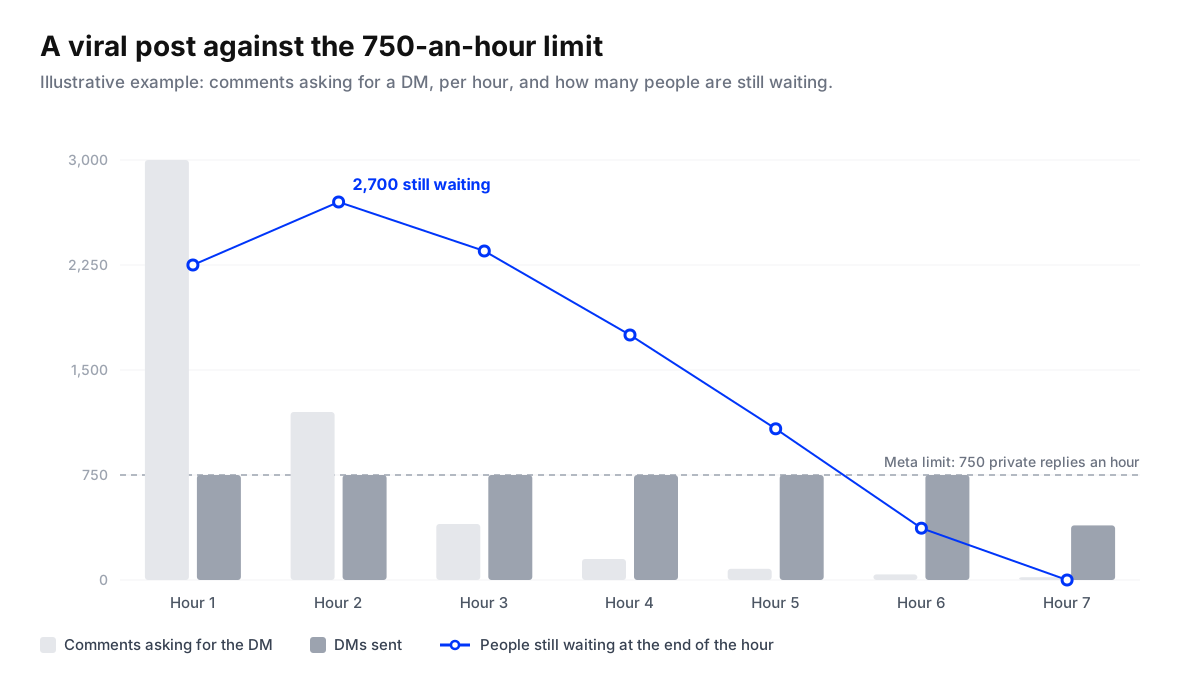
In this illustration a client’s reel gets 3,000 comments asking for the guide in its first hour, then 1,200, then 400, then a long tail. At 750 replies an hour, 2,700 people are still waiting at the end of the second hour, and the queue takes about six and a half hours to clear. Someone who commented near the end of the second hour waits about three and a half hours for their DM. Everyone is inside the seven-day window, so nothing is lost. But a person who commented at 8pm and hears back after 11pm has often moved on.
Three ways to plan for it:
- Estimate the spike before you post. Look at the client’s best-ever comment count and assume a campaign can double it. If the first hour could pass 750, expect a queue.
- Spread the ask. Don’t put the comment-for-the-guide call to action on a reel, a carousel and three stories in the same hour. Stagger them across the day.
- Set the expectation in public. Pin a reply that says the guide is on its way and may take a little while. People wait patiently when they’ve been told to.
Design the campaign so nobody reports it
Reports, not volume, are what you most want to avoid, and almost every report comes from a message someone didn’t expect or didn’t want.
- Promise one thing and deliver exactly that. “Comment GUIDE and we’ll DM you the guide” sets up a DM the person expects. A DM that opens with a sales pitch instead of the guide gets reported.
- Put the link in the first message. You only get one message unless they reply. A first DM that says “want the link?” and waits for a yes loses everyone who doesn’t answer.
- Tell people to check their Requests. Reply in public with something like “Sent! If you don’t follow us, it’s in your message requests.” It’s the single biggest fix for “I never got it”.
- Answer the real questions, not just the keyword. Under a campaign post people also ask the price, the size and whether it ships to them. An agent trained on the client’s business can answer those properly; a keyword rule ignores them.
- Don’t follow up unless they reply. It’s Meta’s rule, and it’s good manners.
- Get the angry ones to a person. A complaint under a viral post is read by thousands. Route it to someone on the team instead of auto-replying with the guide.
- Hide the spam. Viral posts attract follower-farm pitches and competitors dropping links. Hide them so they don’t drown out the replies.
A checklist from launch to the morning after
Run a high-volume Instagram comment-to-DM campaign for a client
- Connect through the official APIHave the client connect their Instagram professional account through the platform's own login. Never give a tool the account password or install a browser extension that sends DMs.
- Write the promise and the first DM togetherThe public call to action and the first private message must match. Put what you promised, including the link, in that first message.
- Estimate the first-hour spikeCompare the expected comments in the first hour with the 750-an-hour limit. If it could pass that, stagger the call to action and prepare a pinned comment about wait times.
- Set the rules for people, not just keywordsDecide what gets answered automatically, what gets hidden as spam, and what goes straight to a named person, such as complaints and anything about refunds.
- Rehearse on real commentsRun last campaign's comments, or a written set if there wasn't one, through the setup without sending anything, and check every reply.
- Watch the first two hours liveKeep someone on the inbox for the first two hours: the queue, the replies, the escalations and the public thread.
- Work the 24-hour windowPeople who reply to the DM can be followed up within 24 hours of their reply. Answer their questions and save them as leads before the window closes.
- Report what it producedSend the client comments received, DMs delivered, people who replied, and leads saved, not just reach.
If the account does get an action block, stop the campaign, check that nothing is connected through an unofficial tool, and don’t push messages through another route to make up the time. A blocked account recovering quietly costs less than one that keeps triggering the same block.
Where Maxbound fits
Maxbound is an approved Meta Tech Provider, and its Instagram DM automation runs on Meta’s official APIs, with clients connecting their own accounts through the platform’s login. For a campaign, an agent trained on the client’s business answers each comment and moves the conversation into a DM, then saves the person to the built-in CRM (comment to DM to CRM). It answers the questions people actually ask rather than only a keyword, hides spam, abuse and competitor links, and hands complaints to a person with the thread. A reply delay lets it answer a burst of messages as one, and you can rehearse a campaign on real past comments before it goes live, as described in how to test an AI agent before it answers customers.
For the conversion side of these campaigns, read how to turn social comments into sales. For order and delivery questions arriving by DM, see social media DM automation for order questions. And if you run paid campaigns for clients, the advertising agencies page covers the comments under ads.