
The 7-Stage Framework for AI Social Media Automation
AI comment and DM automation grows through seven stages, from keyword triggers to agents that hand hard conversations to a person. What each stage fixes
Automated replies to comments and DMs grow through seven stages: keyword triggers, rotating templates, sentiment routing, contextual replies, learning the brand’s voice, human approval, and escalation to a person. Each stage exists because the one before it hits a ceiling, usually tone, trust or the conversations it can’t handle. So the stage an account is on tells you what to fix next.
The stages are cumulative. A good setup at stage seven still uses keyword triggers for a campaign, still routes by sentiment, and still lets a person approve the replies that carry risk.

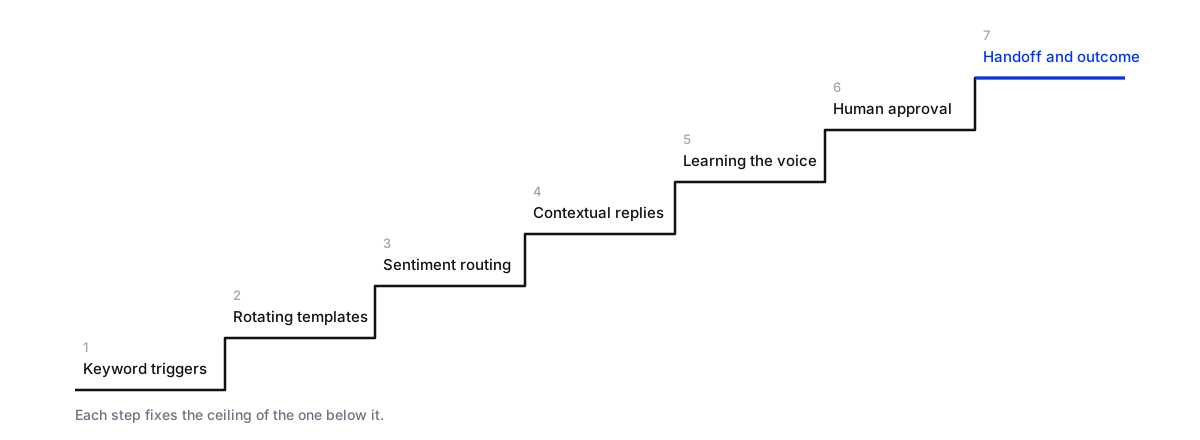
Stages 1 and 2: triggers and templates
Stage 1 sends a fixed reply when a comment contains a word: “comment GUIDE for the link”. It’s perfect for one campaign with one offer, and it’s where most tools started.
Stage 2 rotates the wording, so the account doesn’t post the same sentence forty times a day.
The ceiling: neither stage can tell a fan from a customer with a broken order. Both get “Thanks so much! 🙌”.
Stages 3 and 4: routing and context
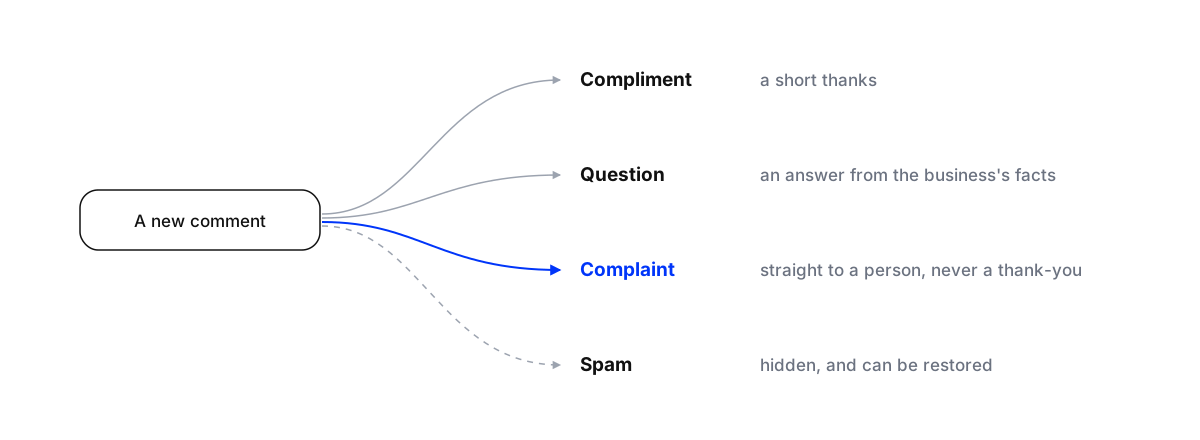
Stage 3 sorts each comment before anything is sent: a compliment, a question, a complaint, spam. Each kind is handled differently, and complaints go to a person. This is the stage that stops the worst mistake in social automation: a cheerful automated thank-you under a public complaint.
Stage 4 reads the comment itself, the post it’s under and the thread, then answers that question from the business’s own facts. “Do you ship to Riyadh and how long does it take?” gets the delivery answer, not a link to the homepage. This is the line between a bot and an agent.
The ceiling: the answers are correct but don’t sound like the brand, and nobody has checked them.
Stages 5 and 6: voice and approval
Stage 5 learns how the brand talks from its past conversations and from the edits the team makes, so replies sound less like software over time. How that works is in self-improving AI that learns your brand.
Stage 6 puts a person between the draft and the customer. Approval is a dial, not a switch: approve everything at first, then only the categories that carry money or risk, such as prices, orders and complaints, and let simple answers send themselves. See setting up a human-in-the-loop workflow.
The ceiling: the AI answers well, but the conversations that matter most still end in a reply rather than an outcome.
Stage 7: handoff and outcome
The last stage is about what happens after the reply. A buying question moves into a private message and the person is saved as a lead. A conversation the AI shouldn’t decide goes to a person with the thread attached (smart escalations). When someone on the team replies, the AI steps back so the customer doesn’t get two answers (avoid double replies). And a reply delay lets it answer a burst of messages once.
This is the stage that pays for itself, because it’s the only one that ends in a sale, a booking or a rescued customer.
One comment, four stages
The difference is easiest to see on a single comment. Someone writes under a client’s post: “Is the black one back in stock? Need it by Friday.”
- Stage 1 (keyword “stock”): “Check our website for availability!” Technically a reply. No answer.
- Stage 2: the same non-answer in different words each time.
- Stage 4: “Yes, the black one is back in stock, and orders before 2pm Wednesday arrive by Friday in Dubai.” The question, answered from the client’s facts.
- Stage 7: the public reply says the details are on their way by message; the private message answers, asks which size, sends the link, and saves the person as a lead. If they then write “it arrived damaged last time”, the conversation goes to a person.
Same comment, very different outcomes. Most of the value sits between stage 2 and stage 4, and the rest between 4 and 7.
Find your stage
Find which automation stage a client account is on
- Label 100 recent commentsMark each one as a compliment, question, complaint or spam, and note whether it got a reply and how fast.
- Read the replies sentThe same few phrases on unrelated comments means stage 1 or 2. Replies that answer the specific question mean stage 4 or later.
- Find the complaintsIf any complaint got an automated thank-you, the account is missing stage 3.
- Check the handoffReply as a person in a thread the AI already answered. If both reply, or neither does, stage 7 is missing.
- Move one stage at a timeFix the next stage only, then measure again after two weeks.
Jumping from templates straight to full autonomy is how accounts end up with the public mistake. One stage at a time is slower and much safer. For an agency, the stages also make a clear plan to show a client: where their account is today, the next stage, and the number that will show it worked.
What to measure
Each stage has its own number. Measuring everything by speed alone hides most of what matters:
- Stages 1 and 2: share of comments answered, and time to answer.
- Stage 3: complaints that reached a person, and none that got an automated thank-you.
- Stage 4: answers that were correct, checked on a sample each week.
- Stages 5 and 6: how many drafts are approved unchanged. Rising means the AI is learning.
- Stage 7: leads saved, handoffs answered, and conversations that ended in a sale or booking.
For a baseline, our study of 1,788 public comments on 178 businesses’ Instagram and Facebook posts found 15% answered in the thread (Maxbound comment response study). Sentiment analytics adds the topics behind the numbers.
Where Maxbound fits
Maxbound is an AI operating system for agencies, built for stages 3 to 7. Its AI agents, trained on each client’s own material, answer comments and DMs on Instagram and Facebook, plus WhatsApp, website chat and in-app chat. Its comment moderation answers, hides or escalates each comment. Replies can wait for approval, the agent learns each brand’s voice from your team’s edits, and conversations it shouldn’t decide go to your team in one inbox with a CRM behind it. Each client runs in its own workspace.