
Avoid Double Replies When AI and Your Team Share an Inbox
Why a chatbot and a person both answer the same customer, and how to stop it: pause the AI when a person replies, add a short reply delay, and keep one inbox.
A double reply happens when an AI agent and a person both answer the same customer, often with two different answers a few seconds apart. The fix is simple to state: when a person replies in a conversation, the AI steps back for long enough that the person can finish it. Add a short reply delay so the AI waits a few seconds before answering, and keep your team replying from the same inbox the AI works in, so it can see them.
In Maxbound this is built in. When someone on your team replies in a conversation, the agent pauses in that conversation for an hour.
What a double reply looks like
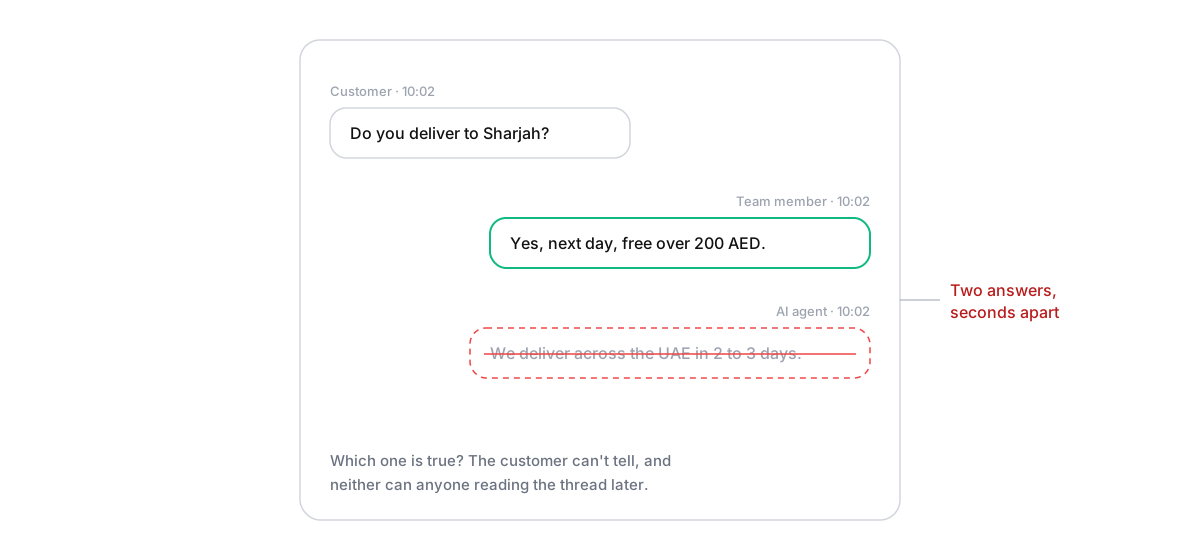
The customer asks a question. A team member, who happened to be looking, answers it. Then the AI, which was already writing, answers it too, slightly differently. The customer now has two answers and no idea which is true. It looks disorganised, and on a client’s account it looks like the agency isn’t in control.
It’s worse with complaints. A person writes a careful apology, and the AI follows with a cheerful line about opening hours.
Why it happens
Two senders work on the same conversation without knowing about each other. The most common causes:
- No pause after a person replies. The AI treats every new customer message as its turn, even mid-conversation with a teammate.
- No delay. The AI answers in the same second the message arrives, so a person who starts typing straight away is always second.
- Two inboxes. The team replies from Meta’s own inbox on their phones while a tool answers through the API. Unless the tool notices replies sent elsewhere, it carries on. On Messenger, Meta’s conversation routing exists to decide which app controls a thread for exactly this reason.
The fix: pause, delay, one inbox
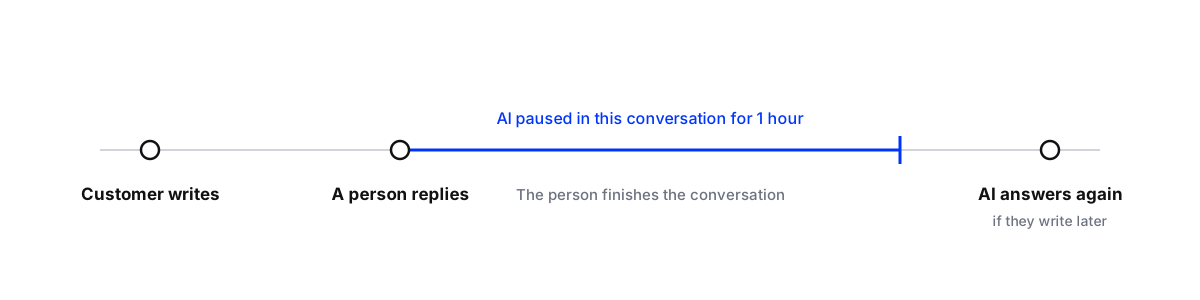
Pause after a person replies. The moment a teammate sends a message in a conversation, the AI stops answering there. An hour is long enough for most conversations to finish, and short enough that the AI picks up again if the person moves on and the customer writes later.
Wait a few seconds before answering. A reply delay of 10 to 30 seconds gives a teammate who is watching the chance to answer first, and lets the AI answer a burst of messages (“hi” … “are you open” … “for 6”) in one reply.
Reply from one inbox. When the team and the AI share one inbox, everyone sees who said what, and the AI sees the team’s replies.

Who owns the conversation
Pausing solves timing. Ownership solves the rest. Agree three simple rules per client:
- The AI owns a conversation until a person replies or it hands the conversation over itself.
- A person owns it once they’ve replied, until they’re done. If they need longer than the pause, they should keep the conversation open or move it to a person-only queue.
- Sensitive topics go straight to a person, so the AI never starts them. Complaints, refunds, legal questions and anything angry belong here. How to set that up is in smart escalations for AI agents.
If you run replies with approval, where the AI drafts and a person sends, double replies can’t happen, because nothing goes out without a person. Many teams start that way: see setting up a human-in-the-loop workflow.
Double replies under public comments
Comments are where a double reply does the most damage, because everyone scrolling the post sees both answers. Two habits cause most of them. A community manager answers comments from the Instagram app on their phone while the agent answers the same comments from the inbox. Or someone replies to a comment in public, and the agent sends the same person a private message with a different answer.
Pick one place to answer comments for each client, and make it the shared inbox. If a person wants to reply to a particular comment, they do it there, so the agent sees it and leaves that comment alone. When the agent moves a comment into a DM, the public reply should say so (“Sent you the details by message”), so a teammate reading the thread knows it’s handled.
When one slips through anyway
It will happen occasionally, usually from a reply sent on a phone. Fix it in the conversation rather than pretending it didn’t happen:
- If the answers agree, leave it. Two versions of the same answer are untidy, not harmful.
- If they disagree, send one short message that settles it: “Sorry for the mix-up, the right answer is next-day delivery, free over 200 AED.” Then correct whichever source was wrong, the AI’s knowledge or the teammate’s note, so it doesn’t happen again.
- If it was a complaint, have the person who replied continue, and apologise once for the confusion.
Then look at why it happened. Nearly always it’s a reply from outside the shared inbox, which the phone test below will show.
Test it before a customer does
Test that your AI and team don't double reply
- Send a test messageFrom a personal account, send a question the AI can answer to the client's Instagram, Facebook or WhatsApp.
- Reply as a person straight awayAnswer from the shared inbox before the reply delay runs out. The AI should not send anything.
- Send a follow-upAsk a second question within the hour. The AI should stay quiet while the person owns the conversation.
- Reply from your phone tooIf anyone on the team answers from Meta's own app, repeat the test that way and check what the AI does.
- Check after the pauseWrite again after the pause has passed and confirm the AI answers normally.
The phone test is the one most teams skip, and it’s where double replies usually come from.
Where Maxbound fits
Maxbound’s AI agents answer comments and DMs on Instagram and Facebook, plus WhatsApp, website chat and in-app chat, in the same inbox your team uses. When a team member replies, the agent pauses in that conversation for an hour; a reply delay lets it wait before answering; and conversations it shouldn’t handle go to your team with the thread attached. You can run every reply through approval first, then let the agent answer on its own once you trust it.