How to Onboard Marketing Agency Clients: A Checklist
A step-by-step client onboarding checklist for marketing agencies: clone a client workspace, collect access without passwords, train agents and go live.
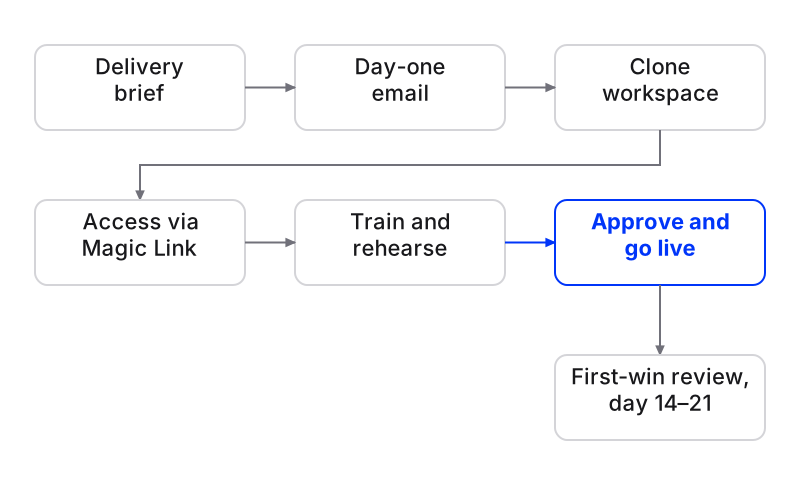
Client onboarding for a marketing agency covers everything between a signed contract and the client’s first visible result. It means a delivery brief, a day-one email, access without passwords, a trained setup, one kickoff and a first-win review, in that order.
In Maxbound, each client gets its own workspace. You clone a workspace that already works as the starting point, replace everything specific to that client, and nothing goes live until someone at your agency approves it.
Onboarding is also when most churn starts.
Customer success consultant Lincoln Murphy’s data puts that share of churned clients who say poor onboarding was a factor at 67%. The account manager’s first two weeks often decide whether the client is still there in a year.
This is the checklist I’d hand a new account manager. Ten steps, one owner each, and a copy-paste email for day one.
How long should client onboarding take for a marketing agency?
Two weeks is a sensible target for most retainers. Superdocu’s checklist notes that paid media and creative-heavy retainers run 14 to 21 days because approval cycles take longer.
Give each stage a two-to-three-day window and one named person. If a stage has no owner, it slips. Every time.
Step 1: Turn the signed scope into a delivery brief
Before anyone touches a tool, write down what was sold. LeadUp’s checklist puts it well: record services, deliverables, exclusions and review rounds, plus milestones and any promise made during sales.
Add the baseline. Write down the period and the data source behind every number you’ll be judged on, so nobody argues later about a metric copied from the sales deck.
What goes wrong: the salesperson promised weekend replies and nobody told delivery. The brief is where that promise gets caught.
Step 2: Send the day-one welcome email
The client should know four things on day one, per 5day.io’s onboarding framework: their main contact, the kickoff timeline, what the agency needs next and the first milestone. Keep it short. A one-page summary beats a deck.
Copy this and fill the brackets:
Subject: Welcome — your first two weeks with [Agency]
Hi [Name], welcome aboard. [Account manager] is your main contact from today.
Kickoff is [date, time], 30 minutes. Agenda attached.
Before then we need three things: (1) your logo in SVG, (2) one person who approves our work, and (3) a click on the Magic Link below to connect your Instagram, Facebook and WhatsApp. You’ll log in on Meta’s own page. We never see your password.
First milestone: [your agent answering your Instagram DMs, approved by you] by [date].
Don’t send the whole checklist. A long document request feels overwhelming and gets ignored. Ask for what this stage needs, then ask again next stage.
Can an agency platform clone an entire client setup?
Yes. In Maxbound, a client workspace that works can be cloned as the starting point for the next client. If you’ve used GoHighLevel, the familiar version is a sub-account per client with Snapshots that copy a configuration across.
In Maxbound, each workspace holds that client’s own channels, knowledge, contacts, agents and posts, and nothing crosses between clients. That separation matters for the question every agency owner eventually asks: how do we stop staff leaking one client’s data into another’s? Use workspace boundaries, not folder labels. Role-based permissions give each teammate access only to the client workspaces they work on.
Step 3: Clone a workspace that already works
Pick your best-running workspace for a similar client. A dental clinic clones from a dental clinic, not from an online store.
Then treat the clone as a draft. Go through it and replace everything that belongs to the old client.
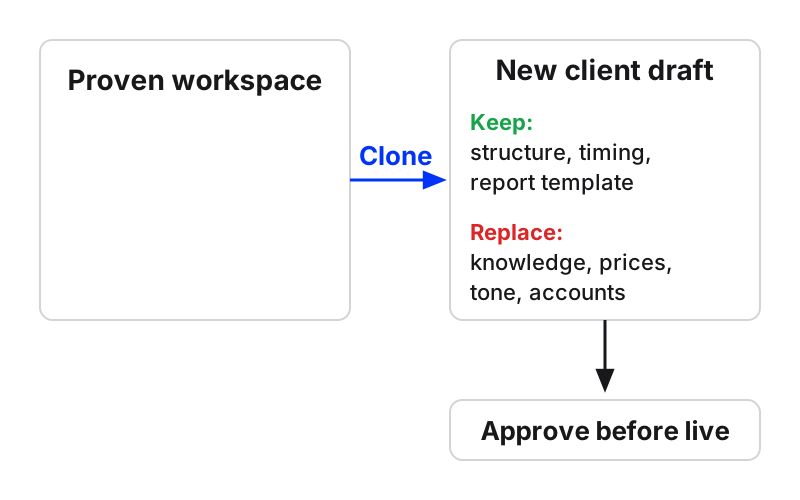
| Part of the workspace | Keep as a starting point | Replace for the new client |
|---|---|---|
| Agent briefs | Structure, escalation rules | Offer, prices, hours, tone of voice |
| Automations and follow-ups | Timing and logic | Wording, owner, trigger posts |
| Knowledge | Nothing | Website, files, FAQs, past chats |
| Channels | Nothing | Client’s own accounts via Magic Link |
| Monthly report automation | Template and schedule | Recipient, branding, date range |
What goes wrong: an agent that still quotes the last client’s prices. Check knowledge first. Always.
Step 4: Collect access without asking for passwords
Never ask a client for a password. Ask for named user invitations to the right roles, and only for access with a clear purpose: ad accounts, analytics, CMS, social channels, file storage.
For conversation channels, Maxbound sends the client a one-time Magic Link. They authorise their own Instagram, Facebook and WhatsApp accounts through each platform’s official login (OAuth). Maxbound is an approved Meta Tech Provider and never asks for, sees or stores a social password.
Step 5: Train the agent on the client’s own sources
Point knowledge training at the client’s website, files, FAQs and past chats. Ask for assets organised by use: brand reference, working files and approved deliverables. Ask for the logo as SVG, not a screenshot from their profile.
Past conversations are the most useful source. They hold the questions customers actually ask and how the client’s team answers them.
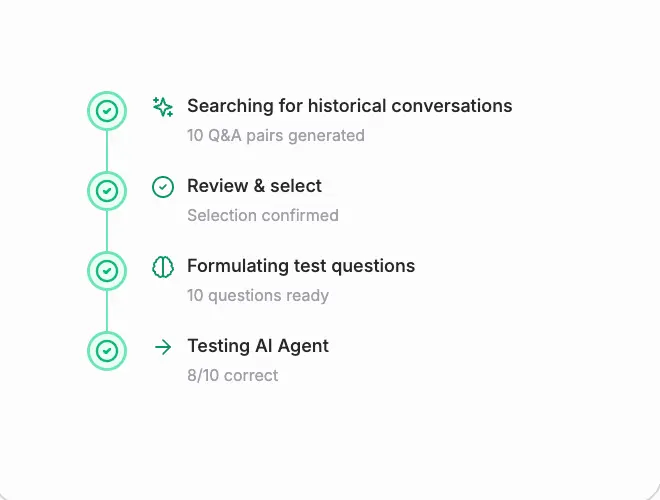
Questions the agent can’t answer are gathered as knowledge gaps. Answer each once and it’s covered from then on. If the client changes prices later, Maxbound re-checks the website.
Step 6: Brief the agents in plain language
Brief the agent the way you’d brief a new hire. You can do it inside Maxbound or from Claude, ChatGPT or Codex through Maxbound’s MCP server.
An example brief for a new clinic client:
When someone comments “price” on the whitening post, DM them the price list. Save anyone who asks to book. Book consultations in the chat during opening hours. Hand anything about pain or complaints to Sara.
The agent asks what it needs to know, such as which channels, what to do if they don’t reply and who owns bookings. Then it builds the agent or automation in that client’s workspace and waits for approval. For a deeper walkthrough, see how to write AI agent instructions.
Step 7: Rehearse before anyone gets an answer
Run Simulations. Maxbound rehearses the agent on the client’s real past conversations before it answers anyone. Read the answers the way the client would: wrong prices, wrong tone, a question that should have gone to a person.
Fix the brief or the knowledge, then run it again. A ten-minute rehearsal is cheaper than an apology to a new client in week one. There’s more on this in our guide to stress-testing agents before go-live.
Step 8: Run the kickoff to confirm, not to read forms
Keep the kickoff to 30 minutes with a pre-shared agenda. Don’t read the intake form aloud. Use the time to confirm milestones, outstanding assets, the approval process and how escalations reach the client.
Get one decision-maker. Five reviewers sending contradictory edits can eat your entire first delivery window. Ask for consolidated feedback from one client owner, and write their name in the delivery brief.
Step 9: Set up the account manager’s onboarding tasks
Put the agency onboarding tasks where the work happens. In Maxbound, each client workspace holds spaces, spaces hold projects and projects hold tasks. Each task goes to a teammate or an agent, with access set per page.
A simple structure:
-
Space: Onboarding
-
Project: [Client] — first 14 days
-
Tasks: delivery brief, welcome email, access confirmed, knowledge trained, agents briefed, Simulations passed, kickoff held, go-live approved, first-win review
Your team discusses blockers in team chat channels and direct messages, with Maxbound’s agents and your own Claude and ChatGPT agents in the conversation. Team chat and tasks are on every plan.
Step 10: Go live with approval on, then prove the first win
Approve the agent. Leave approval on. Agents can draft each reply for a person to approve or edit before it’s sent, and approval can stay on for as long as you want.
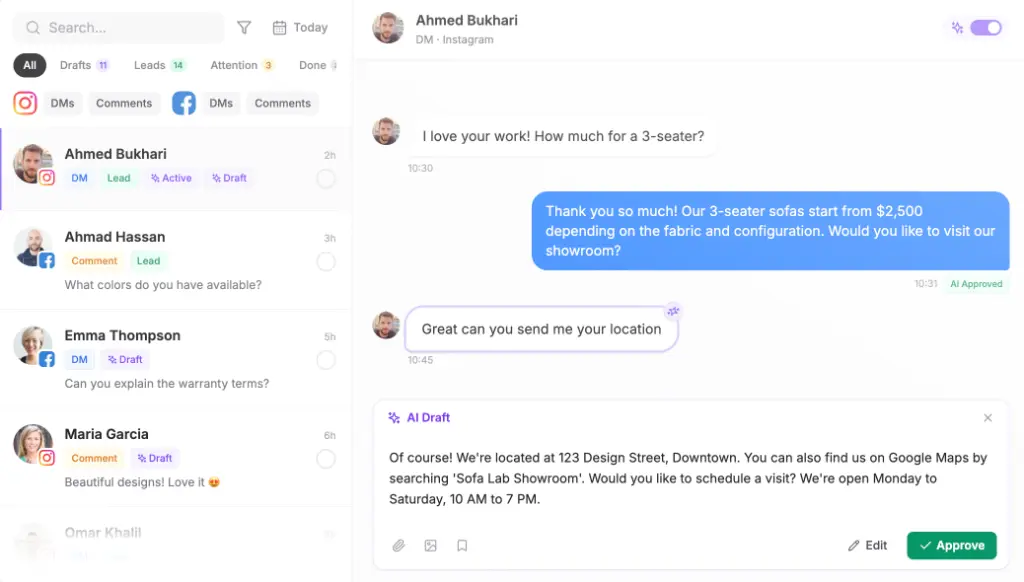
Turn approval off channel by channel, once the drafts stop needing edits. Edits aren’t wasted either: agents learn the brand’s tone of voice from them.
Then schedule the proof. Set a scheduled automation that produces the client’s branded PDF report every month and emails it to them. Book a first-win review at day 14 or day 21.
How do you track time-to-value during onboarding?
Track the days from signature to each visible result, and show them to the client. The table below is an illustration of the targets to set, not measured results.
| Milestone | Target day | Owner | Done when |
|---|---|---|---|
| Welcome email sent | Day 1 | Account manager | Client replied |
| Channels connected | Day 3 | Access owner | Specialist confirmed |
| Simulations passed | Day 7 | Account manager | No wrong answers in rehearsal |
| Agent live, approval on | Day 8 | Account manager | Client approved |
| First-win review | Day 14–21 | Account manager | Report sent and discussed |
At the first-win review, show what came in, what the agent handled and what it turned into. Leads saved in the CRM from conversations are easy for a client to understand.
Common agency onboarding mistakes
-
Asking for everything at once. Stage your requests.
-
Asking for passwords. Use named invitations and the Magic Link.
-
Cloning from the wrong client. Clone from the same industry, or start clean.
-
Going live without a rehearsal. Simulations exist for exactly this.
-
No single approver on the client side.
-
Treating onboarding as one-off. Build a 12-month re-onboarding into the retainer, because guidelines change and logins expire.
When not to clone
Skip the clone when the new client sells something different, speaks to a different audience in a different language, or uses channels your template doesn’t. A clean workspace is faster than unpicking someone else’s setup.
Also know the limits. Maxbound handles WhatsApp, Instagram, Facebook, website chat and in-app chat, and publishes to Instagram, Facebook, TikTok and YouTube. It has no voice, SMS or LinkedIn. If a client’s onboarding is mostly about those, plan for another tool.
Which marketing agency software fits this checklist?
Maxbound fits agencies that run their clients’ conversations, leads and posts: marketing, advertising, performance and lead-generation agencies. Every step above, from cloned workspace to monthly report, happens in one place per client. See how it works for marketing agencies running many clients.
Maxbound is priced per workspace with AI credits included, and pricing starts with a 7-day free trial. Onboard your next client in a trial workspace and run this checklist against it.
How to onboard a new marketing agency client
- Write the delivery briefRecord services, deliverables, exclusions, review rounds, milestones and the baseline period and data source.
- Send the day-one emailName the main contact, kickoff time, what you need next and the first milestone.
- Clone a working workspaceStart from a similar client's workspace and replace prices, tone, owners and knowledge.
- Collect access without passwordsRequest named user invitations and send the Magic Link so the client connects their own accounts.
- Train knowledgeAdd the client's website, files, FAQs and past chats, then answer knowledge gaps.
- Brief the agentsDescribe the job in plain language and answer the agent's questions.
- Run SimulationsRehearse the agent on real past conversations and fix what it gets wrong.
- Hold the kickoffConfirm milestones, assets, one approver and escalation in 30 minutes.
- Set onboarding tasksCreate a space, project and tasks with one owner each.
- Go live and reviewApprove with drafts on, schedule the monthly report and hold a first-win review.