How to Take Bookings on WhatsApp for Agency Clients
A step-by-step WhatsApp booking system for agencies: an AI booking agent that books, reschedules, cancels and reminds inside the chat.
Your client’s WhatsApp fills up every evening with the same message: “Do you have anything Thursday?” Nobody is on shift. By morning, some of those people have booked somewhere else.
To take bookings on WhatsApp, connect the client’s number through the official WhatsApp Business Platform, give a booking agent the client’s services and opening hours, and let it offer slots, collect the customer’s details and confirm, all inside the same chat. Someone on the client’s team confirms each booking. The same conversation then handles reminders, changes and cancellations.
That’s the whole system. The rest of this guide is the order to build it in, the settings that matter, and the mistakes that make WhatsApp appointment booking quietly fail.
Which WhatsApp booking system should an agency use?
There are three common ways to book appointments in WhatsApp chat, and they suit very different clients.
The first is a booking link. A small business can use the WhatsApp Business app with a Google booking page and send that link as a reply. Cheap and fast. The catch is that a booking link opens in the customer’s regular mobile browser, not inside WhatsApp, so the customer leaves the conversation at the exact moment they were ready to commit.
The second is a fixed menu flow. The customer types a keyword and taps through lists. Builders of these flows usually add the blocks in a set order: pick a service, pick a date, pick a time slot, then book. Reliable when the customer follows the script. Breaks when they write “my son needs a cleaning after school, maybe Thursday or Friday”.
The third is an AI booking agent on WhatsApp. The agent reads what the customer actually wrote, answers their questions from the client’s own sources, offers real slots and books it in the chat.
| AI booking agent | Fixed menu flow | Booking link | |
|---|---|---|---|
| Customer stays in WhatsApp | Yes | Yes | No, opens a browser |
| Handles free-text requests | Yes | Only keywords and taps | No |
| Answers questions before booking | From the client’s sources | Pre-written answers only | No |
| Changes and cancellations in chat | Yes | Only if built separately | Through the booking page |
| Setup effort | A plain-language brief | Building and testing each branch | Minutes |
| Fits | Agencies running booking clients at volume | Simple, single-service bookings | Very small businesses |
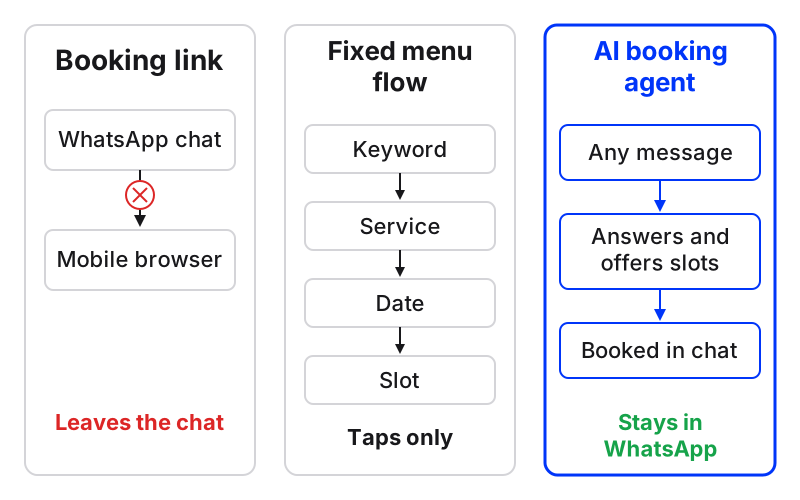
For an agency running clinics, salons, dealerships or studios, the AI booking agent is the one that scales across clients. That’s what Maxbound runs inside each client’s workspace, so the rest of this guide uses it.
What do you need before the agent takes a single booking?
You need five things from the client, and getting them before you build saves a week of back-and-forth.
-
Services: each one with its length and price. Similar tools ask you to set each service’s length, people per slot and price for the same reason: the agent can’t offer a slot it can’t size.
-
Branches and opening hours: per location, including breaks and days closed.
-
Fields to collect: name and phone at minimum. Add email or a reason for the visit only if the client will use it.
-
Who confirms: the person at the client’s business, or on your team, who confirms or cancels bookings.
-
Their sources: website, price list, FAQs and, ideally, past WhatsApp conversations.
Then connect the number. In Maxbound, the client authorises their own WhatsApp account through a one-time Magic Link. Maxbound is an approved Meta Tech Provider and connects only through Meta’s official APIs and login, so no password ever passes through your agency. The number lands in that client’s own workspace, separate from every other client you run.
How to set up WhatsApp appointment booking, step by step
This is the order to build it in. Each step depends on the one before.
How to set up an AI booking agent on WhatsApp
- Connect the client's WhatsApp numberSend the client a one-time Magic Link so they authorise their own WhatsApp account into their workspace through Meta's official login.
- Train the agent on the client's sourcesAdd the client's website, price list, FAQs and past chats so the agent answers questions before it books.
- Set opening hours per branchEnter each branch's hours so the agent only offers slots the client can actually serve.
- Brief the booking agent in plain languageDescribe services, fields to collect, who confirms bookings and when to hand a conversation to a person.
- Rehearse on past conversationsRun Simulations on the client's real past chats and fix any wrong answer before go-live.
- Approve and go live with drafts onKeep approval on so the team sees every reply before it sends, then relax it once the answers hold up.
Step 1: Train the agent on the client’s sources
Add the website, PDFs, FAQs and past chats. Customers rarely book cold. They ask “how much?”, “does it hurt?”, “is there parking?” first, and a booking agent that can’t answer those never gets to the booking. Questions the agent couldn’t answer are gathered as knowledge gaps, so you answer each one once.
Step 2: Brief the agent like a new receptionist
You brief Maxbound in plain language, in the app or from Claude, ChatGPT or Codex through the MCP server. The agent asks what it needs to know, then builds. Copy this and swap in your client’s details:
“For the Downtown and Riverside branches, take bookings on WhatsApp for cleaning (30 min), whitening (60 min) and consultation (20 min), within each branch’s opening hours. Before confirming, ask for the customer’s full name and phone. Offer two slots, not a list of ten. If someone asks about pain, a complaint or a medical emergency, hand the conversation to a person with the history. Lina confirms bookings each morning.”
The agent asks for the fields you listed at the start, after its first reply or at the end, and saves the answers to the contact in the built-in CRM. That’s your booking record: who they are, what they asked for and what they booked, with nobody typing it in.
Step 3: Rehearse before anyone real is answered
Run Simulations on the client’s past conversations. Look for three things: a slot offered outside opening hours, a price that doesn’t match the website, and a conversation that should have gone to a person but didn’t. Fix the brief or the knowledge, then run it again.
Step 4: Go live with approval on
Nothing the agent builds goes live until someone at the agency approves it. For the first days, also set the agent to draft replies a person approves or edits before they send.
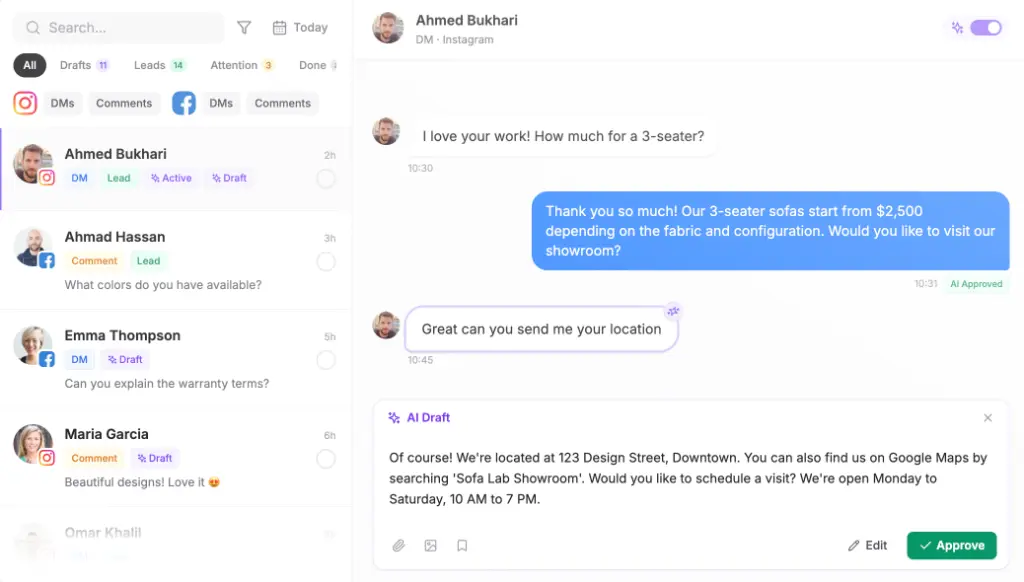
I’d keep drafts on for any new client in a sensitive category, like healthcare. Turn them off when the drafts stop needing edits. Not before.
How do you handle rescheduling and cancellations in WhatsApp chat?
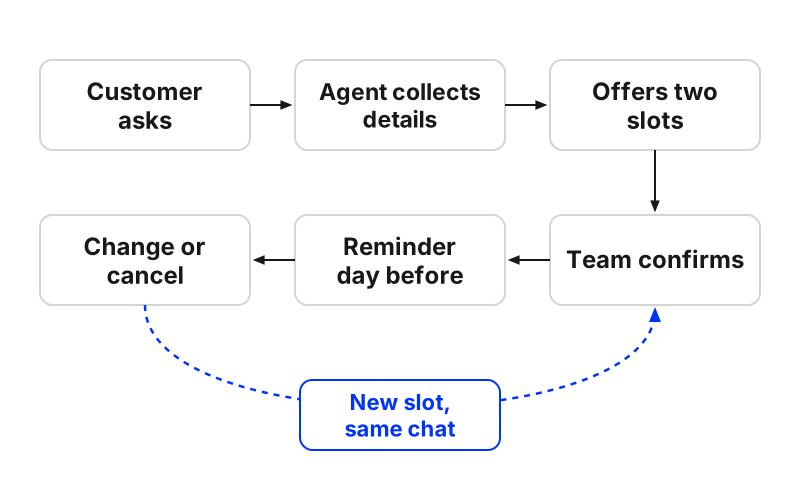
The Maxbound booking agent takes, changes and cancels bookings in the conversation, against each branch’s opening hours. A customer who writes “can we move it to Friday?” gets new slots in the same thread, and the team confirms or cancels the booking in Maxbound.
This is where most WhatsApp booking setups leak. Keyword systems depend on exact phrases: one tool asks customers to reply CANCEL BOOKING to cancel. Real people write “something came up, sorry”. A fixed flow also needs a route for every outcome. One builder’s booking step has four: confirmed, requested, slot taken, and rejected with alternative slots. Each needs its own reply, and an untested route is a customer stuck in silence.
If the client also wants bookings in a spreadsheet, connect a Google Sheet and bookings land there too.
How do you set up WhatsApp booking reminders?
You brief the reminder the same way you briefed the agent: “Send each confirmed customer a reminder the day before their appointment, with the time, the branch and a line saying they can reply here to change it.”
That last line matters. A reminder that invites a change, sent into a conversation where the agent can actually make the change, turns a no-show into a rescheduled slot. WhatsApp message templates are written in the client’s workspace and sent to Meta for approval, so get the reminder template approved before the first bookings come in.
What to avoid: a reminder that says “reply CANCEL” when nothing is listening. One vendor’s own docs flag that their ready-made flows don’t handle a cancel reply even though the confirmation text mentions it. Promise only what the system does.
Where should WhatsApp bookings come from?
A WhatsApp booking system only fills if people can reach it. Give each client several entry points into the same number:
-
Click-to-WhatsApp ads: created from the client’s workspace, so the ad, the conversation and the lead sit together. Before launch, check these click-to-WhatsApp ad mistakes.
-
A WhatsApp link with a prefilled message: on the website, Instagram bio and Google profile. You can make one with the free WhatsApp link generator.
-
Broadcasts to past customers: filter the CRM into a list, such as everyone who had a cleaning six months ago, and send one broadcast. The agent answers every reply and books it.
Because every booking conversation saves the contact with tags and stage, those lists build themselves. That’s the retargeting most booking setups promise and few deliver without a spreadsheet.
What about GDPR and the booking data you store?
Booking data is personal data: names, phone numbers and sometimes the reason for a visit. Collect only the fields the client will use. A dental clinic needs a name and phone, not a date of birth “just in case”.
Maxbound is GDPR compliant. Messages are encrypted in transit with TLS (not end-to-end), each client’s data stays in its own workspace, and role-based permissions decide which teammates see which client. Give a freelancer access to one client’s workspace, not all of them.
Common mistakes with WhatsApp appointment booking
-
Offering every free slot. Ten options cause a stall. Two good ones get a reply.
-
Skipping opening hours per branch. The agent books Saturday at a branch that’s closed Saturdays.
-
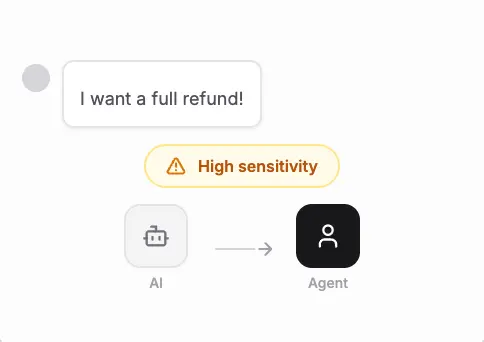
No handover rule. Complaints and urgent cases should reach a person with the history attached.
-
Promising features in the copy. Every “reply X to…” line must be something the system handles.
-
Going live without rehearsal. One wrong price on day one costs more trust than a week of slow replies.
When should you not use an AI booking agent?
If a client gets a handful of booking messages a week and the owner answers them happily, don’t build anything fancy. Sensible advice from people running WhatsApp is to hold off on complex setups until the volume is more than you can answer by hand. The WhatsApp Business app, a booking link and an away message for closed hours will do. Booksy’s guide shows how to toggle Send away message to On in the app’s Business tools.
Maxbound also isn’t for every case. There’s no voice or SMS agent, so a client who books mainly by phone call won’t get much from it. There’s no free plan either.
Where it fits: agencies running bookings for several clients at once, each with their own number, hours and voice, who want one inbox, a CRM that fills itself, and approval on everything that goes live. Build the setup once, clone the workspace for the next clinic or salon, and change the hours and services. Pricing is per workspace, with AI credits included and a 7-day free trial.