How to Test a Kurdish Sorani WhatsApp AI Chatbot
A step-by-step walkthrough for agencies: connect a client's WhatsApp, train a Sorani agent, rehearse it on past chats, and launch with approval on.
A Kurdish Sorani WhatsApp AI chatbot is only safe to launch once it has been rehearsed on the client’s own past conversations and checked by someone who reads Sorani. In Maxbound, that means connecting the client’s WhatsApp number to their own workspace, training the agent on the client’s sources, running Simulations on real past chats, and keeping drafts on approval until the replies hold up.
The order matters more than the tool. Connect, train, brief, rehearse, approve, then widen. Skip the rehearsal and your client finds the wrong-language reply before you do.
This guide is for the agency owner or account manager who has just signed a client in Erbil, Sulaymaniyah or anywhere their customers write in Sorani, and needs the agent answering on WhatsApp without embarrassing anyone in week one.
How do you create an AI chatbot for WhatsApp that answers in Sorani?
You connect the client’s number through the official WhatsApp Business Platform, give the agent the client’s own knowledge, brief it in plain language, and test it before it talks to customers. The Sorani part isn’t a setting you flip. It’s a set of test cases you run until the agent passes them.
One thing to get straight first: Sorani is a variety of Kurdish, not a dialect of Arabic, even though it’s usually written in an Arabic-based script. An agent set to a generic “Arabic” mode will misread your client’s customers. Maxbound agents answer in the customer’s own language, including Kurdish (Sorani) and Iraqi Arabic, and the steps below are how you prove that for one specific client.
Step 1: Get the WhatsApp number ready
The number has to be free before anything connects to it. If the client’s number is already in the WhatsApp Messenger app, it must be deleted from that app first, and the chat history backed up before they do.
Tell the client this on the kickoff call, not on launch day. Business owners in the region often run sales from the personal WhatsApp app on one phone, and losing that history without a backup is the fastest way to lose their trust.
Plan for Meta’s side too. Meta Business verification asks for business documents and typically takes two to seven business days, so start it the day the contract is signed.
Step 2: Create the client workspace and send the Magic Link
Each client gets its own Maxbound workspace, with its own channels, knowledge, contacts and agents. Nothing crosses between clients, so a Sorani clinic and an Arabic-speaking car dealer never share a knowledge base or an inbox.
The client connects their own accounts through a one-time Magic Link. Maxbound is an approved Meta Tech Provider and connects through official APIs and login (OAuth), so nobody at the agency asks for, sees or stores the client’s password.
If you already have a Sorani workspace that works for a similar client, clone it as the starting point. Then swap in the new client’s knowledge before you touch anything else.
Step 3: Train the agent on the client’s own Sorani sources
The agent answers from what you give it: the client’s website, files, FAQs and past chats. For a Sorani client, the past chats are the most valuable source, because they show how real customers actually write to this business.
Load these, in this order:
-
Past WhatsApp conversations, exported from the client’s history
-
The price list and service menu, in whichever language the client uses internally
-
The FAQ document, with Sorani answers where the client already has them
-
The website, so opening hours, locations and policies match what customers can see
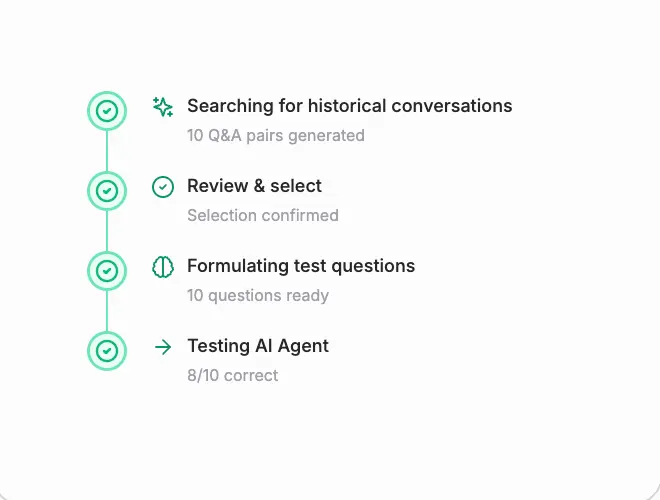
Maxbound’s knowledge training pulls from all of these per workspace. When a price changes, update the source, not the agent’s wording.
Step 4: Brief the agent in plain language
Brief the agent the way you’d brief a new hire who speaks Sorani. In Maxbound, or from Claude, ChatGPT or Codex through the MCP server, you write what you want and the agent asks what it still needs before it builds anything.
Copy this brief and edit the brackets:
You answer WhatsApp messages for [client name], a [business type] in [city]. Reply in the language the customer wrote in: Sorani customers get Sorani, Iraqi Arabic customers get Iraqi Arabic, English customers get English. Answer prices and hours only from the price list and FAQ. Collect name, phone and what they want before booking. Hand the chat to [staff name] for complaints, refunds, medical questions, or when the customer asks for a person.
Expect questions back. Who owns the leads? Should it follow up if the customer goes quiet? What happens outside opening hours? Answer them, and the agent builds the setup in that client’s workspace. It doesn’t go live until someone at the agency approves it.
Step 5: Rehearse on real past conversations with Simulations
Simulations run the agent against the client’s real past conversations before it answers anyone. This is where Sorani problems show up, and it’s the step most WhatsApp setups skip.
Build a test set from the client’s history that covers every way their customers write. Then check each simulated reply against the table below.
| Test case | What a pass looks like | What a fail looks like |
|---|---|---|
| Sorani in Arabic-based script | Reply in Sorani, same script | Reply in Arabic or English |
| Sorani typed in Latin letters | Agent understands and answers in Sorani | Agent asks the customer to repeat |
| Sorani mixed with Iraqi Arabic | Agent answers the question asked, in the customer’s main language | Agent switches language mid-reply |
| English product or brand name inside Sorani | Name kept as written, price correct | Name translated or price guessed |
| Price question not in the price list | Agent says it will check and hands off | Agent invents a price |
| Complaint or request for a person | Handed to staff with the full history | Agent keeps arguing |
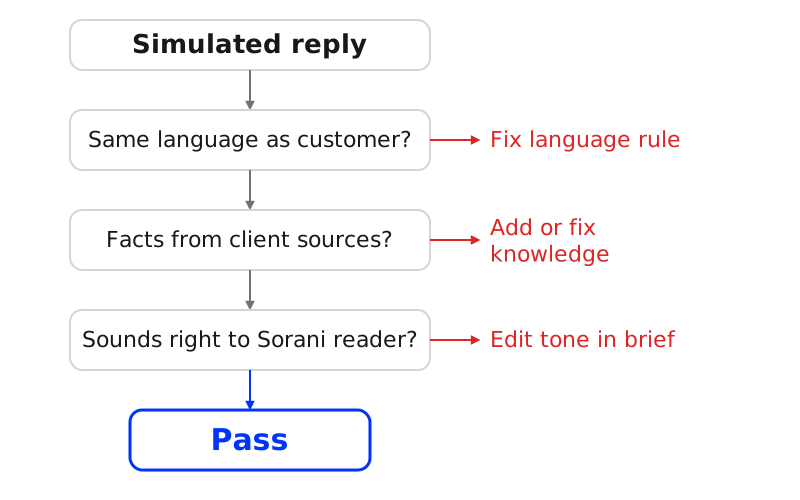
Get a Sorani speaker to read every result, ideally someone on the client’s team. You’re checking tone as well as accuracy. A reply can be grammatically right and still sound wrong for a family clinic. Run Simulations on past conversations again after every brief change.
Step 6: Launch with drafts on approval
For the first stretch, set the agent to draft every reply for a person to approve or edit before it sends. The approver should read Sorani. If nobody at your agency does, make it someone at the client.
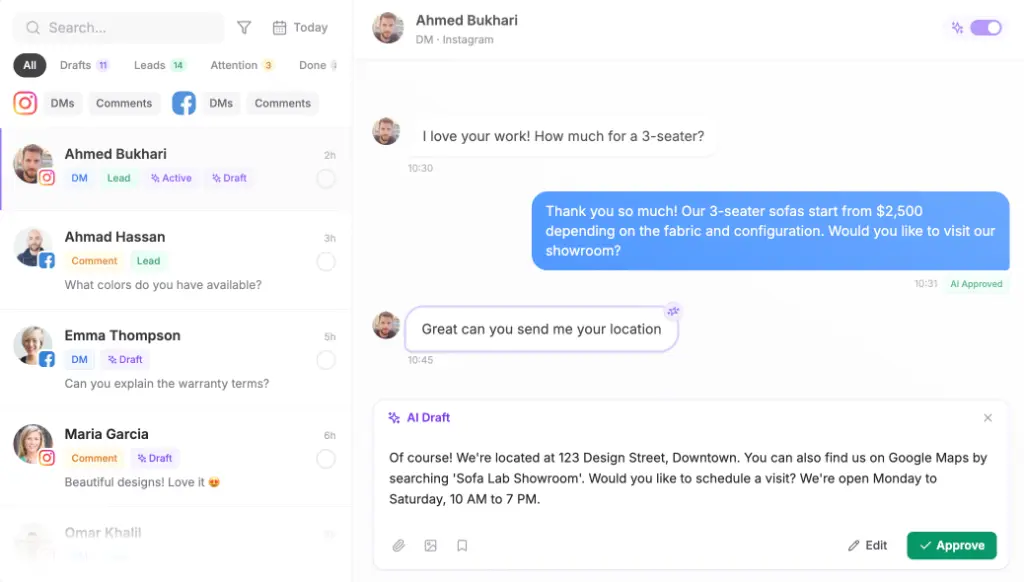
Every edit teaches the agent. Maxbound agents are self-improving: they learn each brand’s tone of voice from the edits and the client’s own conversations. Approval can stay on for as long as you want, so there’s no deadline to switch it off.
Turn on the two guards that stop the agent sounding like software:
-
Avoid double replies. When someone on the team answers, the agent steps back, so the customer never gets two answers.
-
Reply delay. The agent waits a few seconds before replying, so a burst of short messages gets one answer instead of four.
Step 7: Widen to autonomous replies one topic at a time
Once the drafts need almost no edits for a topic, let the agent send that topic on its own. Opening hours and location first. Prices next. Bookings after that. Complaints stay with people.
The agent hands any conversation it shouldn’t handle to a person, with its history, so your staff never ask the customer to start again. Every lead from those chats is saved to the built-in CRM with nobody typing it in.
How to launch a Kurdish Sorani WhatsApp AI agent
- Free the numberBack up chat history, delete the number from WhatsApp Messenger, and start Meta Business verification.
- Create the workspaceCreate the client's own workspace and send the one-time Magic Link so the client authorises their WhatsApp account.
- Train the agentLoad past WhatsApp chats, the price list, FAQs and the website as knowledge.
- Brief in plain languageWrite the brief with a language rule, answer sources and handoff rules, then answer the agent's questions.
- RehearseRun Simulations on real past conversations and have a Sorani reader check every case in the test table.
- Launch on approvalSet drafts to need approval, turn on avoid double replies and reply delay.
- Widen by topicLet the agent send on its own one topic at a time once its drafts stop needing edits.
What does a Sorani WhatsApp AI agent cost to run?
The cost has two parts: what WhatsApp charges and what the agent platform charges. On the WhatsApp side, when a customer messages the business, a 24-hour customer service window opens in which service replies are free. Conversations started from Click-to-WhatsApp ads stay free for 72 hours, which matters for any client running ads that send people straight into WhatsApp.
On the Maxbound side, pricing is per workspace, so one client is one workspace. Each workspace includes 100 AI credits a month, extra credits are priced in brackets, and the price per workspace falls as you add clients. Every account starts with a 7-day free trial; there’s no free plan. The details are on the pricing page.
For a worked example, treat this as an illustration only: a clinic whose customers all write in first gets free service replies inside each 24-hour window, so the main running cost is the workspace and any credits above the included 100.
Should you build it yourself with n8n instead?
You can. An n8n workflow can connect your Meta WhatsApp Cloud API account, answer from a Google Doc, and log conversations to Google Sheets. That suits a technical agency with one client and a developer who enjoys maintaining it.
The gaps show up at client five. You’re building isolation between clients, an approval step, a handoff with history, and a way to rehearse Sorani replies on past chats, all by hand. Maxbound has those in every workspace, which is why it fits marketing agencies running many clients’ WhatsApp at once.
Common mistakes, and when not to do this
The mistakes that cause the worst Sorani replies are predictable:
-
Training only on English documents, so the agent has never seen how customers write
-
Testing with messages your team wrote instead of the client’s real past chats
-
Letting someone who doesn’t read Sorani approve drafts
-
Switching every topic to autonomous on the same day
-
Forgetting the chat-history backup before freeing the number
Don’t launch autonomous replies if nobody on either side can read Sorani. Keep drafts on approval until that changes.
And be clear with the client about scope. Maxbound agents work on WhatsApp, Instagram, Facebook, website chat and in-app chat. There’s no voice, SMS or phone agent, so a client whose customers mostly call should know that before signing.