
Comment Moderation Tool for Agencies: A Setup Playbook
How agencies set up comment moderation for every client: a policy template, hide-vs-reply rules, approval settings and the mistakes that cost clients.
Who watches your clients’ ad comments at 11pm on a Saturday?
For most agencies, nobody does. A comment moderation tool for agencies fixes that. It hides spam, abuse and competitor pitches on every client’s posts and ads, keeps each client’s rules separate, and sends real questions and complaints to someone who can answer them.
Maxbound does this inside a separate workspace for each client. An agent works from that client’s own moderation policy, hides what breaks it, answers what deserves an answer, and hands complaints to your team with the full history. You can keep approval on for as long as you want.
This playbook sets that up for one client, step by step. Then you clone the setup for the next one.
What should a comment moderation tool for agencies do?
A comment moderation tool for agencies has to handle many brands at once without mixing them up. Filtering one page well isn’t enough. Here’s the minimum list:
-
Hide spam, scams and abuse on organic posts and paid ads, across Instagram and Facebook.
-
Catch rival pitches, like a competitor dropping their link under your client’s ad.
-
Keep a separate rulebook per client. A dental clinic and a nightclub don’t tolerate the same words.
-
Tell moderation apart from conversation. “How much?” is a lead. Hiding it costs your client money.
-
Escalate complaints to a person, so the tool doesn’t quietly bury them.
-
Let your team approve what the AI does until you trust it.
Most tools do the first item. The other five are where an agency gains or loses a client.

Why do keyword filters fail on client accounts?
Keyword filters fail because spammers know about them. They break up words, swap letters and add symbols, so a blocklist keeps missing new variations.
Superpower puts it at 60%: that’s the share of spam keyword filters miss, because trolls misspell words on purpose. That matters for an agency with ten clients, because ten blocklists each miss things in their own way, and nobody keeps all ten up to date.
The second problem goes the other way. A blocklist hides good comments too. Block the word “price” to stop spam bots and you also hide every real buyer asking about price.
Maxbound’s agents read the whole comment. They don’t match single words. An agent briefed on a client’s policy can tell “DM me for cheap followers” from “what’s the price on the grey sofa?” and treat each one the right way.
How do you set up comment moderation for each client?
You set up comment moderation for a client in six steps: write the policy, connect the accounts, brief the agent, set the hide-reply-escalate rules, rehearse with approval on, and review the log every week. Here’s each step in detail.
Set up comment moderation for one client
- Write the client's moderation policyList what gets hidden, what gets a reply and what goes to a person. Get the client to sign off on it.
- Connect the client's accountsSend the client a one-time Magic Link so they authorise their own Instagram and Facebook accounts through official login.
- Brief the agent in plain languagePaste the policy into a brief in the client's workspace and answer the agent's follow-up questions.
- Set hide, reply and escalate rulesUse a decision table so every comment type has one action.
- Rehearse with approval onRun Simulations on past conversations and keep approval on for the first weeks.
- Review the log weeklyCheck what was hidden, keep a record and adjust the policy with the client.
Step 1: Write the client’s moderation policy
Start with a written policy before you touch any tool. Without one, every hide decision turns into an argument with the client later.
The public sector learned this first. Government Technology’s guidance says the categories of prohibited speech must be publicly posted to set the limits of the forum. Your clients aren’t governments, but the rule still works. Agree the categories in writing, and post a short version in the page’s bio or pinned post if the client wants to.
Copy this template and fill it in with the client:
-
Always hide: spam and scam links, follower-selling offers, hate speech and slurs, sexual content, threats.
-
Always hide: competitor names or links posted to pull customers away.
-
Always hide: personal details someone posts publicly, like a phone number or home address (theirs or anyone else’s).
-
Reply publicly: product questions, opening hours, delivery areas.
-
Reply, then move to DM: price requests, booking requests, anything that needs personal details.
-
Send to a person, never hide: complaints, refund requests, safety issues, press or legal mentions.
Step 2: Connect the client’s accounts
Each client gets their own Maxbound workspace with its own channels, knowledge, contacts and agents. Nothing crosses between clients, so a rule written for the nightclub never touches the dental clinic.
The client connects their own accounts through a one-time Magic Link. Maxbound is an approved Meta Tech Provider and uses only official APIs and OAuth login. Maxbound never asks for, sees or stores a social password, which makes the client conversation easier.
Step 3: Brief the agent in plain language
Brief the agent the way you’d brief a new hire on their first day. In the client’s workspace, or from Claude, ChatGPT or Codex through Maxbound’s MCP server, write something like:
“On every Instagram and Facebook post and ad for this client, hide spam, scam links, abuse and any comment that promotes a competitor. Answer questions about products and hours publicly. If someone asks about price, reply that we’ve sent details by DM and send them the price list. Send complaints to Sara with the full thread. Never hide a complaint.”
The agent then asks what it needs to know. Which posts? Which competitors count? Who covers when Sara is off? Answer those questions, and it builds the setup in that client’s workspace. Nothing goes live until someone at your agency approves it.
Maxbound’s comment moderation hides spam, abuse and rival pitches from every post and ad, and that same agent handles the comments worth keeping.
Step 4: Set hide, reply and escalate rules
Every comment type needs exactly one action. If two people on your team would handle the same comment differently, the agent will be inconsistent too.
| Comment type | Action | Why |
|---|---|---|
| Spam, scam or follower-selling link | Hide | Adds nothing and can hurt the client’s customers |
| Abuse, slurs, threats | Hide, flag to team | The team may need to block or report |
| Competitor pitch | Hide | Pulls buyers away from paid ads |
| Personal details posted publicly | Hide | Protects the person whose details they are |
| Product or hours question | Reply publicly | Other readers see the answer too |
| Price or booking request | Reply, then DM, save to CRM | It’s a lead |
| Complaint or refund request | Send to a person with history | Hiding it makes things worse |
The price row is where moderation pays for itself. With comment-to-DM-to-CRM, a public comment becomes a private DM and a saved contact, without anyone typing it in.
A note on hiding versus deleting: on Facebook, hidden comments stay visible to the commenter and their friends while they disappear from public view. Hiding usually doesn’t start a fight, because the spammer doesn’t know they’ve been hidden. Deleting does.
Step 5: Rehearse with approval on
Test the agent before it touches live comments. Simulations rehearse an agent on real past conversations from that client, so you can see how it would have handled last month’s comments before it handles anyone’s.
Then go live with approval on. The agent drafts its action, and a person approves or edits it before anything happens. Every edit you make teaches the agent that client’s tone of voice.
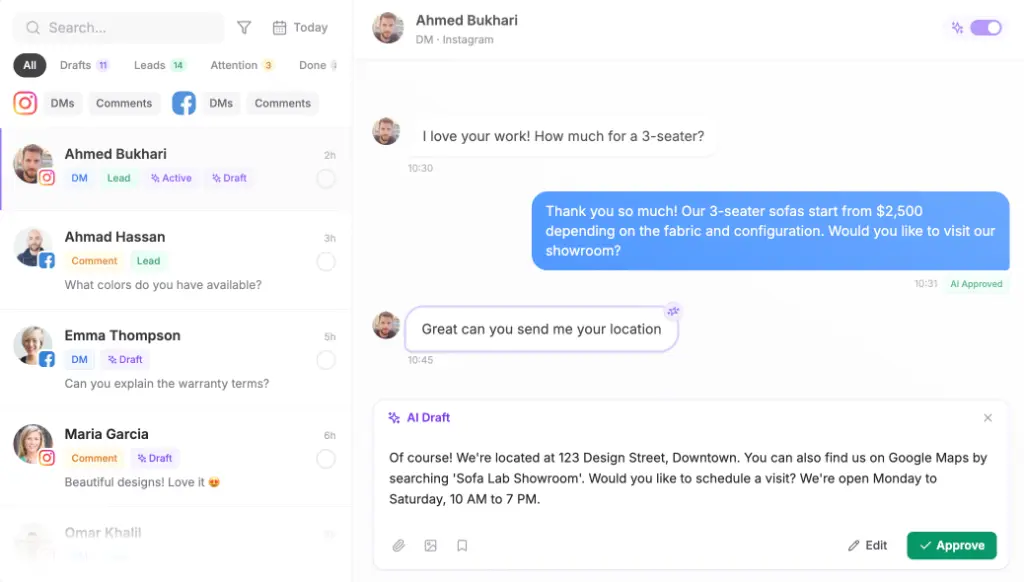
Two settings are worth knowing here. Avoid double replies makes the agent step back when someone on your team answers, so the customer never gets two responses. Reply delay makes the agent wait a few seconds before replying, so a burst of messages gets a single answer.
Step 6: Review the log every week
Once a week, check what was hidden for each client. Look for good comments that got hidden by mistake and new spam patterns that got through. Update the brief when you find either.
Keep a record of every hidden comment. Government Technology calls it essential to retain records of all hidden or deleted material. When a client asks why a comment disappeared, you can show them the policy line and the comment.
What should a comment moderation tool never hide?
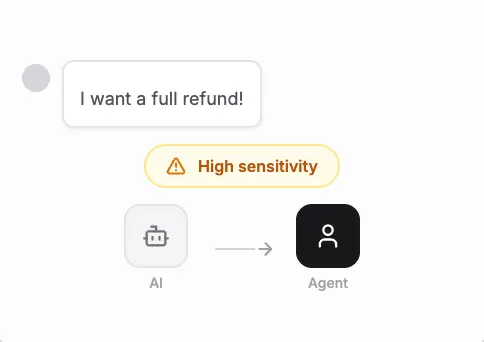
Never hide a complaint just because it’s negative. The same Government Technology guidance warns that unflattering comments can’t come down just because they’re unflattering. For a brand, the risk is a different one: a hidden complaint comes back as a screenshot and a louder second post.
A complaint goes to a person, with the full conversation attached. Maxbound’s agents hand a conversation to your team with its history, so whoever picks it up doesn’t have to scroll back and ask the customer to repeat themselves.
Which Instagram comment management tool fits an agency?
The right Instagram comment management tool depends on whether you only need comments hidden, or need comments hidden, answered and turned into leads in the same place. Here’s how a few options compare on what’s publicly known.
| Tool | What it does with comments | Pricing model | Suits |
|---|---|---|---|
| Maxbound | Hides spam, abuse and rival pitches; agents answer, DM and save leads; complaints go to a person | Per workspace, 100 AI credits a month each, 7-day trial | Agencies running conversations and leads for many clients |
| Planable | Engagement add-on for comment moderation alongside content planning | $33 per workspace/month, plus a $9 per workspace/month engagement add-on | Agencies where content approval is the main job |
| Respondology | Managed comment moderation | From $30,000 to $40,000 a year | Large brands that want moderation done for them |
| Hootsuite | Social management suite | Paid plans from $99/month | Teams wanting one suite for many networks |
Planable’s pricing comes from Planable’s own roundup of moderation tools, which also lists the $99 starting point for Hootsuite. Superpower lists Respondology’s managed service from $30,000 to $40,000 a year.
As a social media management tool for agencies, Maxbound is built around the conversation. Moderation, replies, comment-to-DM, the CRM and post scheduling all sit in the same client workspace. The price per workspace drops as you add more clients, and every feature comes with every workspace. See the per-workspace pricing for the brackets.
What Maxbound doesn’t do: it publishes only to Instagram, Facebook, TikTok and YouTube, and its conversation channels are WhatsApp, Instagram, Facebook, website chat and in-app chat. If your clients need LinkedIn, X, Threads or Pinterest publishing, Planable’s nine-network scheduling is a closer fit.
What mistakes do agencies make with comment moderation?
The most common mistake is using one global rulebook for every client. What a fashion brand happily allows will embarrass a healthcare client. Write the policy per client.
Other mistakes come up again and again:
-
Hiding questions to keep threads tidy. A hidden “how much?” is a lost sale.
-
Turning approval off on day one. Leave it on until the weekly review stops turning up mistakes.
-
Expecting old comments to be cleaned up. Plan a one-off manual pass on older posts when you onboard a client.
-
Never updating the brief. Spammers change their tactics, so your brief has to change too.
When should you skip all of this? If a client gets a handful of comments a week, a person checking twice a day is enough. Automated moderation earns its cost on paid ads and busy accounts, where comments come in faster than anyone can read them.
Is Maxbound one of the best AI tools for marketing agencies?
Maxbound fits agencies that run their clients’ comments, DMs and leads, not only their posting calendar. For marketing agencies running every client from one place, it means one setup per client: moderation, answers and lead capture, cloned from the workspace that already works.
Agencies whose work is mostly content approval across many networks will get more out of a planning-first tool.
If your problem is the Saturday-night ad comments, start the 7-day trial, build one client’s policy with the template above, and run it with approval on for a week.