
WhatsApp Business API for Agencies: Who Owns What
How agencies should set up the WhatsApp Business API for clients: who owns the number and billing, how templates get approved, and where AI agents fit.
Whose name is on the WhatsApp account when a client leaves your agency?
The client should own the WhatsApp Business API account. The client’s Meta business account, phone number and billing card stay in the client’s name. The agency owns the work that runs on top: the templates it drafts, the AI agents it briefs, the inbox rules and the reporting. Agencies that get this split right on day one avoid the billing fights, the frozen numbers and the awkward offboarding that come from setting it up the other way round.
This guide is for the owner or ops lead of a marketing, performance or lead-generation agency who is about to put WhatsApp into client retainers. By the end, you’ll know who should own what, how Meta bills, how to run template approvals with clients, and where an AI layer fits.
What is the WhatsApp Business API, and how is it different from the app?
The WhatsApp Business API, now part of the WhatsApp Business Platform, is the version of WhatsApp that software connects to. The WhatsApp Business app is a phone app one person runs. The API is what lets a team inbox, a CRM and an AI agent all work on the same number at once.
For an agency, the differences that matter are practical:
-
Team access. The API supports full multi-agent team support, which the basic Business app does not. Several people, plus an agent, can work one client’s number.
-
Templates. Any message your client’s business starts, rather than replies to, has to be a pre-approved template.
-
Billing. Meta bills per message, through an account with a currency and a payment method.
-
Versions. Meta hosts the Cloud API; there is also an On-Premises API and a Business Management API. Most agencies will never touch anything but Cloud.
To get started, a business normally chooses a WhatsApp Business Solution Provider and provides documents to WhatsApp for verification. If you want to poke at it before committing a client, Meta gives developers free access to test numbers, a sandbox and webhooks.
Who should own the WhatsApp Business API account, the agency or the client?
The client should own the account, the number and the billing. The agency should run everything on top of it. I call this the ownership split, and it’s the one decision that shapes every other part of WhatsApp work for an agency.
The reason is simple. A WhatsApp number is the client’s customer relationship. Every past conversation, every opted-in contact, every approved template lives on it. If your agency owns that account and the client leaves, you’re holding their customer list hostage, even if you don’t mean to. If the client owns it and you run it, offboarding is just removing access.
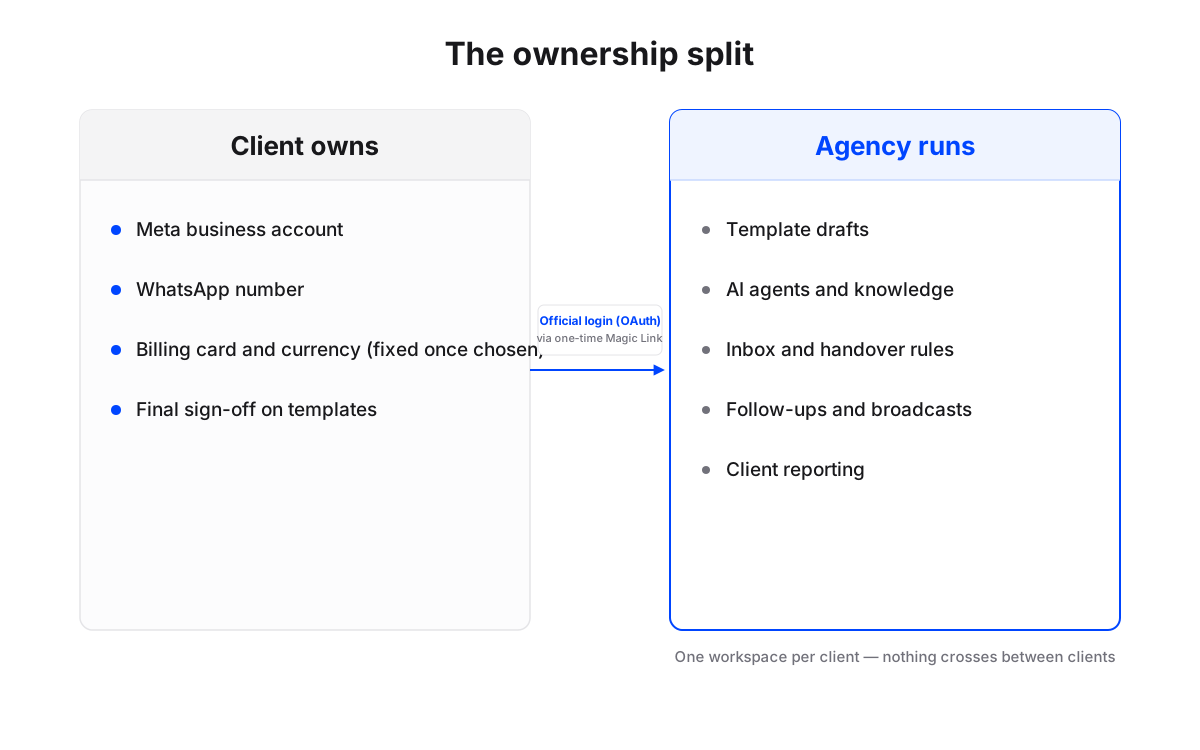
One detail makes this urgent rather than theoretical. In Meta’s own words, currency selection cannot be changed once the messaging account is created. Set a client up on your agency’s account in your currency and you’ve made a permanent choice on their behalf.
Maxbound is built around this split. Maxbound is an approved Meta Tech Provider that connects only through official APIs and login (OAuth), and never asks for, sees or stores a password. A client authorises their own accounts through a one-time Magic Link, so the client keeps ownership and your team gets the access to do the work. Each client lands in its own workspace, with its own channels, contacts, knowledge and agents, and nothing crosses between clients.
How does Meta charge for WhatsApp Business API messages?
Meta charges per message, and only for messages that are delivered. Meta’s pricing page says businesses are charged when a message is delivered, not when it’s sent. A failed send costs nothing.
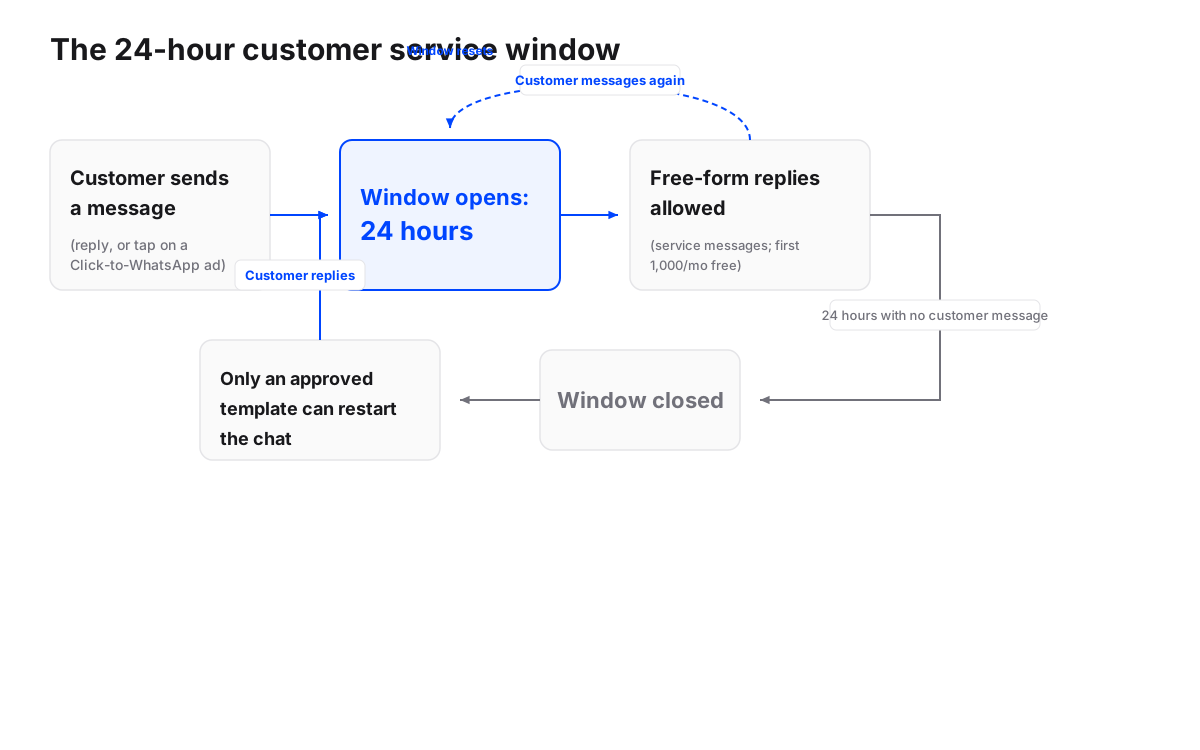
The second rule is the 24-hour customer service window. Free-form messages (plain text, images and so on) can only be sent inside an open 24-hour window, and that window resets every time the customer messages again. Outside it, the only way to reach someone is an approved template.
Meta gives each business phone number 1,000 free service messages per month. That allowance is per number, not per agency, so a client with a modest inbound volume may pay little for service replies, while a client running heavy outbound campaigns pays mostly for templates.
Meta also limits when prices can move: pricing may only change on the first day of a quarter, so up to four times a year. Line your WhatsApp cost reviews up with those dates and you’ll never be surprised mid-retainer.
How should an agency bill clients for WhatsApp?
Pass Meta’s costs straight through on the client’s own card, and charge your agency fee for the work. Of the three common models, that’s the one with the least risk for both sides.
| Model | Who pays Meta | Agency risk | When the client leaves | Suits |
|---|---|---|---|---|
| Pass-through | Client’s card | Low | Client keeps everything | Most retainers |
| Agency card, rebilled | Agency’s card | You float the cost and chase invoices | Number and currency tied to you | Rarely worth it |
| White-label resale | Agency, via a reseller | Medium; you own the contract | Depends on your contract | Agencies selling WhatsApp as a product |
White-label resale is a real option. Some providers let agencies resell WhatsApp under their own brand, with the contract sitting between the agency and its client. Maxbound also lets you white-label the workspace and remove “Powered by Maxbound”. If you want to package this as your own product, read about selling AI agents under your own brand before you price it.
What you charge for is the part that needs judgment. Meta’s message fees are a utility bill. Your margin comes from the templates, the agent, the follow-ups and the reporting, so price those as a monthly line, separate from usage. An illustration, not a benchmark: a retainer line reading “WhatsApp management: agent upkeep, template drafting, monthly report” plus “Meta usage: billed directly to your card” is easy for a client to approve and hard to argue with.
How do agencies run template approvals with clients?
Run two approvals, the client’s and then Meta’s, and never skip the first. Business-initiated template messages require pre-approval by WhatsApp, whether they’re marketing, transactional or support. Meta’s approval says a template follows the rules. It says nothing about whether your client agreed to the offer in it.
Use a written sign-off before anything is submitted. Copy this:
Hi [name], here’s the WhatsApp template we’d like to submit to Meta for [campaign]. Category: [marketing / utility]. Exact text: [template]. Buttons: [buttons]. Who receives it: [list]. Please reply “approved” or send changes. Once Meta approves it, we’ll schedule the first send for [date].
Keep the reply. When a client later asks why a discount went out, you have the answer in their own words.
Where does an AI chatbot for WhatsApp Business fit?
An AI layer answers the conversations inside the 24-hour window, which is where most of the volume and most of the leads are. Zoko’s API guide estimates that automated responses can handle about 80% of common questions. Whatever the real share for a given client, the questions people ask at 11pm are the same ones they ask at 11am, and nobody on your team is awake for the first lot.
Most searches for an ai chatbot whatsapp business setup end at a tool that answers from a script. For an agency, the harder question is how the agent stays inside each client’s facts, and who checks it. In Maxbound, you brief an agent in plain language, the way you’d brief a new hire. It asks what it needs to know, then answers from that client’s own website, files, FAQs and past chats, in the customer’s own language, including Iraqi Arabic and Kurdish (Sorani). The WhatsApp agent answers, qualifies, follows up, and hands the conversation to a person with its history when it should.
The part agencies care about most is control. Every Maxbound agent can be set to draft replies that a person approves before anything is sent, and that setting can stay on for as long as you want.
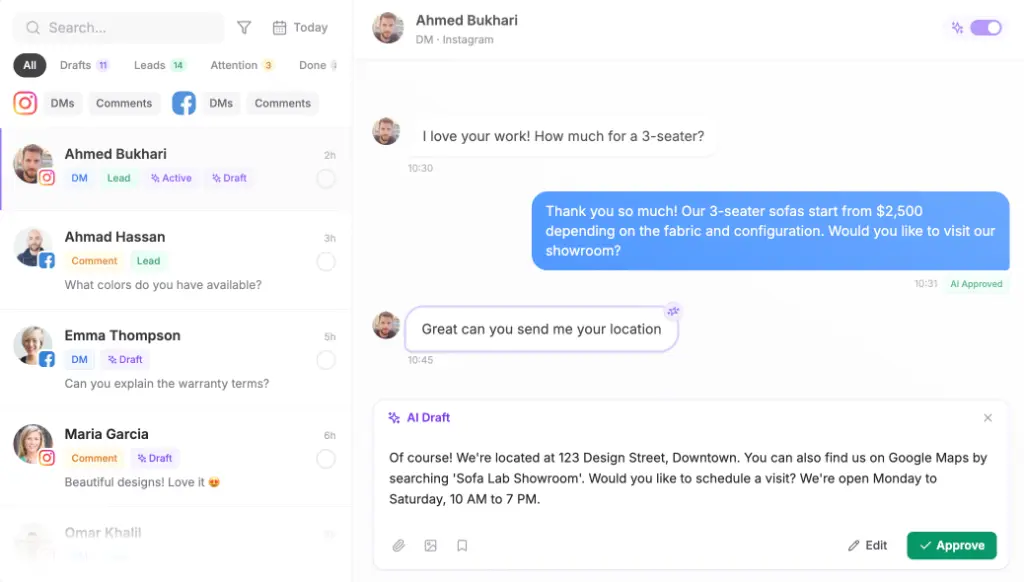
Before an agent answers a single real customer, Simulations rehearse it on that client’s past conversations, so you see its answers on old questions first.
How does WhatsApp connect to a CRM and an e-commerce store?
WhatsApp on its own doesn’t save a lead anywhere. The API delivers messages; something else has to record who the person is and what they wanted. That’s why every serious WhatsApp setup pairs the number with a CRM.
In Maxbound, the built-in CRM saves every lead from the conversation, with nobody typing it in, and every client’s WhatsApp, Instagram, Facebook, website and app chats sit in one inbox.
For online stores, be clear about what’s connected and how. Maxbound doesn’t list a native connector for a specific store platform. The agent learns the store’s products, shipping and returns from the client’s own website and files, so it can answer buyers’ questions. For order data, Maxbound’s API lets your own systems read and act on conversations, contacts and the CRM, and above 50 workspaces the Enterprise plan includes integration with the agency’s own CRM and tools. If a client needs live order lookups inside WhatsApp on day one and you have no developer, plan for that gap before you sell it.
How do you onboard a client onto the WhatsApp Business API?
Onboard a client onto the WhatsApp Business API, agency-side
- Confirm the client owns the Meta business accountThe client creates or uses their own Meta business account. Your agency is added as a partner, never as the owner.
- Pick the currency with the clientChoose the billing currency together and write it down. Meta does not let you change it later.
- Put the client's card on the accountMeta usage is billed to the client directly. Your fee is a separate line on your invoice.
- Gather verification documentsCollect the business documents WhatsApp asks for before the call, not during it.
- Connect through a Magic LinkSend the client a one-time Magic Link so they authorise their own WhatsApp account through Meta's official login into their Maxbound workspace.
- Draft and sign off templatesWrite the first two or three templates, get written client approval, then submit them to Meta.
- Brief and rehearse the agentBrief the agent in plain language, train it on the client's site and FAQs, and run Simulations on past conversations.
- Go live with approval onLeave reply approval on for the first weeks and turn it off only when the drafts need no edits.
If you already have a workspace that works for a similar client, clone it as the starting point and change the knowledge, the contacts and the templates.
What goes wrong, and when shouldn’t an agency do this?
Most WhatsApp problems for agencies are ownership problems that show up late. Watch for these:
-
Numbers on the agency’s account. Fine until the client leaves, then painful for everyone.
-
Templates submitted without client sign-off. Meta approves the wording; the client never approved the offer.
-
Ignoring the 24-hour window. Teams answer the next morning, find the window shut, and pay for templates they didn’t need.
-
No CRM behind the number. Leads sit in chat history and nobody can report on them.
And sometimes the API isn’t worth it. If a client gets a handful of WhatsApp messages a week and one owner answers them personally, the Business app is enough. The API, and an agent on top of it, pays off when volume is high, when messages arrive out of hours, or when a team has to share the number. For marketing agencies running many clients, that describes most of the roster, which is why WhatsApp tends to end up in the retainer rather than as a one-off project.