Instagram Comment Management Tool: 7 Agency Mistakes
An Instagram comment management tool for agencies must hide, answer, move to DM or escalate every comment. The four-lane model and the mistakes to avoid.
Comments on a client’s post are public. Every one that sits unanswered is visible to the next person scrolling.
For an agency running a dozen brands, that means a dozen feeds where a price question, a complaint and a scam link sit side by side, waiting for whoever gets to them first.
An Instagram comment management tool for an agency has to put every comment into one of four lanes: hide it, answer it in public, move it to a DM and save the lead, or hand it to a person with the history. Maxbound does all four inside a separate workspace for each client, with AI agents briefed in plain language and answering from that client’s own website, FAQs and past chats. Nothing goes live until someone at the agency approves it.
Most tools cover one lane well. A moderation tool hides. A keyword-trigger tool sends a DM. A social suite gives your team a stream to work through by hand. The pain for an agency lives in the gaps between those lanes, multiplied by every client you run.
What should an Instagram comment management tool actually do?
An Instagram comment management tool should decide what each comment needs before anyone types a word. I call this the four-lane model. Every comment on every client’s post fits exactly one lane.
-
Hide. Spam, scam links, abuse, rival pitches. Nobody replies. The comment disappears from the post.
-
Answer in public. Opening hours, sizes, delivery areas. A short public reply helps everyone else reading the thread.
-
Move to DM. Price, booking, availability. That’s buying intent. The answer belongs in private and the person belongs in the CRM.
-
Hand to a person. Complaints, refunds, anything medical or legal, anyone angry. A person answers, with the full thread in front of them.
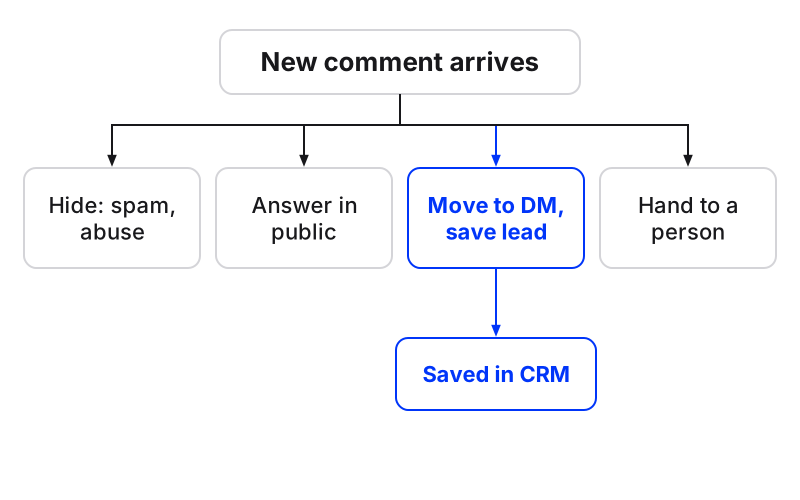
The lane decides the action, the owner and the risk. Get the lane wrong and even a good reply lands badly. A price posted publicly starts a haggle in the comments. A cheerful sales DM sent to an angry customer turns a complaint into a screenshot.
| Comment looks like | Lane | What the tool does | Who owns it |
|---|---|---|---|
| Follower-selling link or abuse | Hide | Hidden from the post, no reply | Agent |
| What time do you open on Saturday? | Answer in public | Short reply from the client’s FAQs | Agent |
| Price? (on an ad) | Move to DM | DM with the price, contact saved to the CRM | Agent, then the sales owner |
| I was charged twice | Hand to a person | Escalated with the full history | Client’s support lead |
| A health or legal complaint | Hand to a person | No automatic reply, escalated straight away | Account manager |
Fill the last column with real names for every client. A lane without an owner is how a refund request sits for three days.
How does Instagram comment to DM automation work?
Instagram comment to DM automation means a public comment triggers a private message to the person who left it, so the conversation moves out of the feed and into the inbox. In Maxbound, the agent reads the comment, sends a DM that answers it from the client’s own sources, keeps the conversation going, and saves the person as a contact in that client’s built-in CRM with what they asked.
Keyword triggers do part of this job. A rule says: if the comment contains ‘price’, send this message. That holds until someone writes ‘how much’, misspells it, or asks in another language. Maxbound’s agents read what the comment means, and they answer in the customer’s own language, including Iraqi Arabic and Kurdish (Sorani).
The CRM step is the one most setups skip. A DM without a saved contact is a lead somebody has to find again by scrolling. Maxbound’s comment to DM to CRM flow saves every lead from the conversation, and follow-up sequences chase anyone who goes quiet until they book or say no.
Every tool here, Maxbound included, works inside Meta’s official Instagram Graph API. A public reply is a POST to the comment’s replies endpoint with the message text. So when a feature seems missing, check the platform first: many limits people blame on software come from the social media APIs, not the tools.
If you want the manual version before automating anything, we wrote up how to reply to instagram comments via dm step by step.
What does a tool need from each client’s Instagram account?
Every comment tool needs the same four things from a client’s account, and a missing one is why most connections fail on day one.
-
An Instagram Business or Creator account, because personal accounts don’t expose comments to third-party apps. Switching to a professional account is free and keeps followers and posts.
-
A Facebook Page linked to that Instagram account, even if the client never posts on Facebook. Meta routes third-party access through the Page.
-
Admin or Editor access on that Page for whoever grants permissions.
-
Every permission requested at login, granted. A tool that can only read comments can’t hide or answer them.
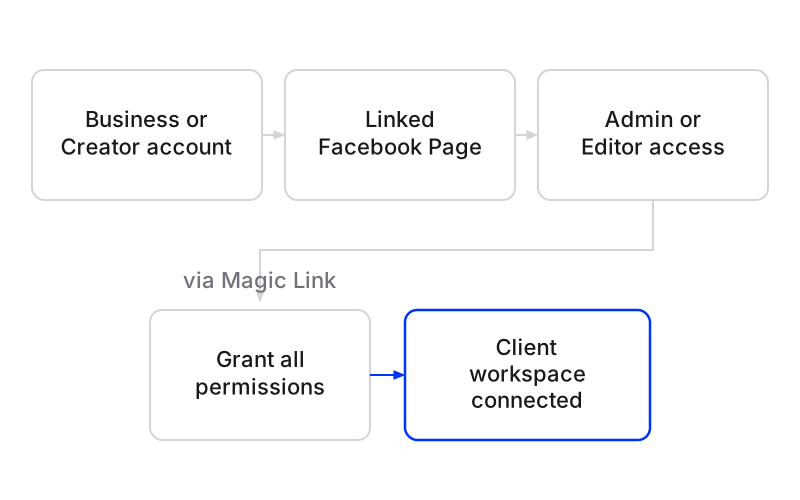
Maxbound is an approved Meta Tech Provider and connects only through official APIs and OAuth login. It never asks for, sees or stores a social password. The client authorises their own accounts through a one-time Magic Link you send them, so nobody at the agency holds a shared login.
Meta’s own documentation says it strongly recommends webhooks to prevent rate limiting instead of repeatedly querying for comments. Listening for new events is the right design. It also means connection day is day one of the record: CommentGuard, for example, does not retroactively import comments received before a page was added. Connect a client before their next launch, never during it.
Common mistakes agencies make with comment management
These are the mistakes that cost agencies leads and clients. Each one: the mistake, why it hurts, the fix.
1. One rule for every comment
Mistake: a single keyword trigger or a ‘reply to everything’ setting across a client’s posts.
Why it hurts: complaints get sales DMs, spam gets thanked, and real questions without the keyword get nothing.
Fix: brief the four lanes for each client, with examples of each, before anything goes live.
2. Answering from shared logins
Mistake: passwords in a spreadsheet so anyone on the team can jump into a client’s app.
Why it hurts: no record of who replied, and a person who leaves keeps access.
Fix: OAuth connections the client authorises, plus role-based permissions in each workspace so people see only the clients they work on.
3. Mixing clients in one stream
Mistake: every client’s comments in one shared feed.
Why it hurts: a reply written for the dental clinic goes out from the car dealership. One wrong-brand reply can end a retainer.
Fix: one workspace per client, with its own channels, knowledge, contacts and agents. Nothing crosses between them.
4. Reading comments too slowly
Mistake: checking comments twice a day, in office hours.
Why it hurts: the volume and the expectations don’t fit a twice-a-day check.
FeedGuardians found that 70% of consumers expect a response within one hour, and puts the average business post at 50 to 200+ comments, with spam at over 40% of all comments. As an illustration only: a post with 150 comments at that spam rate means around 60 to hide and 90 to read, for one post, for one client.
Fix: let comment moderation hide spam and abuse automatically, and let agents answer the public and DM lanes at every hour.
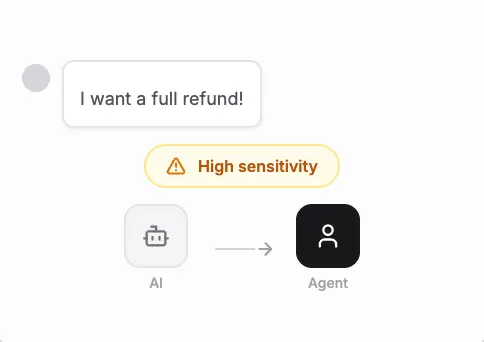
5. Letting automation answer anger in public
Mistake: the same automatic reply for a furious customer as for a curious one.
Why it hurts: a canned reply to a real complaint reads as the brand not listening, in front of everyone.
Fix: tell the agent which topics always go to a person. Maxbound hands the conversation over with its history, so whoever picks it up doesn’t ask the customer to repeat themselves.
6. Two people answering the same comment
Mistake: an account manager replies while the automation also replies.
Why it hurts: the customer gets two different answers and the brand looks disorganised.
Fix: in Maxbound, when someone on the team replies, the agent steps back, so the customer gets one answer.
7. Going live without a rehearsal
Mistake: switching automation on and watching what happens.
Why it hurts: the first wrong answer is public, on the client’s account.
Fix: run Simulations on real past conversations before the agent answers anyone, then keep drafts on so a person approves each reply until you trust it.
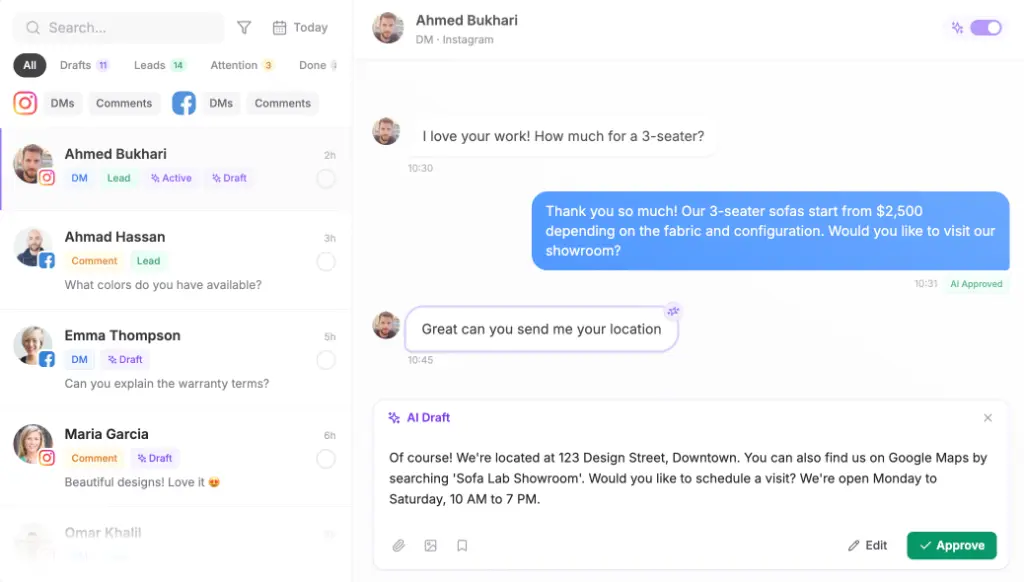
How to reply to Instagram comments for a new client, step by step
Replying to Instagram comments for a new client takes six steps in Maxbound, from connection to approval.
Set up Instagram comment management for a new client in Maxbound
- Check the accountConfirm the client has an Instagram Business or Creator account linked to a Facebook Page, and that they have Admin or Editor access on the Page.
- Send the Magic LinkCreate the client's workspace and send the one-time Magic Link. The client logs in through Meta and grants every permission requested.
- Train the knowledgeAdd the client's website, files, FAQs and past chats so the agent answers from their own sources.
- Brief the four lanesDescribe in plain language what to hide, what to answer publicly, what to move to DM and save, and what to hand to a named person.
- RehearseRun Simulations on the client's real past conversations and correct anything that reads wrong.
- Approve and keep drafts onApprove the workflow. Keep replies as drafts a person approves for as long as you want before letting the agent send on its own.
Here’s a brief you can paste into a workspace and edit:
On every post and ad: hide spam, scam links, abuse and other businesses promoting themselves. Answer questions about hours, location and delivery publicly in one or two sentences. If someone asks about price, booking or availability, reply ‘Sent you a DM’ publicly and DM them the answer, then save them to the CRM tagged ‘Lead’. If they don’t reply, follow up once the next day. Anything about refunds, complaints or health goes to Sara with no automatic reply.
The agent asks what it still needs, such as which price list or who owns quotes, builds it, and waits for approval.
What AI tools can a social media agency use to answer client comments and DMs 24/7?
A social media agency answering client comments and DMs around the clock needs a tool that actually sends replies and escalates, not one that only suggests wording. Maxbound’s agents answer, qualify and follow up on Instagram comments, DMs and story replies, Facebook Messenger and comments, WhatsApp, website chat and in-app chat, and they hand a conversation to a person when they should. For agencies running clients’ ad accounts, ad comments run through the same four lanes as organic posts.
If you’re choosing a social media management tool for agencies, compare how each one charges as much as what it does:
| Tool | How it charges |
|---|---|
| Maxbound | Per client workspace, every feature in each; 100 AI credits a month per workspace; price per workspace falls as you add more; 7-day free trial, no free plan |
| Hootsuite | $99 a month, the most expensive option in FeedGuardians’ roundup |
| tadlo | Comment management included in the free plan |
| CommentGuard | Free for 7 days, no credit card required |
ManyChat suits creators and single brands who want to build keyword flows themselves. Hootsuite suits teams that want a shared stream to work by hand. A free or moderation-first tool suits a single account on a budget.
When is Maxbound the wrong fit?
Maxbound is the wrong fit if a client needs posts on LinkedIn, X, Threads or Pinterest, since publishing covers Instagram, Facebook, TikTok and YouTube only. There’s no voice, SMS or Slack agent either. And a single brand with a handful of comments a week may not need more than the Instagram app.
Maxbound fits the agency running many clients’ conversations: one workspace per brand, all four lanes handled by agents your team briefed and approved, and every lead saved where the sales owner can see it. Start the 7-day trial with one client whose comments you already know well, and keep approval on until the drafts stop needing edits.