
5 Best Flow Builders and AI Agents for Agencies in 2026
Visual flow builder vs AI agent for DM lead qualification: five tools ranked for agencies, with pricing, approval, hand-off and a brief you can copy.
Comments are stacking up under a client’s ad. WhatsApp inquiries and Instagram DMs arrive behind them, and nobody on the team can say quickly which of those people are ready to buy.
For DM lead qualification, a plain-language AI agent fits an agency better than a visual flow builder. Qualifying a lead has a fixed goal (need, budget, timing) but no fixed path, and a drawn flow can only follow paths somebody drew in advance. Maxbound gives each client its own workspace, where an agent briefed in plain English reads each reply, asks the next useful question, saves the lead to the CRM, hands serious buyers to a person with the history, and waits for your approval before anything goes live.
Who should pick what: agencies running clients’ Instagram, Facebook and WhatsApp conversations should start with Maxbound. Technical teams that want to self-host and code every node should look at Open Agent Builder. Teams already on Microsoft can weigh Copilot Studio agent flows or Power Automate. And a visual builder still suits DM work that is only keyword in, link out.
| Tool | Best for | How work is set up | How it bills | Human approval |
|---|---|---|---|---|
| Maxbound | Agencies running many clients’ DMs and comments | Briefed in plain language; the agent asks, then builds | Per workspace, 100 AI credits a month each, 7-day trial | Nothing goes live until approved; reply approval can stay on |
| Open Agent Builder | Technical teams that self-host | Eight node types on a canvas, JavaScript in Transform nodes | Open source, self-run | User Approval node |
| Copilot Studio agent flows | Microsoft teams with uneven volume | Agent flows counted in flow actions | $0.13 per 100 flow actions | — |
| Power Automate | Microsoft teams with steady, repeatable jobs | Subscription flows | $15 per user per month | — |
| Agent Workflow Builder | Builders running scheduled AI jobs | 11 specialised node types, no code | Bring your own API keys | — |
Visual flow builder vs AI agent: what’s the difference for DM lead qualification?
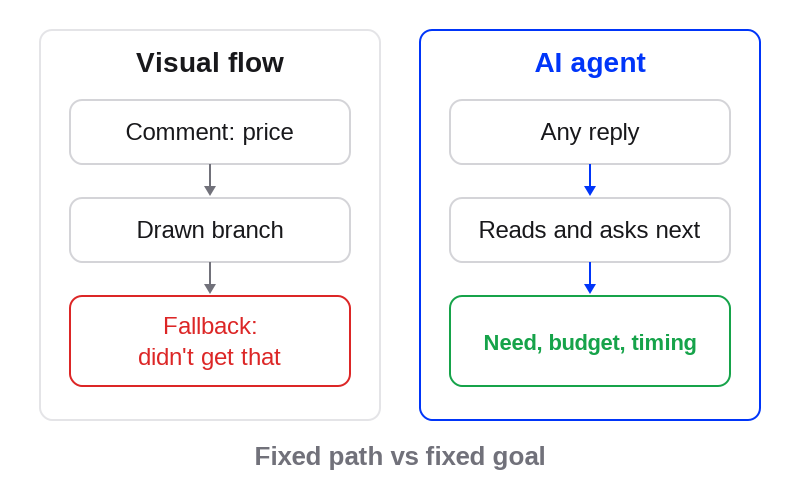
A visual flow builder runs a path a person drew; an AI agent works toward a goal a person described. A flow builder is a canvas of boxes joined by arrows: a trigger, a message, a condition, another message. Every route a conversation can take has to exist on that canvas before launch.
An AI agent gets a goal and the client’s sources, then decides the next message from what the customer actually wrote. Newer builders put AI inside the boxes, but the route between the boxes is still drawn by hand.
One builder community sums up the split well: workflows suit predictable, repeatable tasks, agents fit work where the goal is clear but the path can change, and mixing the two gives a practical balance. Apply that to an ad’s comment section:
-
Fixed path: someone comments “price” and gets the price list by DM. Same every time. A flow handles it fine.
-
Fixed goal, open path: someone asks whether the sofa fits a small flat, then asks about delivery to another city, then says they’ll decide after payday. The goal is still need, budget and timing. The path is different for every person.
DM lead qualification is almost always the second kind. Which is why it breaks flows.
Is there a tool with AI agents that respond, qualify and hand the right conversations to people?
Yes. Maxbound runs AI agents that answer, qualify and follow up on a client’s Instagram comments and DMs, Facebook Messenger and comments, WhatsApp, website chat and in-app chat, and hand the right conversations to a person with their full history. Every channel lands in one inbox per client, and every lead is saved to the built-in CRM from the conversation itself.
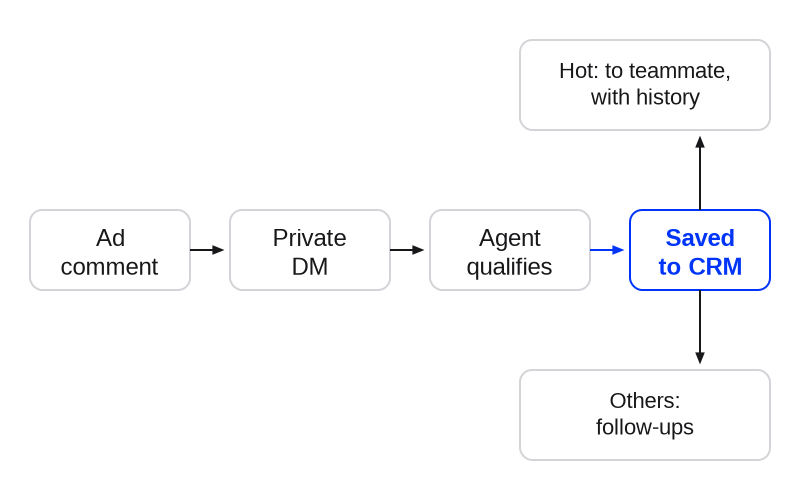
That’s the answer to the question agencies actually type: our ads generate comments, WhatsApp inquiries and DMs, and the team can’t tell who’s serious. Maxbound runs comment-to-DM-to-CRM inside each client’s workspace. The public comment becomes a private DM, the agent qualifies the person in that DM, real buyers are routed to the team, and everyone else gets a follow-up sequence until they book or say no.
The CRM record keeps what the person asked for, how close they are to buying, and tags and stage that stay current as the chat goes on. So when a teammate picks up a hot lead, they read one timeline across every channel instead of scrolling three apps.
The 5 tools, ranked for agencies qualifying DM leads
The ranking below is for one job: qualifying leads from a client’s comments and DMs, across many clients. Each block uses the same fields in the same order so you can read across.
1. Maxbound
Best for: marketing, advertising, performance and lead-generation agencies running conversations for several clients.
Price: per workspace, which in practice means per client. Every feature is in every workspace, each includes 100 AI credits a month, extra credits are priced in brackets, and the price per workspace falls as you add clients. Every account starts with a 7-day free trial; there’s no free plan. Current figures are on the pricing page.
What it does well: Maxbound is the AI operating system for agencies. Each client gets its own workspace with its own channels, knowledge, contacts, agents and posts, and nothing crosses between clients.
Work is briefed in plain language, inside Maxbound or from Claude, ChatGPT or Codex through the MCP server. Write a sentence like: “When someone comments ‘price’ on the sofa ad, DM them the price list. Save anyone who asks for a quote.” The agent asks its questions first: should it follow up if they don’t reply, and who owns the quotes? You answer, and it builds the trigger, the DM, the check for a quote request, the save to the CRM with an owner, and one follow-up the next day.
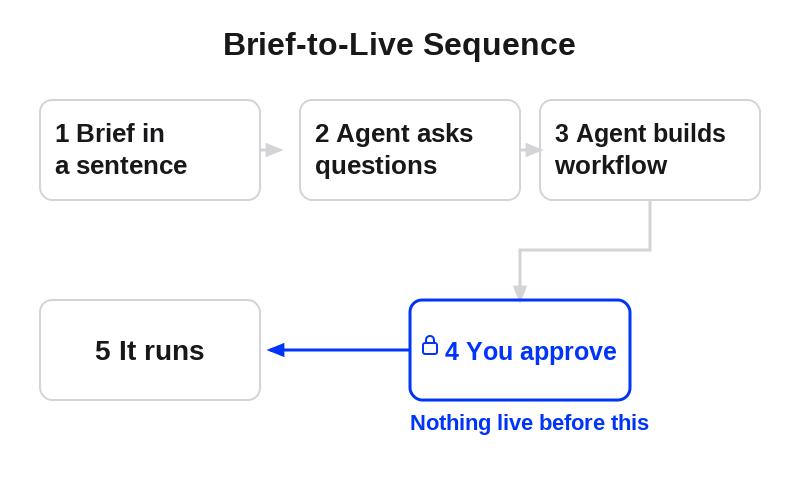
Nothing goes live until someone at the agency approves it. You can also set an agent so a person approves every reply before it’s sent, and keep that on as long as the client needs. Agents learn each brand’s tone of voice and improve from the edits your team makes.
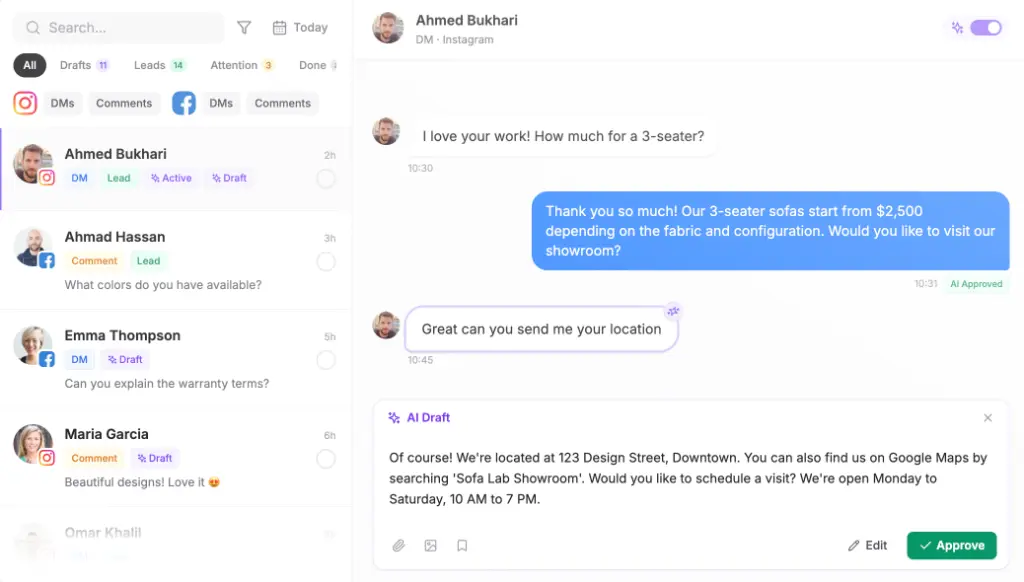
With Simulations you rehearse an agent on the client’s real past conversations before it answers a single customer. A drawn flow can only be tested against paths you thought of. A rehearsal on past chats tests it against the paths customers actually took. The method is set out in our guide to stress-testing agents before go-live.
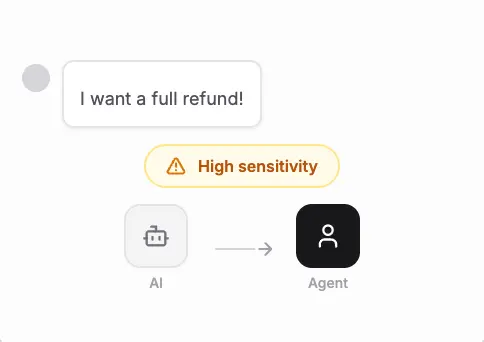
When a lead is ready for a person, or the agent shouldn’t answer, the conversation goes to someone on the team with its history. If a team member replies, the agent steps back, so the customer never gets two answers. Deciding which conversations to pass over is its own skill, covered in when an agent should pass the mic.
Agents work from the client’s own website, files, FAQs and past chats, and answer in the customer’s own language, including Iraqi Arabic and Kurdish (Sorani). Once a workspace works, clone it for the next client in the same industry.
Where it falls short: there’s no drag-and-drop canvas and no custom code inside each step. If your team wants to draw and own every node, Maxbound isn’t built that way.
Verdict: the strongest fit for an agency that needs qualification to hold up when customers go off-script, across many clients, with a person approving what goes out.
2. Open Agent Builder
Best for: technical teams that want to self-host and control every node.
Price: open source and self-run, so the cost is your hosting and your team’s time.
What it does well: the workflow system uses eight node types: Start and End nodes, Agent nodes for LLM reasoning, MCP Tools for external APIs, Transform nodes for data, If/Else and While Loop logic, and a User Approval node for human-in-the-loop work. Transform nodes accept JavaScript when you need custom logic.
Where it falls short: setup is developer work. You need Node.js 18 or higher installed to run it locally, and the domain in the Convex auth configuration has to be hardcoded instead of read from an environment variable. The route between nodes is still drawn by hand, so every unexpected reply needs another branch. Before planning client DM work on it, confirm how you’d connect each client’s Instagram and WhatsApp accounts.
Verdict: a good canvas for engineers who enjoy owning the stack; heavy for an account team that wants to qualify leads this week.
3. Microsoft Copilot Studio agent flows
Best for: agencies already running on Microsoft whose automation volume swings a lot.
Price: consumption-based.
What it does well: a community explanation of Microsoft’s licensing puts agent flows at $0.13 for every 100 flow actions, and notes that consumption models make the noisy users pay more. Quiet accounts cost little.
Where it falls short: a busy campaign is exactly when the bill climbs. For an agency, that means either eating the overage or explaining it to the client mid-month.
Verdict: sensible for Microsoft-native teams with light, uneven volume; harder to price into a flat retainer.
4. Power Automate
Best for: teams on Microsoft running steady, repeatable internal jobs.
Price: a flat $15 per user per month, per the same community explanation.
What it does well: the subscription is predictable. You know the bill before the month starts.
Where it falls short: the price follows headcount, not clients, so it doesn’t map onto how an agency bills. And a workflow tool is at its best on predictable paths, which a qualifying DM conversation rarely is.
Verdict: fine for back-office automation; not where I’d put an ad’s comment section.
5. Agent Workflow Builder
Best for: builders who run scheduled AI jobs that need retries and parallel runs.
Price: the builder needs your own API keys, so model and service usage is billed by each provider.
What it does well: the no-code builder includes 11 specialised node types for AI-powered automation. It supports parallel execution with a configurable maximum concurrency, and its schedule settings allow up to 3 retries with a 5,000-millisecond delay between them.
Where it falls short: full functionality needs API keys for DeepSeek, OpenAI, Firecrawl and Pinecone. That’s four accounts to manage, and for an agency, four more things to keep in order per client. The paths are still drawn.
Verdict: good for scheduled research or data jobs; not shaped around live conversations with buyers.
Where do visual flows break on ad comments?
Visual flows break at the first reply nobody drew a branch for. I call it branch debt. Every new offer, objection or language means another branch, and each one has to be built, tested and kept current for every client.
On paid social, branch debt builds fast for three reasons.
Ad comments are messy. People ask two questions in one message, answer a question you haven’t asked yet, or use a street phrase no keyword list predicted. The flow sends them to a fallback, usually “Sorry, I didn’t get that.” That’s a warm lead you paid for, gone.
Debugging is slow. When a lead drops out, someone traces arrows across a canvas to find which condition misfired. Multiply that by fifteen clients.
Campaigns change weekly. A new creative brings new wording in the comments, which means editing the flow again. The canvas that looked tidy at launch becomes the thing nobody wants to touch.
An AI agent doesn’t remove the work. It moves it: from drawing branches to writing a clear brief and keeping the client’s knowledge current. Maxbound gathers the questions an agent couldn’t answer as knowledge gaps, so you answer each one once, and re-checks the client’s website when prices change.

What does each billing model do to agency margin?
The billing model decides whether a busy campaign is good news or a cost problem. Per-action pricing rises with every busy week. Per-user pricing rises with headcount. Per-workspace pricing rises with clients, which is the thing a retainer is already priced on.
To check the return on any of them, use the standard formula: ROI is revenue minus combined expenses, divided by total cost. As a purely illustrative example, if a client’s qualified DM leads produce 4,000 in sales in a month and the tool, credits and team time cost 1,000, the return is (4,000 − 1,000) ÷ 1,000, or 3 times the cost.
Run that per client, not per agency. Busy accounts hide quiet ones, and a quiet one is the client most likely to ask what you did this month.
How do agencies keep client data separated?
Agencies keep client data separated by giving each client its own workspace with its own connected accounts, knowledge, contacts and agents, and by limiting who on the team sees what. In Maxbound, every client is a separate workspace and nothing crosses between them; role-based permissions control what each teammate can do, and each teammate gets access only to the client workspaces they work on.
Accounts connect only through each platform’s official APIs and login (OAuth). Maxbound is an approved Meta Tech Provider and never asks for, sees or stores a social password; each client authorises their own accounts through a one-time Magic Link. Traffic is encrypted in transit with TLS, the platform is GDPR compliant, and payments run through a PCI-DSS-compliant provider.
With a self-hosted builder, that separation is yours to design: where each client’s tokens live, who can open which flow, and what happens to a client’s data when they leave.
A brief you can copy
An advertising agency running clients’ ad accounts can paste this into a client workspace and adjust it:
On the spring campaign ads, when someone comments asking about price, availability or delivery, DM them. Answer from the website and the price PDF. Then find out three things in your own words: what they need it for, their rough budget, and when they want it. If they give a budget and a date within 30 days, tag them “Hot”, assign them to Sara and tell her. If not, follow up once after two days, then stop. Keep replies short and end each one with a single clear next step. Answer in the language they write in.
The last two lines matter more than they look. Direct-response practice holds that shorter calls to action tend to work better, and that a campaign should say clearly how to buy or sign up. One question per message keeps a DM moving; five read like a form.
How do you move a client from a visual flow to an AI agent?
Move one client at a time, and keep the old flow’s fixed triggers running until the agent has proven itself. I wouldn’t try this on a brand-new client first; pick one whose past chats you know.
Move one client from a visual flow to a plain-language AI agent
- List what the flow doesWrite down each trigger, message and branch in the current flow, and mark which ones are fixed paths and which are qualification.
- Create the client workspaceSet up a Maxbound workspace for the client and have them authorise their Instagram, Facebook or WhatsApp accounts through the one-time Magic Link.
- Train the knowledgeAdd the client's website, price files, FAQs and past chats so the agent answers from the client's own sources.
- Write the briefDescribe the qualification goal in plain language: what to find out, who owns hot leads, when to follow up and when to stop. Answer the agent's questions.
- Rehearse in SimulationsRun the agent on real past conversations and edit its answers until they sound like the brand.
- Approve with replies on reviewApprove the automation, keep human approval on for every reply, then switch off the old flow's matching triggers so the customer never gets two answers.
Inside one workspace, Maxbound’s guard against double replies means the agent steps back the moment a teammate answers. That guard can’t see a second tool, though, which is why the old trigger has to go off the day the new one goes live.

What mistakes do agencies make with DM lead qualification?
The common mistakes are the same whichever tool you pick:
-
Asking all the questions at once. Ask one, react to the answer, then ask the next.
-
No owner for hot leads. If nobody is named, a qualified buyer sits in the CRM until they buy elsewhere.
-
Switching approval off on day one. Keep reply approval on until your team stops making edits.
-
Two tools on the same trigger. The customer gets two DMs. Turn the old trigger off when the new one goes live.
-
Skipping the rehearsal. Test on past conversations before a paid ad sends real people in.
When does a visual flow builder fit better?
A visual flow builder fits better when the DM job really is a fixed path: keyword in, freebie out, no qualification. If a client only runs lead magnets with one trigger word and one link, drawing that once is simple and predictable.
A builder also fits teams who want to own every node, run custom JavaScript in their logic or self-host the whole thing, and who accept the setup work that comes with it. If you’re weighing tools for wider AI social media engagement rather than qualification, that’s a different shortlist.
And a builder fits work on channels Maxbound doesn’t cover. Maxbound has no voice, SMS or Slack agent, and it publishes posts to Instagram, Facebook, TikTok and YouTube only, not LinkedIn, X, Threads or Pinterest. If a client’s leads arrive by phone or text message, look elsewhere for that part.
Verdict: which should a paid social agency use?
If your agency runs clients’ Instagram, Facebook and WhatsApp conversations and needs DM lead qualification that holds up when customers go off-script, Maxbound fits: one workspace per client, agents briefed in plain language and trained on each client’s own sources, rehearsal on real conversations, hand-off with history, and nothing live until your team approves it.
Open Agent Builder suits engineers who want to host and code every node. Copilot Studio agent flows and Power Automate suit Microsoft-native teams, uneven volume and steady volume respectively. Agent Workflow Builder suits scheduled AI jobs with retries. Start the 7-day trial on one client, rehearse on last month’s chats, and see what the agent does with the messy ones.