7 Click-to-WhatsApp Ad Mistakes and How to Fix Them
Click to WhatsApp ads for agencies: seven mistakes that waste client spend, from setup and targeting to slow replies and limits, and how to fix each one.
How many of the WhatsApp chats your client’s ad started last week turned into a saved lead?
Click-to-WhatsApp ads usually break for agencies after the click, not in Meta Ads Manager. The ad starts a conversation, nobody answers it quickly, nobody records the lead, and the client sees a spend line with no pipeline beside it. The fix is to treat every chat the ad starts as a lead that gets answered, qualified and saved inside that client’s own workspace, then judge the campaign on qualified conversations instead of clicks.
A WhatsApp chat that starts from a Click-to-WhatsApp ad opens a free window in which the business can keep the conversation going, marketing messages included, without paying for each one. That window is the most valuable thing the ad buys. Most agencies waste it.
I build Maxbound for agencies running paid social for many clients. Below are the seven mistakes that cost those campaigns the most, why each one hurts, and the fix.
| Mistake | Why it hurts | The fix |
|---|---|---|
| Launching before WhatsApp is connected | The ad can’t point at the number | Connect the number to the client’s Page or portfolio first |
| Judging the campaign on clicks | Clicks aren’t leads | Track qualified conversations in a CRM |
| Leaving the default welcome message | Every chat opens the same vague way | Write a prefilled message per ad |
| Targeting like a traffic campaign | Spend goes to people who already bought | Use customer lists for exclusions and lookalikes |
| Nobody answering after hours | The free window closes on silence | An agent answers, qualifies and hands off |
| Killing ads on day one | Review and learning aren’t done | Wait out review and the first two days |
| Ignoring messaging limits | Follow-ups stop going out | Check the limit and verify the business |
Mistake 1: Launching before the client’s WhatsApp is connected
The mistake is building the creative first and sorting out the WhatsApp number later. Meta only lets you run these ads if the number is connected to your Facebook Page or your business portfolio. The client also needs a business account on the WhatsApp Business app or the WhatsApp Business API, and the person connecting it must be an admin of the Page.
Why it hurts: launch day slips while you chase the client for logins and admin rights. Worse, some agencies end up owning the number themselves, which turns into a fight when the client leaves.
The fix: get the client to connect their own number before you brief creative. On the Page, with admin access, open Settings and choose WhatsApp in the left-hand column. In Maxbound, the client authorises their own accounts through a one-time Magic Link, so no password ever passes through the agency. If ownership is a live question, read who owns what on the WhatsApp Business API before you start.
Mistake 2: Judging click-to-WhatsApp ads on clicks
The mistake is reporting link clicks or conversations started as the result. Meta bills click-to-WhatsApp ads on impressions, so the client pays when the ad is shown, not when someone qualifies.
Why it hurts: a campaign can show a cheap cost per conversation and still produce nothing the client’s sales team would call a lead. The client works this out before you do.
The fix: in Ads Manager, choose Messages as the ad objective and WhatsApp as the destination. Then measure the funnel past Meta: conversations started, qualified, booked. Meta’s metrics end at the chat. Your CRM has to pick up from there.
Maxbound creates Facebook and Instagram ads from the client’s workspace to start conversations on WhatsApp, Messenger or Instagram, and shows spend, results, the top ads and the leads they brought in one place. Every lead lands in the built-in CRM with what they asked for and how close they are to buying, with nobody typing it in.
Mistake 3: Leaving the default welcome message
The mistake is shipping the ad with Meta’s prefilled text. The default message a customer sees is “Hello! Can I get more info on this?”
Why it hurts: every chat from every ad opens with the same sentence. Whoever answers can’t tell which offer the person saw, so the first reply is a question back. That’s a wasted turn.
The fix: write one prefilled message per ad that names the offer. Copy these and adjust:
-
Dental clinic: “Hi, I saw the whitening offer. Is there a slot this week?”
-
Car dealership: “Hi, I’d like the price and finance options on the model in your ad.”
-
Online store: “Hi, is the sofa in the ad available in grey, and how long is delivery?”
-
Estate agency: “Hi, I’m interested in the two-bed listing. Can I book a viewing?”
Now the first reply can answer instead of ask.
Mistake 4: Targeting chat funnels like a traffic campaign
The mistake is reusing the client’s traffic audiences. A chat funnel costs a person’s time on every conversation, so the audience question is different. Who should start a chat, and who shouldn’t?
Why it hurts: existing customers click the ad to ask about an old order, and the chats look like demand. Meanwhile the people most like your best buyers never see it.
The fix: build audiences from the client’s own customer lists, and follow Meta’s rules while you do it.
-
Under GDPR, advertisers act as the data controller for any list uploaded, so confirm the client has a legal basis before you upload.
-
You need to be the owner of the ad account, or have admin or advertiser permissions on it.
-
The list can’t include prohibited information such as health or financial details.
-
If you set an audience to Only exclusions, that can’t be changed later and it can’t seed a lookalike. Make one list to exclude buyers and a separate one to build lookalikes.
-
A list marked Outdated hasn’t been updated in over 30 days. Refresh it monthly.
-
Match score is matched rows divided by uploaded rows, shown in steps of 0.5. A low score usually means messy phone numbers.
The chats the ad already produced make the best seed list, because they’re people who actually messaged. Maxbound saves every one of them as a contact, and the agency can read those contacts through the API to build the next upload. For placements, Meta lets these ads run across Facebook and Instagram in News Feed, Stories and Marketplace. Test Stories separately, because a tap-to-chat behaves differently from a scroll.
Mistake 5: Nobody answering when the chats arrive
The mistake is pointing an ad at a WhatsApp number that a human checks in office hours. Ads keep delivering at night.
Why it hurts: the person who messaged at 11pm asks a competitor by morning. Since July 1, 2025, Meta charges per message by category rather than per 24-hour conversation, and the free 72-hour window from the ad runs out whether anyone used it or not.
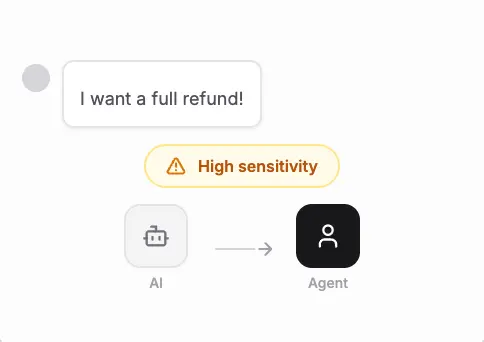
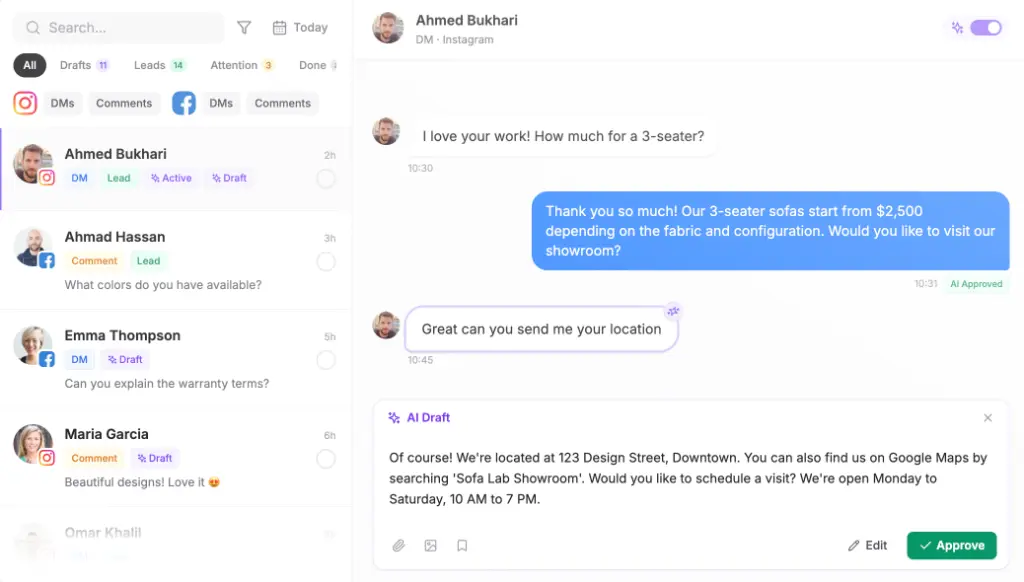
The fix: put an agent on the number that answers from the client’s own website, files and FAQs, asks the qualifying questions, and hands real buyers to a person with the full history. In Maxbound, the agent asks for the fields you list, such as name, phone or email, at the start, after its first reply or at the end, and saves the answers to the contact. Real buyers are routed to the team; the rest get follow-ups until they book or say no.
Agencies with several sales reps per client can route leads by webhook. Maxbound’s webhooks fire the moment a lead is saved or a message arrives, and every delivery is logged and can be re-sent, so your own routing rules decide which rep gets the chat. Before any of it goes live, rehearse the agent in Simulations on real past conversations, and keep drafts on approval for the first weeks.

Mistake 6: Killing the ad after day one
The mistake is pausing an ad that looked quiet on its first day. Ad reviews typically take 24 hours, and WhatsApp says results often improve after the first two days.
Why it hurts: you judge an ad that has barely run, then restart learning with a new one. And if the ad account itself goes into review, you can’t create new ads at all until it clears.
The fix: launch two days before you need results, not on the morning of a promotion. Every ad and ad account must follow Meta’s advertising policies and WhatsApp Business policies, and all ads need approval before they go live, so write the creative clean the first time. Read the numbers on day three, not day one.
Mistake 7: Ignoring WhatsApp messaging limits
The mistake is planning follow-ups and broadcasts as if the number can message anyone. A newly created business portfolio has a messaging limit of 250 unique phone numbers outside a customer service window, in a moving 24-hour period.
Why it hurts: a big weekend of ad chats followed by Monday’s follow-up template can hit the ceiling, and the follow-ups to the warmest leads don’t go out.
The fix: answer inside the window the ad opened, since replies there don’t count toward the limit. To raise it to 2,000, verify the client’s business, or send 2,000 delivered template messages to unique users in 30 days with high-quality templates. Automatic scaling needs the business to have used at least half its current limit in the last 7 days. Developers can check the current limit by requesting the whatsapp_business_manager_messaging_limit field.
How do agencies set up click-to-WhatsApp ads for a client?
Agencies set up click-to-WhatsApp ads by connecting the client’s number first, building the ad on the Messages objective, and putting an agent and a CRM behind the chat before launch. The order matters more than any single setting.
Set up click-to-WhatsApp ads for a client
- Connect the client's WhatsAppThe client creates a WhatsApp Business account, then connects the number to their Facebook Page or business portfolio as Page admin, under Settings, then WhatsApp.
- Build the audiencesUpload a buyers list as an exclusion and a separate list of past chatters to seed lookalikes, after confirming a GDPR legal basis.
- Create the adIn Ads Manager, choose Messages as the objective, WhatsApp as the destination, and replace the default welcome text with an offer-specific message.
- Brief and rehearse the agentBrief the agent on the offer and qualifying questions, train it on the client's site and FAQs, and rehearse it on past conversations.
- Decide routingList which fields the agent collects and who gets qualified leads, by assignment or webhook to your own routing.
- Launch and waitAllow 24 hours for review and two days of delivery before judging. Report qualified conversations, not clicks.
When shouldn’t an agency run click-to-WhatsApp ads?
Skip them when nobody on the client’s side can take a qualified lead within the day. The ad will produce chats; if bookings and quotes stall, you’ve paid to annoy people. Be careful too in Europe, Japan and South Korea, where some messaging metrics aren’t available.
Maxbound won’t fix a weak offer, and it doesn’t do voice or SMS: conversations run on WhatsApp, Instagram, Facebook, website chat and in-app chat. It suits agencies running ads that start conversations for many clients, each in its own workspace, which is who our page for advertising agencies running clients’ accounts is written for. If that’s you, start with one client’s number and the WhatsApp agent on a 7-day trial, and keep approval on until you trust it.