6 Best WhatsApp AI Chatbots for Agencies: Typebot Rated
Is Typebot good for WhatsApp AI chatbots? An honest look at Typebot and five alternatives, rated on what agencies running many clients actually need.
You run WhatsApp for a roster of clients. Each one wants an AI agent answering customers at 11pm, each one wants a monthly report that proves it worked, and none of them should ever see another client’s leads. Maxbound is built for that agency: every client gets its own workspace with its own WhatsApp number, knowledge, contacts, agents and reports, and nothing an agent builds goes live until someone at the agency approves it.
This guide is for the owner or manager who has to pick a tool, get each client’s number verified with Meta, and price the work so it pays. By the end you’ll be able to take one client from an unverified business to a live, supervised WhatsApp agent, know what Meta and each tool will charge, and know how to judge a builder like Typebot before you commit a client to it.
What does an agency need from a WhatsApp AI chatbot?
A single business needs a bot that answers well. An agency needs that, plus everything that happens after launch, repeated for every client. That changes what you should test.
First, separation. Each client’s knowledge, contacts and conversations have to stay in their own space, so an agent trained on a dental clinic’s prices never answers a gym’s customer. Second, supervision. You need a way to read and approve replies on a new client before the agent talks to anyone alone, and a clean handoff to a person with the conversation’s history when the agent is out of its depth.
Third, proof. Clients renew when they can see what came in, what the agent handled and what it turned into. If a tool can’t produce that per client, your team builds it by hand in a spreadsheet every month, and that time comes straight out of your margin.
How do you get a client verified for the WhatsApp Business API?
Every tool on this page sits on top of Meta’s WhatsApp Business Platform, so verification comes first whichever one you pick. People who’ve been through it advise you to complete Facebook Business verification before you apply for WhatsApp Business API access. The same people warn that the display name and profile must match the client’s registered company name, because mismatches get rejected, that even small differences in addresses across documents slow things down, and that verification can take up to 7 business days.
Verification isn’t just paperwork; it changes the limits on the account. New business portfolios are capped at two registered business phone numbers, and Meta raises that cap to 20 automatically once the business becomes verified or reaches a messaging limit of 2,000. The same page says you must set a two-step verification PIN when you register a number, and that a number must show a status of “connected” before it can send or receive messages through the API.
Templates follow the same pattern. An unverified portfolio is limited to 250 message templates per Messaging account, while a verified portfolio with at least one approved display name can have up to 6,000. For a client running broadcasts and follow-up sequences, that’s the difference between rationing templates and not thinking about them.
Get a client's WhatsApp number verified and live
- Collect matching documentsAsk the client for their registration document, a utility bill or bank statement, and their website. Check that the legal name and address are written exactly the same way on every one before anything is submitted.
- Run business verification in the client's own portfolioHave the client start Business verification in their own Meta business portfolio, not yours, and give them a realistic wait of up to 7 business days.
- Pick a display name that matches the companyUse the registered company name, or a name clearly tied to it. A display name that doesn't match the registered business is the usual reason for rejection.
- Register the number with a two-step PINSet a two-step verification PIN during registration and store it in the client's password manager, not in a chat thread.
- Confirm the number shows ConnectedCheck the number's status before any testing. A number that isn't Connected can't send or receive through the API.
- Connect the number to your toolIn Maxbound, send the client a one-time Magic Link from their workspace; they authorise their own account through Meta's official login, so no password passes through the agency.
If you’re wiring the API yourself instead of using a platform, Meta’s guide tells you to create a new Meta app with the WhatsApp use case in the Meta App Dashboard, then click Generate access token for a temporary token to send a test message. Replying to that test message opens a 24-hour window in which you can send non-template messages. For anything beyond testing, you go to Business Settings, click System users in the sidebar, create a system user and assign it the right assets and permissions to get a permanent token.
What changed in Meta’s rules and pricing in 2026?
Two changes matter to anyone pricing WhatsApp work this year. Since January 15, 2026, Meta’s business terms have prohibited general-purpose AI assistants on the API, meaning bots that answer any question on any topic. An agent for a client has to stay on that client’s business: its products, bookings, orders and support.
The second change is money. On October 1, 2026, Meta began charging for service messages, the replies inside the 24-hour window, with each business phone number getting 1,000 free service messages a month. Meta’s own AI on the Business Platform, the Meta Business Agent, is billed at $2.00 per million tokens, which works out at roughly 4 to 5 cents a message. Whatever tool you choose, these Meta charges sit on top of its price.
How do the six tools compare on price?
The table lists the starting price each tool publishes for its WhatsApp or AI tier. Meta’s message charges are extra in every case.
| Tool | Starting price | What that price covers |
|---|---|---|
| Maxbound | Per workspace (one per client), falling as you add workspaces | Every feature in every workspace, 100 AI credits a month each, 7-day free trial, no free plan |
| Wati | $59/month billed annually | Plans with a 7-day free trial; Astra Pro AI-agent tier from $99/month on monthly billing |
| respond.io | $79/month (Starter) | AI Agents and workflow automation from Growth, $159/month |
| ManyChat | $29/month billed annually, $39 monthly | WhatsApp is gated to the Pro plan |
| Botpress | Free plan | 25 conversations a month |
| Tidio Lyro | $32.50/month | 50 AI conversations a month |
The six WhatsApp AI tools, one by one
1. Maxbound
Maxbound is the AI operating system for agencies: marketing, advertising, performance and lead-generation agencies running conversations for many clients. Each client gets a workspace with its own channels, knowledge, contacts, agents and posts, and a workspace that works can be cloned as the starting point for the next client. You brief an agent in plain language, the way you’d brief a new hire, inside Maxbound or from Claude, ChatGPT or Codex through Maxbound’s MCP server. The agent asks what it needs to know, builds in that client’s workspace, and waits for approval.
Agents answer from the client’s own website, files, FAQs and past chats, and questions they couldn’t answer are gathered as knowledge gaps you answer once. They qualify leads, follow up, take bookings in the chat against each branch’s opening hours, and hand a conversation to a person with its history. Every lead lands in the built-in CRM with what they asked for and how close they are to buying. Agents answer in the customer’s own language, including Iraqi Arabic and Kurdish (Sorani).
The reporting is per client: reply and resolution times, qualified leads, sentiment and topics, and a branded PDF report from a template. A scheduled automation can build last month’s report and email it to the client every Monday. Maxbound is an approved Meta Tech Provider that connects only through official APIs and login, and it never asks for or stores a social password.
It doesn’t suit everyone. It’s hosted, so you can’t self-host it, and there’s no free plan, only the 7-day trial. Conversations run on WhatsApp, Instagram, Facebook, website chat and in-app chat, with no voice, SMS or Slack agent. If you only need one bot for one business and want to own the code, a builder will suit you better.
2. Wati
Wati’s plans start at $59 a month billed annually with a 7-day free trial, and its Astra Pro AI-agent tier starts at $99 a month on monthly billing, with WhatsApp support included in that tier. AI usage is billed at $30 per 1,000 credits, so budget for credits on busy client numbers as well as the plan.
3. respond.io
respond.io’s Starter plan begins at $79 a month. AI Agents and workflow automation are included from the Growth plan, which starts at $159 a month, so price the Growth tier if the point is AI answering on WhatsApp.
4. ManyChat
ManyChat’s WhatsApp capability is gated to the Pro plan, which costs $39 a month on monthly billing or $29 a month billed annually. If your client’s work is already in ManyChat for Instagram, check that the account is on Pro before promising WhatsApp.
5. Botpress
Botpress has a free plan that covers 25 conversations a month. That’s enough to test an agent’s answers on a client’s questions, not to run a live client number.
6. Tidio Lyro
Tidio’s Lyro AI Agent starts at $32.50 a month for 50 monthly AI conversations. Count a client’s real monthly conversations before you quote on it, because the starting tier is sized for a small volume.
How should you judge Typebot or another flow builder?
Typebot, and automation tools like Make, come up whenever a technical teammate is in the room. You draw or wire the conversation yourself, which gives you control and leaves the running of it to you. Rather than take anyone’s word for how well that works on WhatsApp, run the builder you’re considering through the same checklist you’d use for any tool, on one test client, before you sign anyone up.
Copy this checklist and fill it in for each tool you test:
- Separation: can each client’s knowledge, contacts and conversations live apart, with teammates seeing only the clients they work on?
- Handoff: when the agent can’t answer, who is notified, and does that person see the whole conversation?
- No double replies: if a teammate answers, does the bot stop, or can the customer get two answers?
- Approval: can a person approve or edit replies before they’re sent on a new client?
- Lead capture: is the lead saved with name, phone and what they asked, without someone typing it in?
- Rehearsal: can you test the agent on real past conversations before it goes live?
- Reporting: can you hand the client a report for a date range without building it yourself?
- Topic limits: does the agent stay on the client’s business, given Meta’s ban on general-purpose assistants?
- Total cost: what is the tool’s price plus Meta’s message charges plus any AI credits, per client, per month?
Any answer that reads “we’d build that ourselves” is hours your team pays for on every client. That’s fine for one bot for one business. It adds up fast across a roster.

How do you run many client numbers from one agency?
Keep each client’s number in their own portfolio, and give your team access rather than taking ownership. Meta lets a business share a WhatsApp account with up to five Solution Partners, and a Messaging account with up to two partners, which matters when a client already has a vendor connected and wants you added.
In Maxbound, the workflow for client number twelve looks like client number two. You clone the workspace of a similar client, send the new client a Magic Link to connect their own WhatsApp, Instagram and Facebook, swap in their website and FAQs as knowledge, and brief what’s different. Every client’s chats then sit in one inbox where the agent answers first, and a teammate can take a conversation over, leave a note for the team and hand it back. Role-based permissions mean each teammate sees only the clients they work on.
Very small clients sometimes ask whether the free WhatsApp Business app will do. The app lets a business connect up to 10 devices for its team, though the exact maximum depends on the Meta Verified or Meta One subscription, and linked devices disconnect if the main phone isn’t used for over 14 days. That’s a shared phone, not an AI agent with a CRM and reports behind it, so treat it as the starting point for a client you’ll move to the API.
What does a client’s WhatsApp actually cost?
The numbers below are an illustration, not a quote. Take a client whose number sends 2,500 service replies in a month. The first 1,000 are free under Meta’s monthly allowance for that number, and the other 1,500 are billed at Meta’s service rate for the customer’s country. On top of that sits the tool: a per-account plan, a per-workspace price, or AI credits, depending on what you chose.
For your quote, add three lines per client: Meta’s message charges, the tool’s cost for that client, and your team’s hours supervising and reporting. The third line is where agencies lose money. A tool that saves leads to a CRM automatically and builds the monthly report for you keeps that line short, which is why it belongs in the comparison as much as the price.
A simple way to price it is a monthly retainer per client that covers setup once, then the running cost plus your margin, with a clause for message volume above an agreed level. Show the client the reply times and qualified leads each month so the retainer is tied to something they can see.
How do you set up a new client’s agent safely?
Once the number is connected, the order you go live in matters more than the tool. Rehearse first, supervise next, and only then let the agent answer alone.
- Train it on the client’s own sources: website, PDFs, FAQs and past chats.
- Brief it in one paragraph: what to answer, which details to collect and when (for example name and phone after its first reply), when to book, and who takes over complaints.
- Rehearse it: a Simulation runs the agent on real past conversations, so you read its mistakes before a customer does.
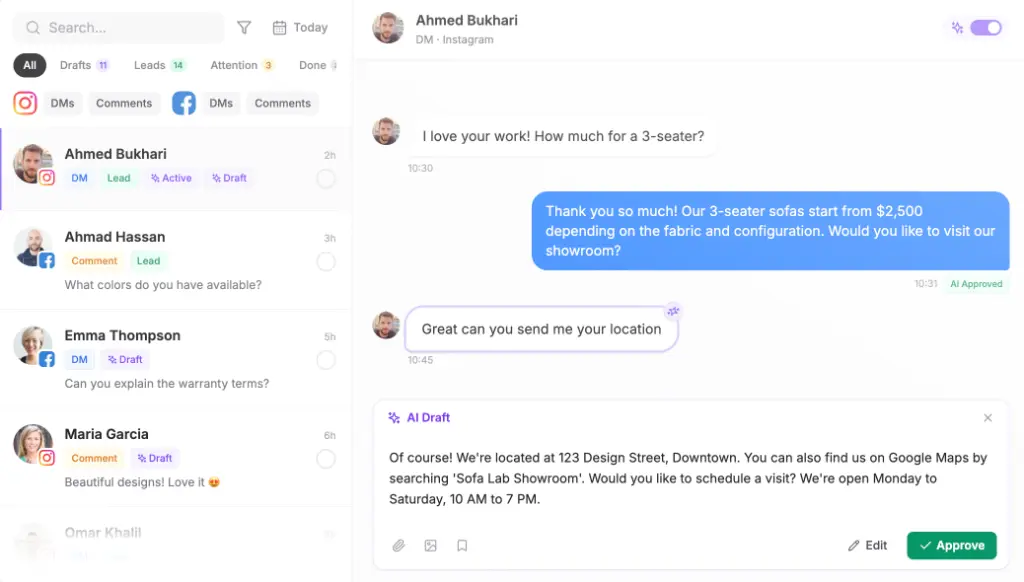
- Turn on drafts: every reply is drafted for a teammate to approve or edit, and the agent learns the brand’s tone from those edits.
- Set the reply delay: the agent waits a few seconds so a burst of four messages gets one answer.
- Record opt-ins: keep a note on each contact of how and when they asked to hear from the client before you add them to any broadcast list.
What are the common mistakes, and when shouldn’t you do this?
The most common mistake is applying for API access before business verification is done, then waiting twice. Close behind it is a display name or address that differs slightly from the registration document, which is enough to slow or reject the application. Agencies also register client numbers in their own portfolio to save time, then hit the two-number cap on new portfolios and have to untangle ownership later.
On the agent side, the mistakes are briefing it to answer anything, which runs into Meta’s ban on general-purpose assistants, and letting it reply alone on day one. Skipping the Meta charges in the quote is the money mistake, now that service replies past 1,000 a month are billed.
Don’t put an AI agent on WhatsApp for a client who can’t keep its prices, hours and stock information current, because the agent can only be as right as its sources. And don’t take the work if the client won’t verify their business; without it, you’re stuck at two numbers and 250 templates.
Which WhatsApp AI chatbot should your agency pick?
If you run WhatsApp for many clients and have to report to each one, Maxbound fits that work: a workspace per client that you can clone, agents briefed in plain language and approved before they go live, every client’s chats in one inbox, leads saved to a CRM, and a branded report per client. It’s built for marketing agencies running every client from one place. Wati, respond.io, ManyChat, Tidio Lyro and Botpress suit a single business running its own number, and a builder like Typebot suits a technical team that wants to build and own one bot.
For a wider look at WhatsApp tools, see our WhatsApp AI chatbots for business comparison. To see what a workspace costs as you add clients, check Maxbound pricing and run the 7-day trial on one client first.