
7 Best WhatsApp AI Chatbots for Agencies in 2026
Which company makes the best WhatsApp AI chatbot for an agency? Seven tools compared on sources, setup, approval, client separation and proof.
You don’t run WhatsApp for one business. You run it for a dental clinic, a car dealer and a furniture store at the same time, each with its own number, its own prices and its own idea of what a good reply sounds like. Most WhatsApp chatbot guides are written for the business itself, so they skip the parts that decide whether an agency keeps the account: keeping clients apart, onboarding the next one quickly, promising a response time you can actually meet, and showing the client what they paid for.
Maxbound is built for that job. Each client gets its own workspace with its own channels, knowledge, contacts and agents, and nothing crosses between clients. The agent answers from that client’s own website, files, FAQs and past chats, and nothing goes live until someone at your agency approves it. A workspace that works can be cloned as the starting point for the next client.
By the end of this post you’ll be able to connect a client’s number through Meta’s official API with the right settings, shortlist a vendor on what’s actually published about it, and walk into the next client kickoff with an onboarding checklist, an SLA you can sign and a report outline. All three are below, ready to copy.
Which WhatsApp AI chatbot fits which agency?
The short version, before the detail. Every row about another product holds only what that vendor or Meta has published; where nothing is published on a point, the point is left out.
| Tool | Where it fits | What’s known that matters to an agency |
|---|---|---|
| Maxbound | Agencies running WhatsApp, Instagram and Facebook for several clients | One workspace per client, cloneable; plain-language briefs; approval before anything goes live; priced per workspace with 100 AI credits a month each; 7-day trial, no free plan; white-label option removes “Powered by Maxbound” |
| Meta Business Agent | One business inside the WhatsApp Business app | Turned on from Tools, then AI agent; disconnects existing linked devices; stops replying when you reply manually unless unmuted; may impede broadcast lists and disappearing messages; language set by the business phone number |
| Wati | A team that wants a fixed monthly WhatsApp tier | Three tiers: Growth $59, Pro $119, Business $279 a month |
| Botpress | Teams with developers who want to build | Free tier; Plus $89 a month and Team $495 a month; white-label on those plans is widget watermark removal only |
| ConvoCore White Label | Agencies that want reseller sub-accounts | $199 a month for 60,000 credits and 20 client sub-accounts; chat on web, WhatsApp, Instagram, Messenger and SMS |
| Stammer | Agencies that prefer usage billing | Billed per message, from $0.001 to $0.03+ depending on the model |
| Landbot | Businesses that want a chat allowance | WhatsApp Pro from €200 a month, including 2,500 chats |
If your clients are mostly single businesses that live in the WhatsApp Business app, Meta’s own agent is the cheapest place to start. If you sell WhatsApp alongside Instagram and Facebook to several clients and need approval, separation and reports, start with Maxbound.
What should an agency check before picking a vendor?
A feature list won’t tell you whether an agent will invent a price for your client’s customer at 11pm, or whether one clinic’s FAQs can show up in a car dealer’s replies. Those are the failures that cost an agency a client, so judge every vendor on five checks: Source, Brief, Gate, Wall and Proof.
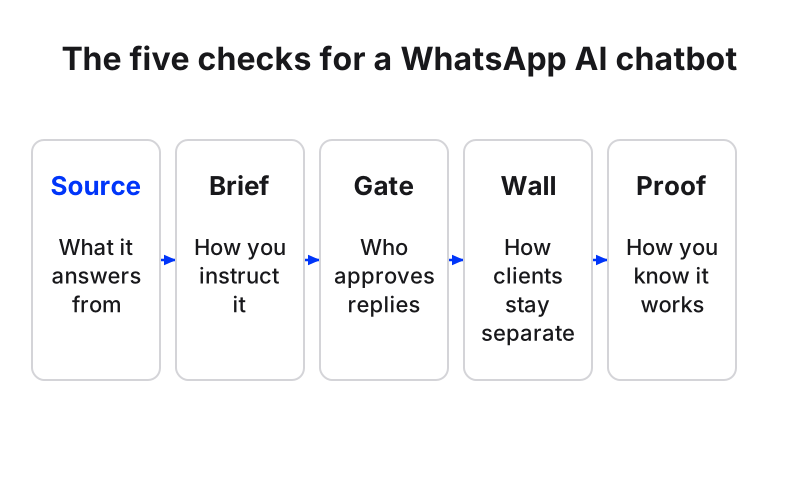
Source is what the agent answers from. An agent that reads the client’s own website, files and past chats is far less likely to make up opening hours than one working from a prompt box. Brief is how you set it up: drawing flows, writing prompts, or describing the job in plain language and letting the builder ask questions. That decides whether a junior account manager can maintain twenty clients or only your one technical hire can.
Gate is what stands between the agent and the customer: approval, handover with history, and the agent stepping back when a person replies. Wall is client separation, including how the client connects its number. If the answer involves the client sending you a password, walk away. Proof is rehearsal before launch and a report after it, because that report is what you put in front of the client at renewal.
Copy these questions into your next vendor call:
- What does the agent answer from, and what happens when it can’t find an answer?
- When the client changes its prices, how does the agent find out?
- Can a person approve replies before they send, and for how long can that stay on?
- When a teammate replies, does the agent stop, and does the customer ever get two answers?
- Are each client’s knowledge, contacts and numbers stored apart, and can I copy a working setup to a new client?
- Does the client connect its own accounts through Meta’s official login, without giving us a password?
- Can I test the agent on real past conversations before it answers anyone?
- What report can I send the client each month without building a spreadsheet?
- Can I white-label it, and what exactly does white-label remove?
The seven tools in detail
1. Maxbound
Best for: marketing, advertising, performance and lead-generation agencies running conversations for several clients at once on WhatsApp, Instagram (DMs, comments, story replies), Facebook (Messenger and comments), website chat and in-app chat.
Price: per workspace, with every feature in every workspace. Each workspace includes 100 AI credits a month, extra credits are priced in brackets, the price per workspace falls as you add more, and every account starts with a 7-day free trial. There’s no free plan. See what a workspace costs for current brackets.
Source. Each agent answers from the client’s own website, docs and PDFs, FAQs and past chats. Questions it couldn’t answer are collected as knowledge gaps, so you answer each one once, and the website is re-checked when the client changes its prices.
Brief. You describe the work in a sentence, inside Maxbound or from Claude, ChatGPT or Codex through the MCP server at app.maxbound.ai/api/mcp. The builder asks what it needs to know, then builds the agent, automation or schedule in that client’s workspace and waits for approval.
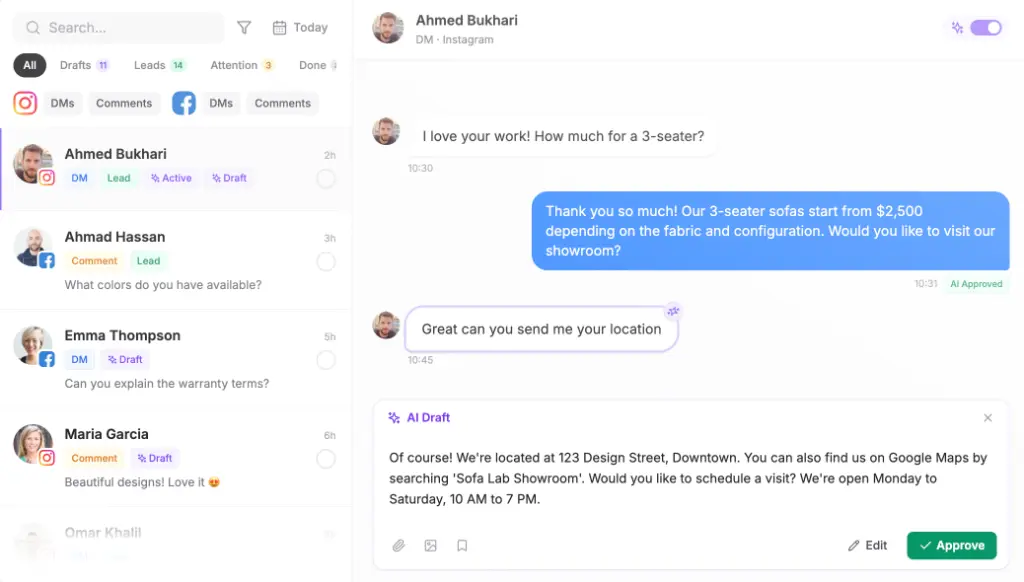
Gate. Nothing goes live until someone on your team approves it, and approval can stay on as long as you like. An agent can also draft each reply for a person to approve or edit. When a teammate replies, the agent steps back, and it waits a few seconds before replying so a burst of three short messages gets one answer. Hard cases go to a person with the full history.
Wall. One workspace per client, role-based permissions, and each teammate given access only to the client workspaces they work on. The client authorises its own WhatsApp, Instagram and Facebook accounts through a one-time Magic Link. Maxbound is an approved Meta Tech Provider that connects only through official APIs and login, and it never asks for, sees or stores a social password.
Proof. Simulations rehearse an agent on real past conversations before it answers anyone. After launch, each workspace shows reply and resolution times, qualified leads, what people asked about and sentiment, and produces a branded PDF report per client.
Where it falls short: no voice, SMS or Slack agent. Posts go to Instagram, Facebook, TikTok and YouTube only, never LinkedIn, X, Threads or Pinterest. It’s encrypted in transit with TLS, not end-to-end. And there’s no free plan.
2. Meta Business Agent in the WhatsApp Business app
Best for: one business that runs WhatsApp from the WhatsApp Business app and wants automatic answers without another tool.
You turn on Meta Business Agent from the Tools tab by tapping AI agent and following the instructions. Read the trade-offs first. Turning it on disconnects any existing linked devices, and it may impede broadcast lists and disappearing messages. If you reply to a customer manually, the AI stops generating responses until you unmute it. Its data can’t be downloaded from WhatsApp Web, only from the mobile app, and the language it uses is set by the business’s phone number rather than the customer’s.
For an agency, the bigger limit is shape: it lives in one business’s app, so there’s nothing that separates clients, gates replies on your side or reports back to the client.
3. Wati
Best for: a team that wants a fixed monthly price for WhatsApp.
Wati’s three tiers are Growth $59, Pro $119 and Business $279 a month, which makes it easy to quote. Meta’s own message charges sit on top of any platform price, as they do for every tool here. We compare it with Maxbound for agency work in the WATI comparison. If you’re also weighing Respond.io, there’s a separate Respond.io comparison for agencies.
4. Botpress
Best for: agencies with developers who want to build a custom agent and own every part of it.
Botpress has a free tier, and people on a budget pair it with Make to send chatbot data to Google Sheets. The paid plans are $89 a month for Plus and $495 a month for Team, but white-label on them is shallow: widget watermark removal only. That matters if you resell under your own brand. You also assemble the inbox, handover and client reporting yourself, so each client is its own project.
5. ConvoCore White Label
Best for: agencies that want a reseller plan with client sub-accounts and SMS in the mix.
The entry White Label plan is $199 a month with 60,000 credits and 20 client sub-accounts, covering chat on web, WhatsApp, Instagram, Messenger and SMS. If SMS is a must for your clients, that’s a point in its favour, since Maxbound has no SMS agent.
6. Stammer
Best for: agencies that would rather pay per message than per seat or per workspace.
Stammer bills from $0.001 to $0.03+ per message depending on the underlying model. Usage pricing is cheap at low volume and harder to forecast at high volume, so model the busiest client’s month before you quote a retainer.
7. Landbot
Best for: a business that wants a monthly chat allowance on WhatsApp.
Landbot’s WhatsApp Pro starts at €200 a month, around $220, including 2,500 chats. Check how a busy client’s chat count compares with that allowance before you commit.
Three more names come up on shortlists. Chatbase can be trained on business documents or FAQs and capture names, contact details and booking details without code. Kayako charges $1 per AI-resolved ticket, counted only when the AI resolves it without a human. And n8n’s WhatsApp chatbot template keeps a memory window of 10 interactions per user session and accepts only PDF uploads, filtered by MIME type, which tells you how much you’d be building yourself.
How do you connect a client’s WhatsApp number through Meta’s official API?
If you use Maxbound, the client authorises its own WhatsApp account through a one-time Magic Link in its workspace and you never see a password. If you’re wiring the API yourself, or want to know what sits under any vendor, Meta’s own steps begin by opening the App Dashboard to create a new Meta app with the WhatsApp use case. Practitioners add hard-won advice: test everything on a separate number first, never reuse numbers, and set spending limits before anything goes live.
How to connect a client's WhatsApp number to the official API
- Pick a clean numberUse a number that is not active on WhatsApp or the WhatsApp Business app and can receive an OTP. Do not reuse the client's existing WhatsApp Business app number, and test on a separate number before production.
- Create the Meta appOpen the Meta App Dashboard, enter your details and select the WhatsApp use case.
- Send a test messageClick Generate access token to get a temporary access token and send a test message. Replying to that message opens a 24-hour customer service window in which non-template messages are allowed.
- Create a permanent tokenGo to Business Settings, click System users in the sidebar, create a system user and assign it the right assets and permissions.
- Lock the account downEnable two-factor authentication and keep at least two admins so nobody gets locked out. Set spending limits in Meta Business Manager on day one, before any API calls go live.
- Choose the currency carefullyCurrency is picked when the messaging account is created and cannot be changed afterward, so use the currency the client will be billed in.
- Check the messaging limitRequest the whatsapp_business_manager_messaging_limit field through the API to see the current limit before you plan any broadcast.
What will WhatsApp cost the client, and what can you charge?
There are two bills: the platform you pick, and Meta’s. Meta is charged only when a message is delivered, per message, never for messages merely sent. Each business phone number gets the first 1,000 service messages free every month. Non-template messages can only go out inside an open 24-hour customer service window, which resets each time the customer writes. Meta can change prices only on the first day of a quarter, so up to four times a year, which is worth a line in your contract.
The second constraint is volume. New business portfolios start at a messaging limit of 250: that’s the number of unique phone numbers you can reach outside a customer service window in a moving 24-hour period. To reach 2,000, verify the business, or send 2,000 delivered messages to unique numbers outside service windows within 30 days using templates with a high quality rating. Automatic scaling also needs you to have used at least half your current limit in the last 7 days.
On the agency side, white-label sellers put client pricing for an SMB-grade chatbot at $300–$1,500 a month plus a setup fee of $1,000–$5,000, and say agencies with five clients on a mid-tier plan commonly run 70–80% gross margins. Treat those as one vendor’s figures, not a promise.
Worked example (an illustration, using Meta’s published limits). A clinic client on a brand-new portfolio wants a template broadcast to 600 past patients. At 250 unique numbers per moving 24 hours, that’s at least three days of sending, not one afternoon. Replies to that broadcast open service windows, so the agent’s answers inside them count as service messages, and the first 1,000 of those each month are free on that number. If the clinic wants monthly campaigns to 600 or more, get the business verified before the first one so the limit is 2,000.
How do you onboard a new client’s WhatsApp agent?
In Maxbound, onboarding follows the same order every time, which is what lets one account manager take on another client without a rebuild:
- Create or clone the workspace. Clone the closest working client, then swap the knowledge, offers and branches.
- Send the Magic Link. The client authorises WhatsApp, Instagram and Facebook itself.
- Add the sources. Website, PDFs, FAQs and past chats. The agent can learn from past conversations too.
- Brief the agent in plain language (example below), and answer the builder’s questions.
- List the details to collect, such as name, email or phone, and when to ask: at the start, after the first reply or at the end.
- Run Simulations on real past conversations and fix wrong or missing answers.
- Approve it, and keep draft approval on for replies until the client is comfortable.
A brief you can adapt:
You answer WhatsApp, Instagram and Facebook messages for Northside Dental. Answer only from our website and price list. Book check-ups and cleanings against each branch’s opening hours. Ask for name and phone after your first reply. Anyone asking about implants or braces is a qualified lead: save them and hand them to the front desk with the conversation. If you don’t know an answer, say a person will reply and hand over. Never quote a price that isn’t on the price list.
For cross-channel attribution, every contact keeps a timeline of every message across channels, and Facebook and Instagram ads created from the workspace show spend, results, the top ads and the leads they brought in one place. If the client already has its own CRM, webhooks tell it the moment a lead is saved or a message arrives, and every delivery is logged and can be re-sent.
How should handoff and SLAs work for client WhatsApp queues?
The hard rule behind any WhatsApp SLA is the 24-hour window. If a person doesn’t reply inside it, the only way back to the customer is an approved template, so never promise a human response time that can run past 24 hours. Write the SLA around what the agent answers instantly and what a person owns.
An SLA outline to copy, with the blanks agreed per client:
- Agent first reply: every message, any hour, from approved sources only.
- Handover triggers: complaints, refunds, [client’s list], any question the agent can’t answer from sources.
- Human response time: within [X] business hours on handed-over conversations, always inside the 24-hour window.
- Out-of-hours handover: agent tells the customer when a person will reply; team picks up by [time].
- Owner per client: [name], with [backup name].
- Knowledge gaps: answered and added within [X] days.
- Reporting: monthly PDF by [day], plus a review call each [period].
In Maxbound, a conversation can be assigned to a teammate, taken over and handed back to the agent, noted for the team and translated with one button, all from one inbox across every client.
How do you handle opt-in and privacy?
Ask the client’s counsel which consent rules, such as GDPR or TCPA, apply to their markets before the first broadcast. Whatever they say, keep the evidence: for every contact, record where they opted in, when, the exact wording they agreed to, and how they opt out. Filter broadcast lists to contacts with a recorded opt-in, and honour opt-outs in every client’s list, not just one.
Clients also ask about Meta AI reading their chats. Meta says only messages that mention @Meta AI, or that people choose to share with it, can be read by Meta. On Maxbound’s side: it’s GDPR compliant, encrypted in transit with TLS (not end-to-end), keeps each client in its own workspace with role-based permissions, and takes payments through a PCI-DSS-compliant provider.
What should go in the monthly client report?
Put the numbers a client cares about on page one and keep the method the same each month, so the comparison means something. A report outline that maps to what Maxbound measures per client:
- Conversations in, by channel, this month beside last month.
- Reply and resolution times.
- Conversations the agent resolved and how many a person did.
- Qualified leads, and bookings taken in the chat.
- What people asked about, and the sentiment trend.
- Ad spend, results and leads from Facebook and Instagram ads.
- Knowledge gaps found and fixed.
A scheduled automation can build last month’s branded PDF every Monday and email it to the client.
What are the common mistakes?
- Reusing the client’s existing WhatsApp Business app number for the API, or one that can’t receive an OTP.
- One admin on the Meta account, no two-factor authentication, and no spending limit.
- Picking the wrong currency, which can’t be changed later.
- Planning a big broadcast on a new portfolio without checking the 250 limit.
- Promising human replies later than the 24-hour window allows.
- Turning on Meta Business Agent without warning the client that linked devices disconnect.
- Going live without testing on past conversations or keeping approval on.
When shouldn’t you use Maxbound?
Skip Maxbound if a client needs a voice, SMS or Slack agent, or posting to LinkedIn, X, Threads or Pinterest. A single business happy to run WhatsApp from the app is better served by Meta Business Agent. A team with developers that wants to build every piece will prefer Botpress. And if you need a free plan rather than a 7-day trial, it isn’t one.
Which WhatsApp AI chatbot should your agency pick?
If you run conversations for several clients and need to repeat a working setup, gate every reply until you trust it, keep clients apart and send each one a report, Maxbound fits that work: one workspace per client, briefed in plain language, rehearsed on real conversations and approved before it goes live. Meta Business Agent suits a single business inside the app, and a developer-led agency building one large custom deployment will be more at home in Botpress. For the wider field, we keep WhatsApp AI chatbots for business compared on one page.