
How to Write AI Agent Instructions for Customer Service
A step-by-step way to brief an AI customer service agent in plain language: purpose, sources, limits, handoff rules and human approval before replies.
Good AI agent instructions read like a brief for a new hire. They are not code. They say what the agent is for, which of the client’s sources it answers from, what it must never do, when it hands a conversation to a person, and whether a person approves each reply before it sends.
Write those five things in plain sentences for each client, rehearse the agent on real past conversations, and keep approval on until the drafts stop needing edits. That is the whole method. The rest of this post walks through it in order, with a template you can copy.
What is an AI customer service agent?
An AI customer service agent is a language model that answers a business’s customers by working toward a goal, checking sources and taking actions, instead of following a fixed script. Richard Baxter describes an agent as a large language model running in a loop, with a goal and tools it can call.
The difference from automation matters for how you write instructions. A workflow runs a predefined path you drew. An agent decides its own next step. So you can’t brief an agent by drawing boxes. You brief it by stating the goal, the sources and the limits, and the agent works out the path inside them.
For an agency, that changes the setup effort. A flow needs every branch built by hand for every client. An agent needs a good brief and good sources, and then it handles questions nobody mapped.
How do you brief an AI agent in plain language?
You brief an AI agent in plain language by writing short, direct sentences that cover purpose, sources, boundaries, handoff, details to collect, tone and approval. In Maxbound you type that brief into the client’s workspace, the agent asks what it still needs to know, builds the agent, and nothing goes live until someone at the agency approves it.
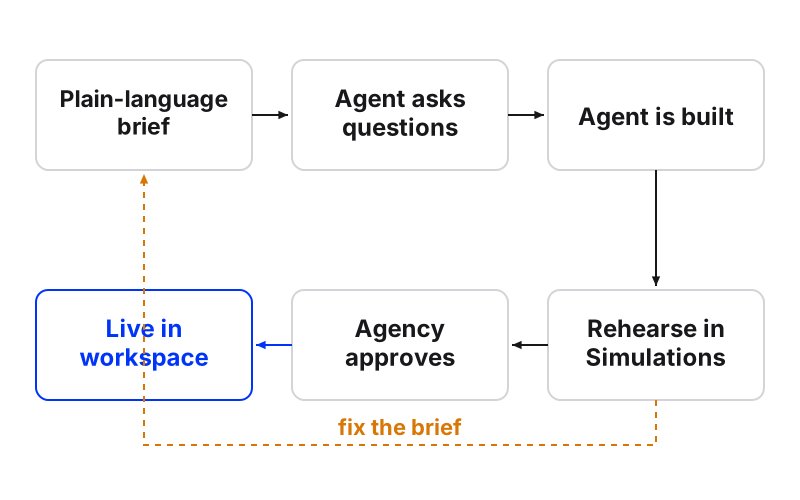
How to brief an AI customer service agent
- State the purposeOne or two sentences on what the agent is for and what counts as done.
- Name the sourcesList the client's website, files, FAQs and past chats the agent answers from.
- Write the boundariesSay plainly what the agent must never do or promise.
- Set the handoff rulesSay exactly when a person takes over and who that person is.
- List the details to collectName the fields to ask for and when to ask.
- Turn on approvalHave a person approve replies until drafts stop needing edits.
- Rehearse before go-liveRun the agent on real past conversations and fix the brief where it fails.
Step 1: State the purpose and the finish line
Jerzy Kramarz’s advice is to start every agent with a clear statement of purpose. Purpose means the job and the finish line, not “help customers”.
Fuzzy goals are where agents drift. As one plain-English guide puts it, “make the app better” has no finish line, so the agent has no reason to stop. A customer service brief needs an end state: a booking made, a question answered, a lead saved, or a conversation handed over.
Weak: “Handle the clinic’s messages.”
Strong: “Answer questions about treatments, prices and opening hours. Your goal is a booked consultation or a clear answer. If neither is possible, hand over.”
Step 2: Name the sources the agent answers from
An agent should answer from the client’s own material, not from what a model guesses about the industry. In Maxbound, knowledge training covers the client’s website, files and PDFs, FAQs and past chats. Questions the agent couldn’t answer are gathered as knowledge gaps, so you answer each one once instead of fixing the same miss every week.
Tell the agent in the brief which source wins when two disagree. Price lists change. Old chats quote old prices. Write: “If the price list and a past chat disagree, use the price list.”
Step 3: Write the boundaries
The best agents have explicit boundaries. Kramarz’s example is an agent that will summarise documents and will not make recommendations. For customer service, boundaries are the promises the client can’t keep.
Common ones to write out:
-
Never quote a price that isn’t in the sources.
-
Never promise a discount, refund or delivery date.
-
Never give medical, legal or financial advice.
-
Never mention competitors.
Add the agent’s limits too. Kramarz suggests stating them openly, like “I may miss context from conversations I haven’t seen.” For a customer, the limit becomes a line the agent can say: “I don’t have that detail, I’ll pass you to the team.”
Step 4: Set the handoff rules
AI agent handoff rules say exactly when a person takes over, who that person is, and what the customer hears in the meantime. Vague rules like “escalate if needed” produce an agent that either never hands over or hands over everything.
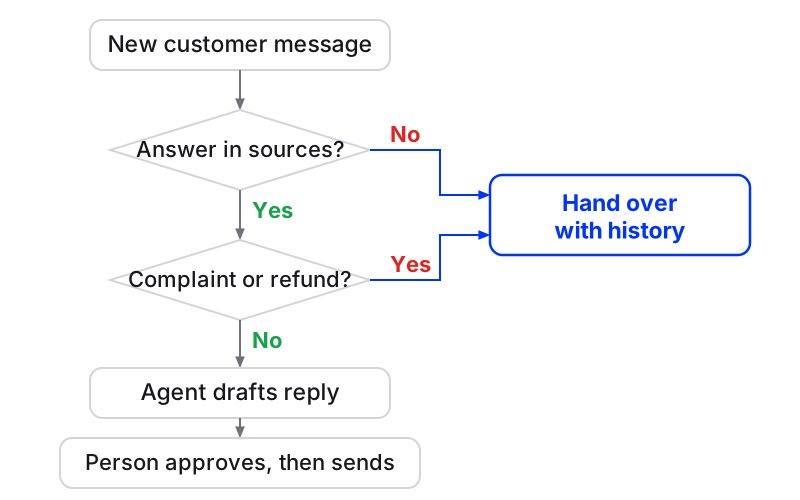
Maxbound agents hand a conversation to a person with its full history, so nobody asks the customer to repeat themselves. There’s more on picking the moment in this piece on smart escalations for AI agents.
| Situation | Rule to write | Who takes it |
|---|---|---|
| Complaint or angry customer | Hand over at once, apologise, don’t argue | Account lead |
| Refund, discount or price exception | Never decide, hand over | Client’s sales owner |
| Question not in the sources | Say you’ll check, hand over | Support teammate |
| Ready to buy above a set budget | Collect details, hand over | Sales owner |
| Customer asks for a person | Hand over, no questions | Next available teammate |
Step 5: List the details to collect
Name the fields and when to ask for them. Maxbound agents ask for the fields the agency lists, such as name, email or phone, at the start, after the first reply or at the end of a conversation, and save the answers to the contact in the built-in CRM.
Ask too early and people leave. For most clients, after the first useful answer is the right moment. Write it as: “After you answer the first question, ask for their name and phone number.”
Step 6: Describe the tone
Tone in two or three lines is enough. “Warm, short, no emojis, first names.” Agents answer in the customer’s own language, including Iraqi Arabic and Kurdish (Sorani), so say if the client wants a particular register.
You don’t need to perfect tone in the brief. Maxbound agents learn each brand’s tone of voice from the client’s conversations and from the edits your team makes to drafts.
Step 7: Turn on human approval before AI replies
With approval on, the agent drafts and a person approves or edits before anything goes to the customer. Keep it on for a new client until the drafts stop needing changes.
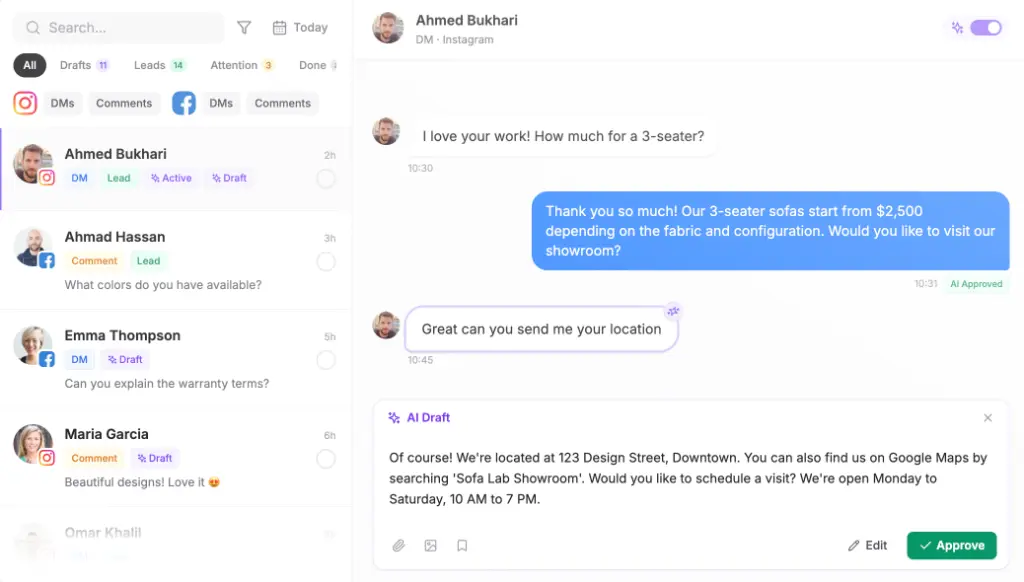
Step 8: Rehearse on real past conversations
Before the agent answers anyone, run Simulations on the client’s real past conversations. Read where it got things wrong and fix the brief, not the answer. One wrong answer usually means one missing sentence.
Kramarz recommends a checkpoint before any output: am I sure, and what would make this wrong? Simulations is that checkpoint for the whole agent, run before a single customer sees it.
A customer service AI prompt template to copy
Paste this into a client’s workspace and fill the brackets. It’s an illustration for a dental clinic; swap the details for your client.
You answer messages for [Clinic name] on WhatsApp, Instagram and website chat.

Purpose: answer questions about treatments, prices and opening hours. Done means a booked consultation, a clear answer, or a handover.

Sources: the clinic's website, the 2026 price list PDF and the FAQ. If they disagree, the price list wins.

Never: give medical advice, promise a discount, quote a price not in the price list, mention other clinics.

Hand over to [Name] when: someone complains, asks about a refund, asks a medical question, or asks for a person. Tell them a team member will reply and keep the chat history.

Collect: name and phone, after your first answer.

Bookings: offer consultation slots within opening hours for each branch.

Tone: warm, short, first names, no emojis. Reply in the customer's language.

Approval: draft every reply for approval until I switch it off.Should a person approve AI replies before they send?
Yes, for every new client and every new agent. Approval costs a few minutes a day and protects the client’s name while the brief is still being tested.
The risk is real outside customer service too. Gartner predicts, as reported by The CoS Signal, that governance failures will push 40% of enterprises to scale back or shut down autonomous agents they deployed by 2027.
In Maxbound, approval isn’t a trial-period setting you lose. An agency can keep approval on for as long as it wants, per client. Some clients, like regulated ones, may never come off it.
Can you brief an AI agent from Claude or ChatGPT?
Yes. Through the Maxbound MCP server, you can brief from Claude, ChatGPT or Codex in plain language, and the build lands in that client’s workspace, waiting for approval like any other.
That matters because a chat assistant on its own only writes text. It can draft a messaging schedule, but it can’t connect to the client’s WhatsApp or Instagram, save leads or wait for your sign-off. Briefing through MCP keeps the habit your team already has and puts the result where the client’s conversations actually live.
What is the best way to train an agent on a client’s website and past chats?
The best way is to let the agent answer from those sources directly, then close the gaps it reports. Connect the website, upload the price list and FAQs, and add past chats so the agent learns what customers really ask and how the client answers.
Then do three things. Check the knowledge gaps weekly and answer each once. Re-check the website when the client changes prices. Rehearse again in Simulations after any big source change.
What goes wrong when an agent misreads the brief?
Most failures trace back to one missing or vague sentence. Fix the brief, re-run Simulations, and approve again.
| What you see | Likely cause | Fix in the brief |
|---|---|---|
| Agent invents a price | No source rule | ”Only quote prices from the price list” |
| Agent never hands over | Vague handoff rule | List exact triggers and a named person |
| Agent hands over everything | Purpose too narrow | Widen what counts as done |
| Asks for phone too early, people leave | No timing for details | ”Ask after your first answer” |
| Wrong tone | Tone left out of the brief | Two lines on tone, then edit drafts |
When shouldn’t you hand a conversation to an agent at all?
Keep a person on conversations where one wrong sentence has a cost the client can’t absorb: legal disputes, medical diagnosis, anything under an active complaint. Write those as boundaries and handoffs, not as hopes.
Be clear on scope too. Maxbound agents work on WhatsApp, Instagram, Facebook, website chat and in-app chat. There’s no voice, SMS or Slack agent, so a brief that depends on phone calls belongs somewhere else.
For marketing agencies running many clients, this is where social media customer service software earns its keep: one brief per client, each in its own workspace, nothing crossing between them, and a person signing off before anything goes live. Write the first brief today. Start with purpose and handoff. The rest takes an afternoon.