7 Instagram Messaging Window Mistakes and How to Fix Them
Instagram's 24-hour messaging window, the human agent window and private reply rules: seven mistakes agencies make with client DMs, and the fix for each.
Instagram gives a business 24 hours to answer a customer after that customer’s last message. After that, the conversation is closed to you until they write again. Conversations that start from a Click-to-Direct ad can stay open for up to 7 days, and Meta’s human agent window allows manual follow-up for 7 days, but no automated message may be sent inside it.
Those three rules decide whether a client’s Instagram lead gets answered or lost. Most agencies only learn them when a follow-up fails to send or a client’s account gets restricted.
I run Maxbound, where agencies manage every client’s Instagram DMs and comments through Meta’s official APIs. The rules below apply to every tool that sends Instagram messages, including ours. These are the seven mistakes that cost agencies the most, and the fix for each.
What are the Instagram DM rules for businesses?
The Instagram DM rules for businesses come down to a few limits set by Meta.
-
The 24-hour window. A business can message a customer for 24 hours after their last interaction. On the Manychat community forum, a Manychat team member put it bluntly: you cannot send messages after 24 hours from the last interaction, because it is a Meta rule.
-
The ad window. According to Blotato, the window may extend up to 7 days for conversations that start from Click-to-Messenger or Click-to-Direct ads. Every other entry point stays at 24 hours.
-
The human agent window. Meta allows a person to follow up manually for 7 days after an interaction. Automated replies are not allowed inside it.
-
Message tags. Message tags let a business send non-promotional updates outside the standard windows.
-
Private reply limits. An Instagram professional account can send 750 private replies per hour to comments on posts and reels.
That 750-an-hour ceiling matters when a client’s reel takes off and hundreds of people comment the same keyword. Blotato also reports that an account handling more than 72,000 sent and received messages will stop showing new messages until volume drops, and that automated text messages are capped at 1,000 bytes of UTF-8.
| How the conversation started | Window | Automated replies allowed? | What you can send after it closes |
|---|---|---|---|
| Customer DMs the account | 24 hours from their last message | Yes, inside the window | Nothing, until they write again |
| Customer comments, you send a private reply | 24 hours | Yes, inside the window | Nothing, until they reply |
| Click-to-Direct or Click-to-Messenger ad | Up to 7 days | Yes, inside the window | Nothing, until they write again |
| Human agent follow-up | 7 days after the interaction | No, a person must send it | Nothing |
| Message tag | Outside the standard windows | Only non-promotional updates | Non-promotional updates only |
Mistake 1: Treating every client conversation as the same window
The mistake. The agency builds one follow-up timing for all of a client’s Instagram leads. Same delay, same sequence, whether the lead came from an ad or an organic DM.
Why it hurts. An organic DM closes at 24 hours. A Click-to-Direct ad conversation can run up to 7 days. Time everything to 24 hours and you waste the longer window on ad leads the client paid for. Time everything to 7 days and your organic follow-ups never send.
The fix. Split follow-ups by entry point. Ad conversations get a longer sequence. Organic DMs and comment replies get their follow-up inside the first day. In Maxbound, the follow-up sequences are written per lead in each client’s workspace, so an ad campaign and an organic post can carry different timing.
Mistake 2: Letting automation answer inside the human agent window
The mistake. The 24 hours pass, someone hears about the 7-day human agent window, and the automation keeps sending under it.
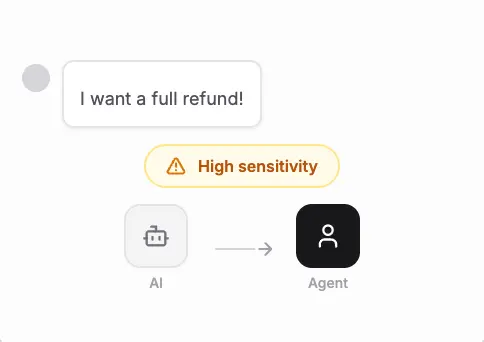
Why it hurts. The human agent window exists for a person picking up a conversation that needs more time. Deepsolv is clear that automated replies are strictly prohibited during this 7-day window. An agency that runs a bot through it is putting the client’s account at risk for a follow-up the client didn’t ask for.
The fix. Let the agent work inside the 24 hours, then hand the conversation to a person with its history before the window closes. Maxbound agents hand a conversation to a teammate with the full thread when it needs one, so the person picking it up on day two doesn’t start from zero.
Mistake 3: Slipping an offer into a message tag
The mistake. The client wants to re-engage last week’s leads. Someone sends a message tag update with “and 20% off this weekend” at the end.
Why it hurts. Message tags are for non-promotional updates only. Deepsolv lists promotional content in non-promotional tags as a common mistake that can get a business blocked. One discount line can cost the client the account their ads point to.
The fix. Keep tags to the update itself. Put offers in content that reaches people when they are already talking to you, or in a fresh ad that starts a new conversation.
Copy this as a compliant update:
Hi Sara, your appointment on Thursday has moved to 4pm. Reply here if that time doesn’t work and we’ll find another.
Not this:
Hi Sara, your appointment has moved to 4pm. Book a second session this week and get 20% off!
Mistake 4: Sending a first message that doesn’t invite a reply
The mistake. The first DM is a wall of information. Price list, address, opening hours, a link. No question.
Why it hurts. The window runs from the customer’s last interaction. A message that gives them nothing to answer lets the clock run out. Deepsolv suggests using a call to action that asks people to click a link or reply with a keyword, since a reply reopens the 24-hour window.
The fix. End every first message with one easy question. Copy these and adapt them per client:
-
“Is this for you, or are you buying for someone?”
-
“Which size are you after, the two-seater or the corner sofa?”
-
“Do mornings or evenings suit you better for a viewing?”
Each answer resets the clock and tells you something you’d want saved on the lead anyway. Maxbound’s built-in CRM saves those answers to the contact as the conversation goes, so nobody types them in.
How do I set up automatic replies to Instagram comments without breaking the rules?
Automatic replies to Instagram comments work by sending a private reply as a DM to the person who commented, usually with a short public reply under the comment. The private reply opens a 24-hour window. Mistakes 5 and 6 are where comment automation goes wrong.
If you’re answering by hand, our guide on how to reply on instagram dm covers the manual steps. For automation:
-
Pick the post or ad and the keyword, such as “price”.
-
Write the DM in two or three wordings, not one.
-
Add a short public reply so other viewers see the comment was answered.
-
End the DM with a question so the person replies inside 24 hours.
-
Save anyone who replies as a contact with what they asked for.
-
Approve it before it goes live.
In Maxbound you brief this in a sentence, such as “When someone comments price on the sofa ad, DM them the price list and save anyone who asks for a quote.” The agent asks what it needs, builds the comment-to-DM automation, and nothing runs until someone on your team approves it.
Mistake 5: Firing identical private replies at volume
The mistake. A reel goes viral. Every comment gets the same DM, word for word, as fast as the tool can send.
Why it hurts. The account is capped at 750 private replies an hour, so a big spike queues anyway. And hundreds of identical messages in an hour look like spam, which is exactly what you don’t want on a client’s account.
The fix. Vary the wording and let replies arrive at a human pace. In Maxbound each post can carry its own DM sent in varied wording, and a reply delay makes the agent wait a few seconds so a burst of messages from one person gets one answer, not five.
Mistake 6: Retrying when Meta says stop
The mistake. A custom integration hits an error and retries in a loop.
Why it hurts. Meta’s Graph API rate limiting documentation says that when a limit is reached, you should stop making calls. Retrying extends the recovery time. Error code 4 means the app has hit its limit, error 17 means the user whose token is used has hit theirs, and error 32 means a Pages API request hit the limit. Meta calculates an app’s calls within a rolling hour as 200 multiplied by the number of users.
The fix. Read the X-App-Usage header to see how close the app is to its limit, and pause on those three error codes. Keep automated text messages under 1,000 bytes, and count bytes, not characters, since the limit is set in bytes.
Mistake 7: Running every client from one shared setup
The mistake. All clients’ Instagram accounts sit in one tool, one inbox, one set of rules. Nobody owns a client’s DMs on a given day.
Why it hurts. A lead from a client’s ad lands at 9pm. Nobody sees it in the shared pile. By the time anyone does, the window has closed and the only legal move is to wait. Worse, a reply meant for one client’s customer can go from another client’s account.
The fix. Give each client its own workspace with its own channels, knowledge, contacts and agents, with nothing crossing between them. Maxbound works that way, with role-based permissions so each teammate only sees the clients they work on. The agent answers first at any hour, and if your team wants to check replies, the agent drafts and a person approves before anything is sent.
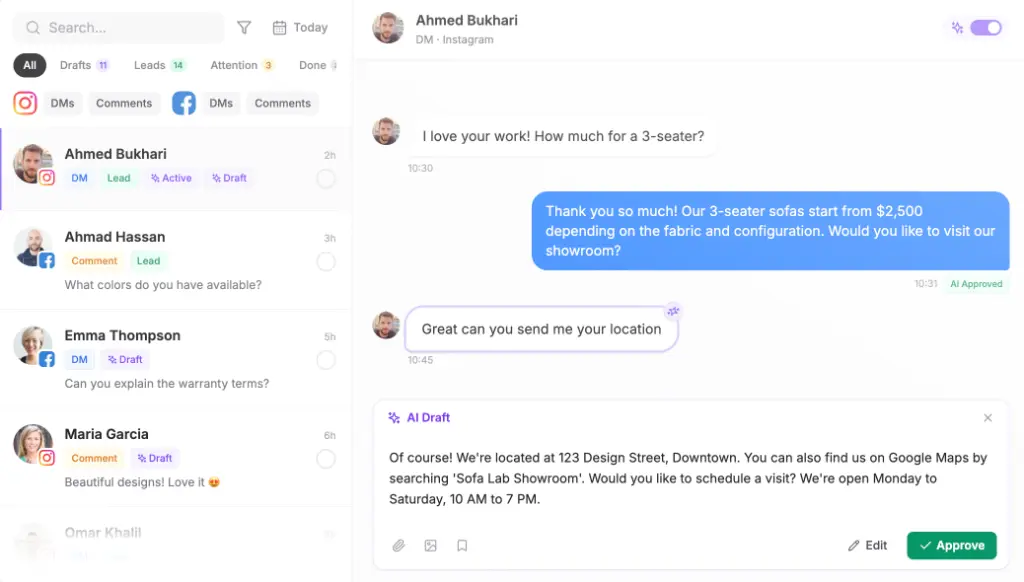
That setup suits agencies, especially advertising agencies whose clients’ ads create replies faster than a team can answer by hand. It is less useful for a business that gets a handful of DMs a week and can answer them all on the phone. And no tool, Maxbound included, can message a customer outside Meta’s windows. We connect only through Meta’s official APIs, so the same rules hold.
A quick checklist for every client account
-
Follow-up timing split by entry point: ad conversations versus organic DMs.
-
No automated message after the 24 hours, or after the ad window for ad leads.
-
Message tags carry updates only, never offers.
-
Every first DM ends with a question.
-
Comment DMs written in more than one wording.
-
Integrations stop on error codes 4, 17 and 32.
-
Every client in its own workspace, with someone owning handoffs.
Get these seven right and a client’s Instagram leads stop dying at hour 25.