AI Tools for Social Media Engagement, by the Job They Do
AI tools for social media engagement do four jobs: answering, analysing, moderating and suggesting replies. Which tools do each, and how to pick
“AI for social media engagement” covers four different jobs, and most tools are good at one or two of them. Some answer comments and DMs themselves. Some read thousands of comments and tell you how people feel. Some hide spam and abuse before anyone sees it. And some suggest a reply for a person on your team to send. Pick the job first, then the tool.
For an agency running several clients, the job that usually hurts is the first one: the questions under posts and ads that nobody answers in time. The other three are worth adding when a client’s volume makes them pay. Below is what each job involves, which tools do it, what the platforms give you for free, and how to tell whether any of it is working.
The four jobs
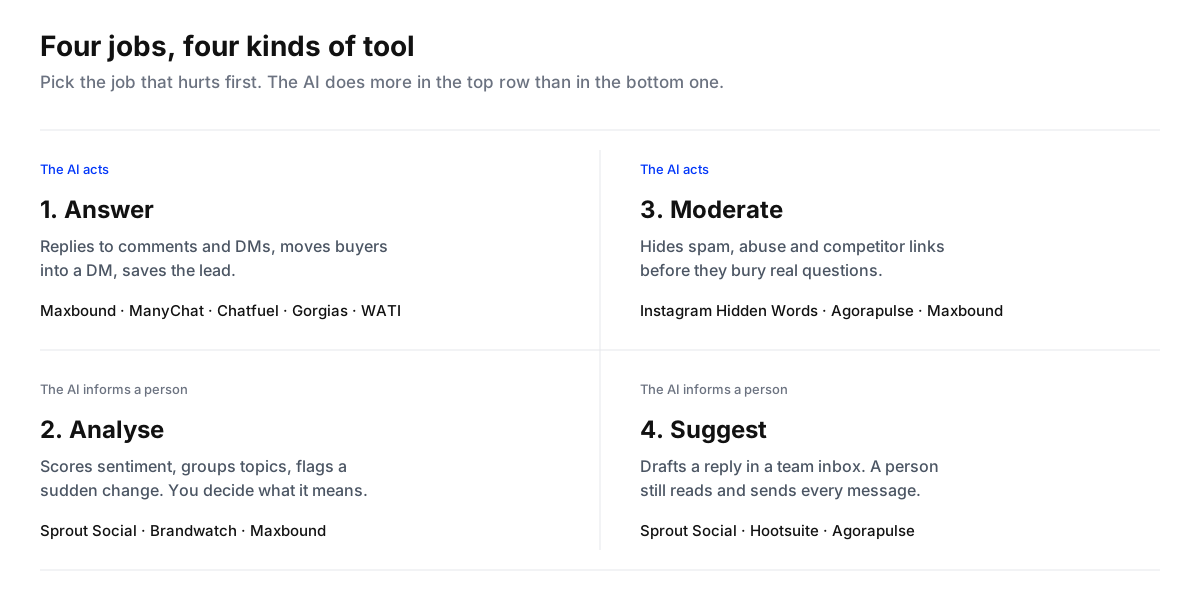
The line between “answer” and “suggest” is the one that matters most for cost. A tool that suggests replies still needs a person for every message, so it saves typing, not hours. A tool that answers saves the hours, and needs more care before you trust it.

Job 1: answering comments and DMs
This is where engagement turns into revenue, and where most accounts fall short. When we read 1,788 public comments on the Instagram and Facebook posts of 178 businesses in the Middle East, the pages had answered about one in seven of them in the thread.
Tools that answer fall into two camps: ones that follow flows you build, and ones that answer from what they know about the business.
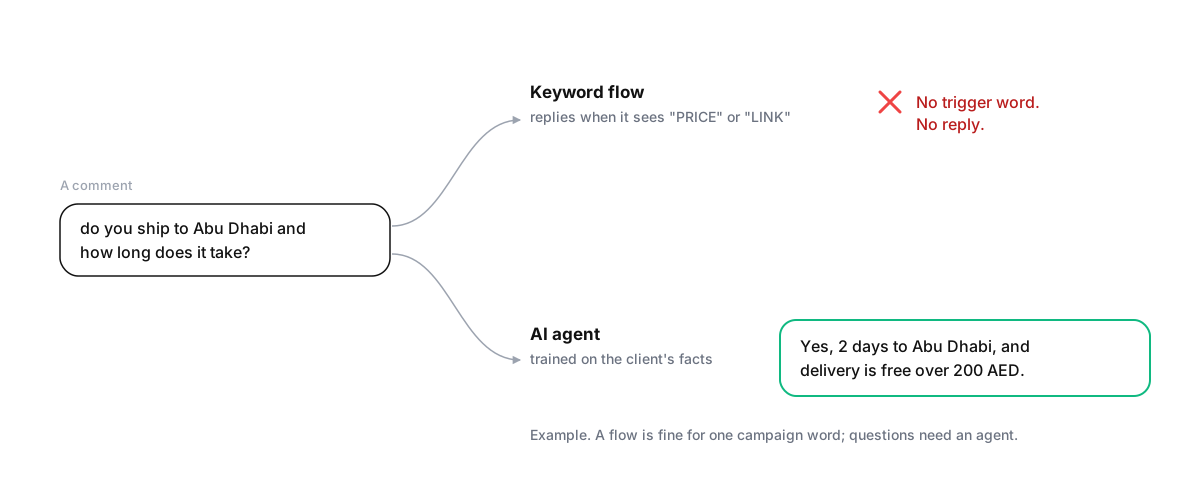
Flow builders with AI added. ManyChat is the best-known: a comment or DM that matches a trigger word gets a pre-written reply, typically a link. Its AI add-on adds an AI Step for scripted conversations and Intention Recognition to match messages without exact keywords, according to ManyChat. Chatfuel puts an AI assistant inside a flow builder for Facebook, Instagram and WhatsApp. These are strong for one campaign with one offer. You maintain the flows as offers change.
Agents trained on the business. Maxbound trains an agent per client on their website, documents, FAQs and past conversations, and lets it answer comments and DMs on Instagram and Facebook, plus WhatsApp, website chat and in-app chat. It replies in public, moves buying questions into a DM, saves the contact to a CRM and hands sensitive conversations to a person. For online stores, Gorgias offers an AI agent for Instagram DMs and Messenger built around order questions, and for businesses that live on WhatsApp, WATI offers an AI agent called Astra.
Whichever you pick, start with replies a person approves. The safe way to roll this out is covered in how to set up a human-in-the-loop workflow, and two timing settings matter more than they sound: a reply delay so a burst of messages gets one answer, and avoid double reply so the agent steps back when a teammate replies.
Job 2: analysing comments
Comment analysis answers a different question: not “what do we reply?” but “what are people saying, and is it getting better or worse?”
- Sprout Social’s Smart Inbox classifies incoming messages as positive, negative, neutral or unknown, so a team can prioritise and route them.
- Brandwatch’s Iris works at the level of the whole conversation online, automatically detecting significant changes and looking for the cause behind a trend. It’s listening, not inbox work.
- Maxbound labels each incoming message positive, neutral, negative or urgent, and its analytics show each client’s conversations and what the agent handled. See sentiment analysis for comments and DMs.
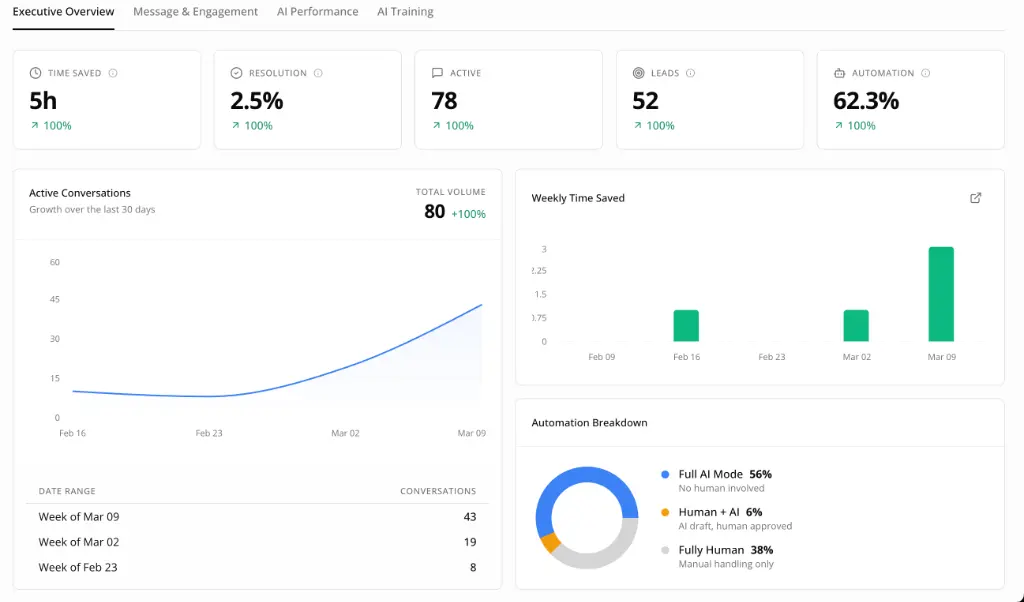
A sentiment score is only useful if somebody acts on it. Before you pay for analysis, decide who gets told when negative sentiment jumps, and what they’re expected to do.
Job 3: moderating
Comments under a popular post or a paid ad attract spam, abuse and competitors dropping links. Moderation tools hide them so real questions aren’t buried.
Start with what’s free. Instagram’s Hidden Words automatically hides comments likely to be offensive and lets you add your own words, phrases and emojis to hide. It’s blunt, because it works on words, not meaning, but it costs nothing.
Agorapulse’s automated moderation lets you write rules that hide, remove, assign, label or send items for review, triggered by keywords. Maxbound’s comment moderation reads each comment in context and does one of three things: answers it, hides it (spam, abuse, competitor promotion), or flags it for a person. An unhappy customer is never hidden, and every hidden comment can be restored.
Job 4: suggesting replies to a team
If your team answers every message by hand and wants to type less, reply suggestions are the gentlest kind of AI. Sprout Social’s AI Assist suggests alternative replies and tones in its Smart Inbox. Hootsuite’s Smart Replies suggest replies to comments, mentions and DMs in its Advanced Inbox. Agorapulse offers AI reply suggestions too.
The limit is that a person still reads and sends every reply. That’s the right model for some clients, and it does nothing for the 11pm message.
How to choose for each client
Choose AI engagement tools for a client
- Count a week of engagementFor one week, log comments and DMs per channel, how many got an answer, and how long it took. Note how many arrived outside office hours.
- Name the job that hurtsUnanswered questions point to job 1, answering. A client asking how people feel points to job 2. Spam under ads points to job 3. A team that answers everything but slowly points to job 4.
- Use the free tools firstTurn on Instagram's Hidden Words and Meta Business Suite's instant replies and away messages before buying anything for moderation or first replies.
- Trial one tool for that one jobRun it on one client for two weeks with approval on, and measure the same numbers you logged in step one.
- Add the next job only when the first worksA tool that does four jobs badly loses to one that does the job you need well.
For agencies, two more questions decide it: can each client be a separate workspace with its own voice and report, and does the price grow with your team’s seats or with your clients? Both are covered in choosing social media customer service software for agencies.
How to tell whether it’s working
Engagement tools should move numbers a client can feel. Track these per client, before and after:
- Comments answered: replies in the thread divided by comments. Our study’s baseline was 15% overall, 12% on Instagram and 22% on Facebook.
- Time to first answer: the median. When the pages in our study answered, the typical wait was 2 hours 42 minutes.
- Out-of-hours answered: more than half of the unanswered comments in our study arrived outside 9am to 6pm.
- Leads saved: contacts captured from comments and DMs.
- Spam hidden: and how many hidden comments had to be restored.
Where Maxbound fits
Maxbound is an AI operating system for agencies. On engagement, it covers jobs 1, 2 and 3 in one workspace per client: agents that answer comments and DMs and learn each brand’s voice from your team’s edits (self-improving AI), analytics per client, and comment moderation, with an omnichannel inbox and CRM behind them. It doesn’t do social listening across the web, and it doesn’t publish to X or LinkedIn. Pricing is per workspace, on the pricing page.