How to Follow Up Facebook Lead Ads on WhatsApp
A step-by-step playbook for agencies: move Facebook and Instagram lead ads into a CRM, message on WhatsApp in minutes, qualify and hand off hot leads.
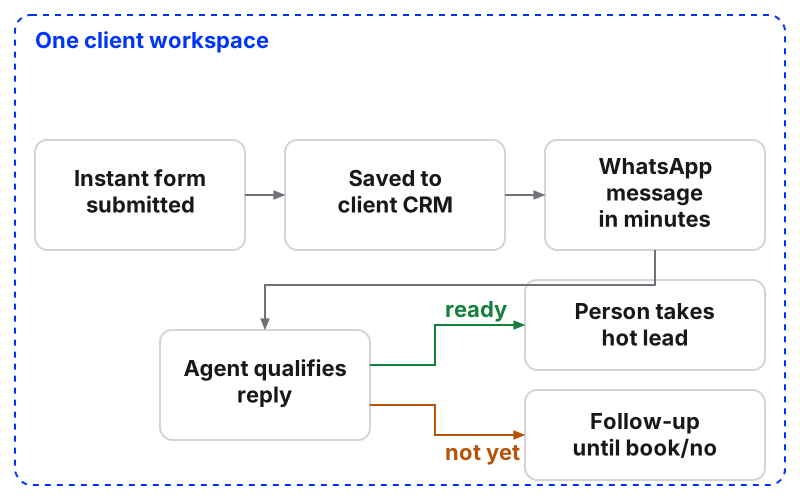
To follow up Facebook lead ads on WhatsApp, get each lead out of the instant form and into a CRM the moment it’s submitted, send a WhatsApp message within minutes, and let an AI agent qualify the reply before a person takes the hot ones.
Maxbound runs this whole chain inside each client’s own workspace: the lead form, the CRM record, the WhatsApp conversation and the handoff to your team sit in one place, and nothing goes live until someone at your agency approves it.
When a Facebook lead comes in, the follow-up that arrives within moments is the one that gets opened and acted on, while a reply sent hours later competes with everything else on their phone. For an agency running leads for many clients, that timing matters on every channel, and it carries straight to WhatsApp: the message that lands while the lead still has their phone in their hand is the one that gets read.
Why does speed to lead matter so much for Facebook lead ads?
A lead ad lead never left Facebook or Instagram. They tapped a form, the form filled itself in, and they went back to scrolling. Nobody has spoken to them yet, so the first message is the whole relationship.
In a Reddit thread on following up Facebook ad leads, one business owner advises an automated message within 2-3 minutes of the form, then a booking-link email 10 minutes later, because most leads go cold after 30 minutes. Another commenter claims most studies put the drop-off at around 80% if you wait longer than five minutes. Treat that as a rule of thumb from practitioners, not a benchmark. The direction is clear either way.
For an agency, slow follow-up is the client’s problem and your problem. The client sees cost per lead in Ads Manager and thinks the leads are junk. Often they were fine. Nobody answered in time.
What do you need before you start?
Get these ready for each client before you touch the ad:
-
The client’s Facebook Page and Instagram account connected to their workspace. In Maxbound the client authorises their own accounts through a one-time Magic Link, so no password passes through your agency.
-
The client’s WhatsApp number connected on the WhatsApp Business Platform.
-
An instant form that asks for a phone number, because WhatsApp needs one.
-
A first WhatsApp message written and approved by Meta. Maxbound writes WhatsApp message templates in the workspace and sends them to Meta for approval.
-
An agent trained on the client’s website, FAQs, files and past chats.
-
A named person at the client who owns hot leads.
How do you follow up Facebook lead ads on WhatsApp, step by step?
The full procedure runs in seven steps, from the form to the silent leads. Each one is below with the exact settings and wording.
Follow up Facebook lead ads on WhatsApp
- Build the instant form in Ads ManagerCreate the form in Ads Manager, include a phone number question and at least one qualifying question.
- Send every lead to the CRM instantlyCollect the lead into the client's workspace CRM the moment the form is submitted.
- Write the first WhatsApp messageWrite a short, personal template that references the ad and asks one question. Get it approved by Meta.
- Brief the follow-up in plain languageDescribe the follow-up the way you would brief a new hire, answer the agent's questions and approve the workflow.
- Let the agent qualify the replyThe agent answers from the client's sources and collects the fields you list.
- Hand hot leads to a personRoute qualified leads to the client's owner with the full conversation history.
- Follow up the silent onesRun a follow-up sequence until the lead books or says no.
Step 1: Build the instant form in Ads Manager
Build the form in Ads Manager, not anywhere else. Meta’s guide to creating instant forms says the additional form features only work when the form is created in Ads Manager, and that every form needs at least one question.
Meta offers three form types: more volume (the default), higher intent and rich creative. If you pick rich creative, the intro section is mandatory. Start with the default. Move to higher intent if the client tells you the leads aren’t serious.
One housekeeping point for agencies: a Page saves at most 100 instant forms, and only the most recent 100 are kept. Name forms by client and campaign so nobody hunts for the live one.
Step 2: Send every lead to the CRM instantly
A lead sitting in a CSV download is a lead nobody is talking to. Meta’s lead ads documentation is blunt that all leads from a lead ad belong to the Facebook Page, which is why each lead should land in that client’s own records, not a shared agency sheet.
In Maxbound, you can create the Facebook and Instagram lead ads from the client’s workspace. Spend, results, the top ads and the leads they brought sit in one place, and every lead is saved to the built-in CRM with its details.
If you’re wiring your own integration instead, the same documentation covers the three things that break it most: your App Review submission must include the leads_retrieval and pages_manage_ads permissions, you should use Page access tokens because they’re rate-limited on the Page’s active users, and you can’t retrieve leads while the app is in Development mode, except for testing by people with a role in that app.
Step 3: Write the first WhatsApp message
Keep it short, name the ad, ask one question. Don’t lead with a booking link. The same Reddit thread recommends using the calendar link as a fallback, not the opener, and that matches how people answer on WhatsApp.
A template to copy:
For a dental clinic, the qualifying question might be “is this for you or a family member, and do you have a date in mind?” One question. Not three.
Step 4: Brief the follow-up in plain language
You don’t draw a diagram in Maxbound. You brief it, inside the workspace or from Claude, ChatGPT or Codex through the MCP server. For example:
“When a lead comes in from the whitening offer form, message them on WhatsApp with the approved template. Ask if it’s for them and when they’d like to come in. Book them if they’re ready. If they don’t reply, follow up once the next day. Leila owns hot leads.”
The agent asks what it still needs, like which branch’s hours to book against, then builds the workflow and waits. Nothing runs until someone on your team approves it, and you can keep approval on for as long as you like.
Step 5: Let the agent qualify the reply
The agent answers in the customer’s own language from the client’s own sources. Set the details it collects, such as name, email or phone, and choose when it asks: at the start, after its first reply, or at the end of the conversation. The answers are saved to the contact, and tags and stage stay current as the chat goes on.
Before it answers a real lead, run a Simulation. Maxbound rehearses the agent on the client’s real past conversations so you see its answers first.
If you want a person to check every reply for a new client, switch on drafts. The agent writes the reply and it waits for approval in the inbox.
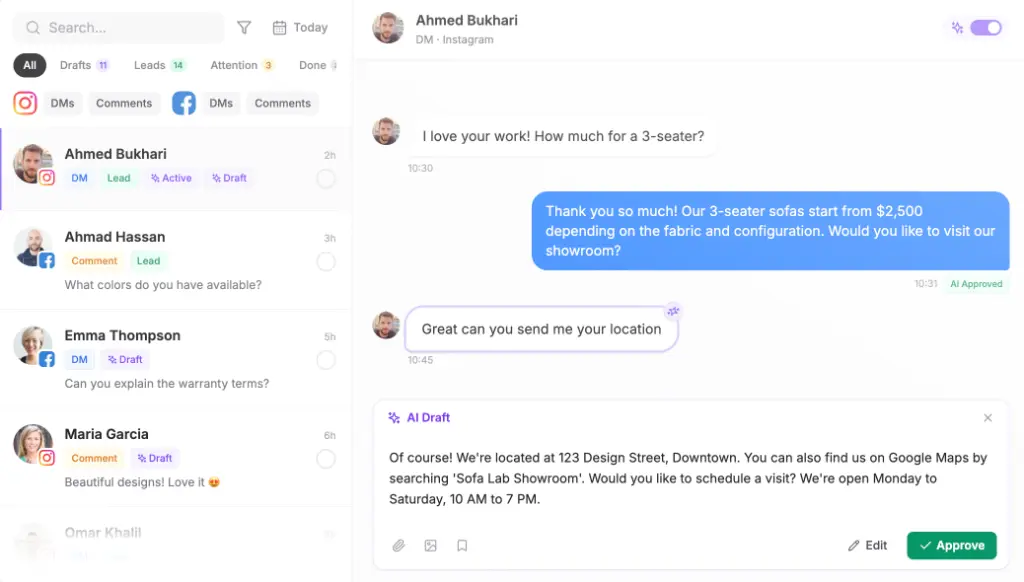
Step 6: Hand hot leads to a person
The agent hands a conversation to a person with its full history when they should take it: a lead who wants a quote, a booking the agent can’t make, an unhappy reply. The Reddit owner put it well enough to repeat in my words: the automated message holds the lead, the person closes them.
When someone on the team replies, the agent steps back, so the lead never gets two answers.
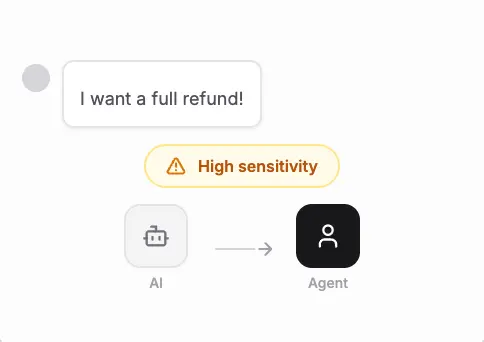
Step 7: Follow up the silent ones
Some leads never reply. Maxbound’s follow-up sequences write a follow-up for each lead and keep going until they book or say no. The Reddit thread suggests a five-email sequence over seven days for leads who never picked up. Whatever cadence you choose, stop when they say no.
A worked example (illustration only)
The numbers here are invented to show the mechanics. A clinic’s lead ad brings in 40 leads on Saturday. The WhatsApp template goes out within minutes of each form. Say 22 reply. The agent books 9 straight into the chat against the clinic’s opening hours, hands 5 asking about financing to the clinic’s coordinator, and puts the 8 undecided into the follow-up sequence. The 18 who never replied get the sequence too. On Monday, the coordinator has 5 conversations to finish, not 40 phone numbers to call.
How do you set up comment-to-DM on Facebook ad campaigns with CRM sync and human takeover?
Lead ads attract comments as well as form fills, and those comments are leads too. In Maxbound, comment-to-DM works per post: each post or ad carries its own DM, sent in varied wording, with a public reply under the comment. The commenter is saved to the CRM, the agent qualifies them in the DM, and a person takes over when they should.
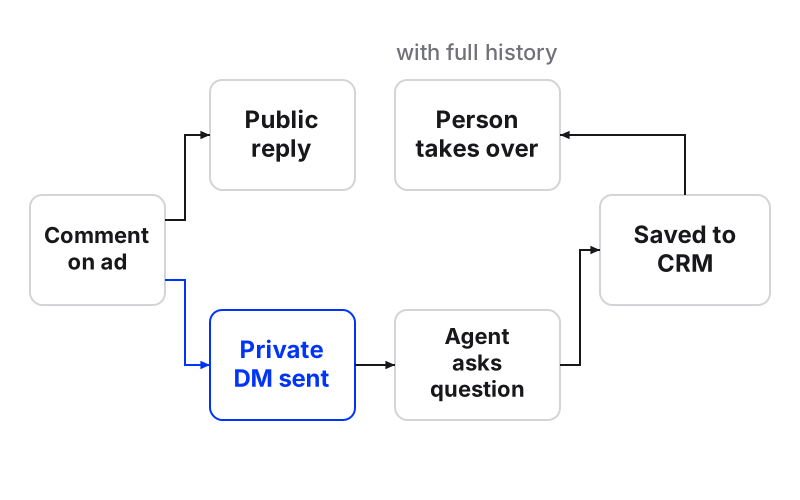
The setup in Maxbound, in order:
-
Open the client’s workspace and brief it: “When someone comments ‘price’ on the whitening ad, DM them the price list and reply publicly that we’ve sent it.”
-
Answer the agent’s questions: follow up if no reply, who owns quotes.
-
Review the workflow and approve it.
-
Watch the first commenters land in the CRM, tagged.
If you’re checking the native route, Meta’s help on Meta Business Suite automations gives the path: Inbox, then Automations, then Create automation. Keyword automations are only available on desktop, custom automations are sent before others, a new automation can take a few minutes to appear, and turning on Meta Business Agent pauses existing automations like away messages and instant replies.
GoHighLevel’s comment automation guide documents its own limits: up to 3 buttons on an Interactive Messenger action, a default 1-minute wait you can edit, a Reply to DM that fails unless there was a conversation in the last 24 hours, and a 7-day window to reply to a comment by DM. If you want the detail on the Instagram side, there’s a full guide on how to reply on Instagram DM to a comment.
Static flow builder or AI agent: which should follow up your leads?
A flow builder sends what you scripted, in the order you scripted it. An AI agent answers what the lead actually asked, from the client’s sources, and still follows the rules you briefed. For lead ads, where people reply with questions you didn’t predict, that difference is the whole game.
| Maxbound | Meta Business Suite automations | GoHighLevel comment automation | |
|---|---|---|---|
| How you set it up | Brief in plain language, agent asks questions, you approve | Inbox, Automations, Create automation | Workflow with actions |
| What the lead gets | Answers from the client’s own sources, in their language | Scripted automations; custom ones sent first | Interactive Messenger with up to 3 buttons |
| Timing | Short reply delay so a burst gets one answer | New automations can take minutes to appear | Default 1-minute wait, editable |
| Limits to know | Approval stays on as long as you want | Keyword automations desktop only; Business Agent pauses others | Reply to DM needs a chat in the last 24 hours; 7-day comment-to-DM window |
| Handoff | To a person with history; agent steps back when they reply | — | — |
What does lead ad follow-up software cost?
Pricing in this space comes in three shapes: per seat, flat tiers, and per workspace. Very few public price pages spell out per-contact or per-lead charges, so check the contact limits on any plan before a big campaign.
| Tool | Pricing model | Starting price |
|---|---|---|
| Maxbound | Per workspace, every feature, 100 AI credits a month each | 7-day free trial, no free plan; price per workspace falls as you add more |
| HubSpot Marketing Hub | Tiers with core seats | Free for up to 2 users; Professional from $800/mo with 3 seats; Enterprise from $3,600/mo with 5 seats |
| Leadpages | Flat tiers | Standard from $49/mo billed annually |
| Intercom | Tiers | Starter from $74/mo |
| Drift | Tiers | Premium from $2,500/mo |
| DIY stack (Zapier, Meta, SMS AI) | Several subscriptions | Under $250/mo, per one user’s report |
The HubSpot figures come from its own marketing pricing page; Leadpages, Intercom and Drift come from a 2026 lead generation pricing comparison. The DIY figure is from a user who automated Meta lead follow-up with Zapier and Mockingbyrd AI over SMS; another commenter there points to Privyr’s WhatsApp Sequences for the same job.
Maxbound is priced per client workspace, which maps to how agencies bill: one retainer, one workspace.
How do agencies keep client leads apart across WhatsApp, Instagram and web chat?
Give each client its own workspace, not a tag or an inbox folder. In Maxbound, each workspace holds that client’s channels, knowledge, contacts, agents and posts, and nothing crosses between clients. Role-based permissions mean each teammate only gets the client workspaces they work on.
You still get one inbox for every client. During a heavy sales weekend, WhatsApp, Instagram, Facebook, website and app chats arrive in that inbox with the agent answering first, and a teammate can be assigned a conversation, take it over and hand it back. That’s the setup lead generation agencies need when they’re judged on buyers handed over, not raw volume.
When a client’s setup works, clone the workspace as the start for the next client in the same industry.
What mistakes kill lead ad follow-up?
-
Downloading leads as a CSV once a day. By then they’re cold.
-
Leaving the phone question off the form, then wondering why WhatsApp can’t reach anyone.
-
Opening with a calendar link instead of a question.
-
Sending every lead to the client’s sales team, including the ones who were just curious.
-
Letting a person and the automation both answer the same lead.
-
Sharing one inbox and one CRM across clients, so a lead from one client’s Page ends up in another’s list.
When shouldn’t you run follow-up this way?
If the client’s buyers expect a phone call or an SMS, this isn’t the setup for them. Maxbound has no voice or SMS agent: conversations run on WhatsApp, Instagram, Facebook Messenger and comments, website chat and in-app chat. The calls in the Reddit playbook stay with the client’s team.
And I wouldn’t try this on a new client without approval switched on. Run Simulations, keep drafts on for the first week, then let the agent answer on its own when you trust it.
Start with one client and one lead form. The 7-day trial is enough to see whether the leads you were calling junk start replying.