How to Handle Arabizi Customer Service in Client DMs
A step-by-step playbook for agencies answering Arabizi (Franco Arabic) DMs: train on client sources, rehearse on real chats, approve replies, route leads.
Arabizi customer service means answering customers who write Arabic in Latin letters and numbers. They reply in the script and dialect they used, from the client’s own sources, with a person stepping in when the agent can’t read the message with confidence. For an agency, that comes down to three jobs: train the agent on each client’s material, rehearse it on that client’s real Arabizi messages, and keep approval on until the replies hold up.
Maxbound runs this inside a separate workspace for each client. You brief the agent in plain language, rehearse it on past conversations, and nothing goes live until someone at your agency approves it. The playbook below is the order I’d follow for a new client whose DMs mix Arabizi, Arabic script and English.
What is Arabizi, and why does it break customer service?
Arabizi, also called Franco Arabic or Arabic chat alphabet, is Arabic written in Latin letters with numerals standing in for sounds English doesn’t have, such as 3 for ع and 7 for ح. The 3 is chosen because it looks like a mirrored version of the Arabic letter ayn.
Arabizi started partly because early electronic systems could not support non-Latin scripts, and it stuck because it’s fast on a Latin keyboard. It’s also casual by nature. Arabizi is never used in formal settings and rarely for long messages, which is exactly why it shows up in DMs, comments and WhatsApp chats rather than in emails.
Arabizi breaks customer service in three places:
-
Numbers stop meaning numbers. A 3 or a 7 inside a word is a letter. A 3 next to a price is a quantity. An agent that guesses wrong quotes the wrong thing.
-
Spelling varies. There’s no single dictionary, so the same word arrives spelled several ways.
-
Scripts mix. One message can hold Arabizi, Arabic script and English product names together.
How should an AI agent handle Arabizi, Arabic script and English in one DM?
An AI agent should reply in the script the customer used, keep the dialect plain, and ask one short question when a word is ambiguous instead of guessing. Mixed messages are normal, not edge cases. A 2025 study of Jordanian social media conversations found English elements are most often inserted into otherwise Arabic utterances, so expect a brand name or a size in English dropped into an Arabizi sentence.
Mirroring the script matters because a customer who wrote in Latin letters is on a phone keyboard set to Latin. A reply in full Arabic script forces them to read in a mode they didn’t choose. Matching the script keeps the conversation feeling like a chat with a person who works there.
What is the best way to train AI on a client’s website and past chats to handle customer service?
The best way is to give the agent the client’s website, files, FAQs and past chats as its sources, then let it answer from those sources rather than from general knowledge. Past chats matter most for Arabizi. They’re where the client’s real customers show how they spell product names, prices and neighbourhoods.
In Maxbound, knowledge training works from the client’s own website, docs, PDFs, FAQs and past conversations. Questions the agent couldn’t answer are gathered as knowledge gaps, so you answer each one once and the agent has it next time. When the client changes its prices, the website is re-checked, so the agent doesn’t quote last month’s numbers in any script.
Two practical rules for the sources:
-
Keep prices, hours and product names in the client’s official form. The agent writes them out correctly; it doesn’t need an Arabizi price list.
-
Include unedited past chats. Cleaned-up transcripts teach the agent a language nobody types.
How to set up Arabizi customer service, step by step
Set up Arabizi customer service for a client
- Collect twenty real messagesPull twenty unedited customer messages from the client's WhatsApp, Instagram and Facebook history, typos and mixed script included.
- Load the client's sourcesAdd the website, FAQs, files and past chats to the client's workspace as agent knowledge.
- Write the script rule into the briefTell the agent to reply in the customer's script and dialect, confirm ambiguous numbers and hand over when unsure.
- Rehearse on real conversationsRun Simulations on the client's past Arabizi conversations before the agent answers anyone.
- Keep approval onHave the agent draft replies for a person to approve or edit until the drafts stop needing changes.
- Set the handoff rulesName who takes refunds, complaints and unreadable messages, so the conversation reaches them with its history.
- Write outbound templates in plain ArabicWrite WhatsApp templates in plain Modern Standard Arabic and let live replies adapt to the customer.
Step 1: Collect twenty real messages
You can evaluate Arabic handling in an hour by collecting twenty real customer messages from the client’s WhatsApp history, unedited, typos and mixed script kept. Sort them by type: price questions, booking requests, complaints, and messages where a numeral could be a letter or a number. That set is your test bench for every later step.
Step 2: Load the client’s sources
Open the client’s workspace and add the website, FAQs, files and past chats as described above. Because each client sits in its own workspace, one client’s spelling habits and prices never leak into another client’s replies.
Step 3: Write the script rule into the brief
Brief the agent the way you’d brief a new hire. Copy this and change the names:
Customers often write Arabic in Latin letters and numbers (Arabizi),
where 3 stands for ayn and 7 for ha. Reply in the script the customer
used: Arabizi to Arabizi, Arabic script to Arabic script, English to
English. Keep replies to two or three short sentences in plain dialect.
If a number could be a letter or a quantity, confirm it in one short
question before quoting a price or booking. Write prices, phone numbers
and product names exactly as they appear in our sources. If you still
can't read the message after one question, hand it to Sara with the
full conversation.
The agent asks what it needs before it builds anything, such as which channels this covers and who owns complaints. Answer those, and the setup waits for approval.
Step 4: Rehearse on real conversations
Simulations rehearse the agent on the client’s real past conversations before it answers anyone. Run your twenty messages through and read every reply against three questions: did it keep the customer’s script, did it read the numerals correctly, and did it answer from the client’s sources?
Step 5: Keep approval on
Set the agent to draft replies for a person to approve or edit before anything is sent. Approval can stay on for as long as you want. The edits your team makes feed the agent’s tone of voice, so the drafts get closer to how the client’s best staff write.
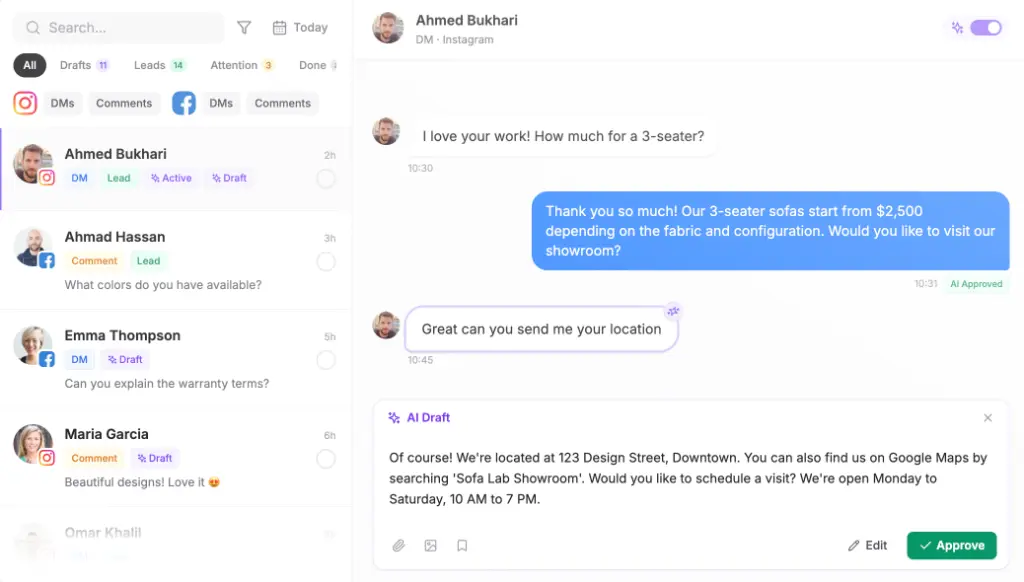
If someone on your team doesn’t read Arabic, the inbox translates a conversation with one button. They can still check that the price and the booking time are right before approving.
Step 6: Set the handoff rules
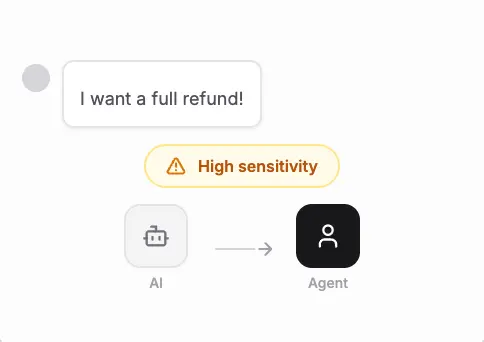
Name the cases a person always takes: refunds, complaints, angry messages and anything still unreadable after one clarifying question. Maxbound hands the conversation over with its full history, so the customer doesn’t repeat themselves in any script.
Two settings help with Arabizi specifically. Reply delay makes the agent wait a few seconds, so a burst of short Arabizi messages gets one answer instead of four. Avoid double replies makes the agent step back when a teammate answers, so the customer never gets two replies in two different scripts.
Step 7: Write outbound templates in plain Arabic
Meta requires a language code for every WhatsApp message template and does not translate template strings or variables for you. For templates you send first, plain Modern Standard Arabic is the safest default because no market finds it strange. Let the live conversation adapt to Arabizi once the customer replies. In Maxbound, templates are written in the client’s workspace and sent to Meta for approval.
Translation layer or native multilingual agent: which costs less?
A native multilingual agent costs less in both time and money than routing every Arabizi message through a separate translation step. Google Translate and Microsoft Translator can convert Arabizi into Arabic script, but a conversion pass adds a step, a delay and a second place for meaning to slip. Human translation isn’t a realistic option for live DMs either.
U.S. Language Services lists Arabic to English translation at $0.12 per word. As an illustration, a 40-word reply would cost $4.80 to translate by hand, before anyone has written the answer. That pricing is built for documents, not chat.
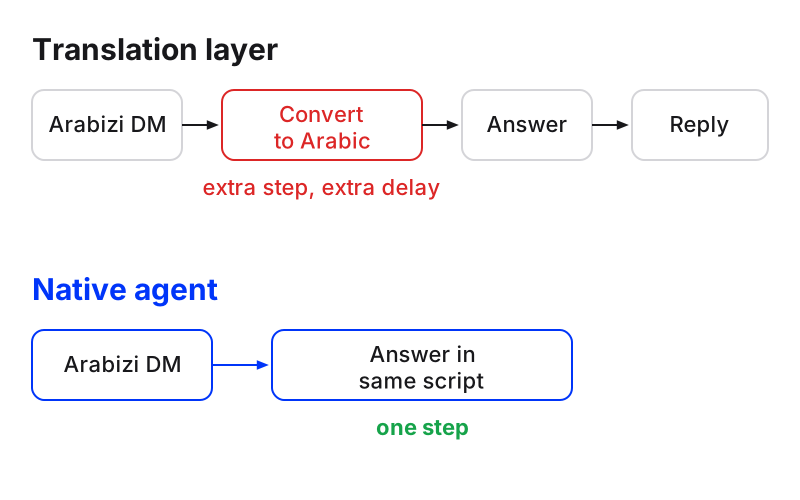
| Approach | How it works | Where it fails |
|---|---|---|
| Native multilingual agent | Reads Arabizi directly and replies in the customer’s script from the client’s sources | Needs rehearsal on real messages before going live |
| Machine conversion layer | Converts Arabizi to Arabic script, then answers | Extra step and delay; meaning can slip on numerals |
| Human translation | A translator renders each message | Priced per word, too slow for live DMs |
On WhatsApp, Meta also charges for messages. Meta charges per message delivered at a rate that depends on the template category and the recipient’s country calling code, and the first 1,000 service replies per business phone number each month are free inside the 24-hour customer service window. Maxbound’s per-workspace pricing includes 100 AI credits a month in each workspace, with every feature included and a 7-day free trial. There’s no free plan.
How does Arabizi customer service connect to a CRM or helpdesk?
Every lead from an Arabizi conversation is saved to Maxbound’s built-in CRM with what they asked for and how close they are to buying, with nobody typing it in. Name, phone and email are collected as fields you list in the brief, and tags and stage stay current as the chat goes on. Each contact keeps a timeline of every message across WhatsApp, Instagram, Facebook, website and in-app chat.
If a client runs its own CRM or helpdesk, the Maxbound API reads and acts on conversations, contacts and the CRM. Webhooks tell the client’s system the moment a lead is saved or a message arrives, and every delivery is logged and can be re-sent. Helpdesk ticketing is usually reached the same way: a unified ticketing API is REST-based, with common authentication, pagination and rate limiting, so a webhook payload can open a ticket on the other side. Agencies above 50 workspaces get integration with their own CRM and tools on the Enterprise plan.
Common mistakes, and when not to automate Arabizi
The mistakes I’d watch for on a new client:
-
Testing on cleaned-up messages. Real Arabizi is messy. Test on the mess.
-
Letting the agent quote a price from an ambiguous numeral. Confirm first.
-
Replying to Arabizi in formal Arabic. It reads like a form letter.
-
Turning approval off after a good week. Turn it off once the drafts stop needing edits on your twenty-message set, not before.
-
Writing outbound templates in Arabizi. Keep them in plain Arabic.
Don’t automate Arabizi for a client whose conversations are mostly complaints, legal questions or medical details. Use draft-and-approve there permanently, or keep a person on it. I wouldn’t try full autopilot on a client whose past chats you haven’t read yet.
Where Maxbound fits for agencies answering Arabizi DMs
Maxbound is the AI operating system for agencies running work for many clients: one workspace per client, one inbox across all of them, agents briefed in plain language, and approval before anything goes live. It suits marketing agencies and ad agencies whose clients get Arabizi, Arabic and English across WhatsApp, Instagram, Facebook, website chat and in-app chat.
It doesn’t cover voice, SMS or Slack, so Arabizi arriving by text message stays outside it. If your clients’ customers mostly write in formal Arabic by email, a general helpdesk may suit you better. If they write the way people actually type on their phones, start the 7-day trial with one client’s twenty messages and see what the drafts look like.