7 Agency WhatsApp Broadcast Mistakes and How to Fix Them
WhatsApp broadcast for agencies: seven mistakes that cost clients reach, money and trust, plus how to create, edit and delete lists and fix each one.
Who on your team is sending the client’s WhatsApp offer this Friday? From whose phone? To which list?
WhatsApp broadcast for agencies works when each client’s list is opted in, sent from that client’s own WhatsApp Business number through official tools, approved before it goes out, and answered the moment replies land. The free broadcast list in the WhatsApp Business app is fine for a small client with a short list. It was never built for an agency sending for ten clients.
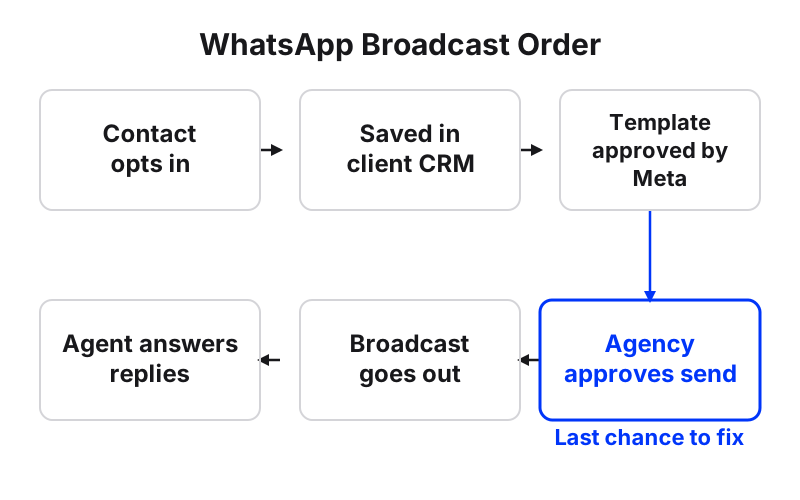
Maxbound runs broadcasting inside each client’s own workspace. The list comes from that client’s CRM. The message template is written in the workspace and sent to Meta for approval. Someone at the agency approves the send. Then the client’s agent answers every reply.
Below are the seven mistakes that break agency broadcasts, why each one hurts, and the fix.
How do you create, edit and delete a WhatsApp broadcast list?
In the WhatsApp Business app, a broadcast list is built from your phone, not from a computer. Every recipient gets the message as a private chat from you, and every reply comes back to you alone.
WhatsApp caps each broadcast list at 256 contacts, only delivers to people who have saved your number in their address book, and doesn’t support broadcast lists on Windows, Mac or Web. Those three limits shape every mistake below.
Create, edit and delete a broadcast list in WhatsApp Business
- Create the listTap Chats, then Business Broadcast (or Tools, then Business Broadcast). Search for or select the contacts you want to add.
- Edit the listFrom the Chats tab, open the broadcast list and tap Audience info to change who is on it. On Android, the three-dot menu, then Broadcast List Info, then Edit Recipients also works.
- Delete the listFrom the Chats tab, tap and hold the broadcast list, then tap Delete. On iOS, you can also go to Settings, Broadcast Lists, tap the i icon next to the list and tap Delete Broadcast List.
The creating, editing and deleting steps above come from WhatsApp’s own guide to creating a business broadcast list. The Android and iOS menu paths are laid out in Zoko’s step-by-step broadcast list guide, which also confirms that WhatsApp Web and Desktop can’t create or edit lists.
Mistake 1: Running client broadcasts from a phone in the office
The mistake. The account manager holds the client’s phone and sends broadcasts from the app.
Why it hurts. You’re capped at 256 per list. Anyone who never saved the number gets nothing. Nobody else on the team can work the list from a laptop. And when that person is off sick, the client’s campaign is off sick too.
The fix. Move any client with a real list onto the WhatsApp Business Platform, connected through official APIs. In Maxbound, the client authorises their own WhatsApp account through a one-time Magic Link, so no password passes through the agency, and the whole team works from the workspace instead of one handset.
When not to bother. A small client with a few dozen loyal customers who already saved the number can stay on the app. Don’t overbuild it.
Mistake 2: Sending without proper opt-in
The mistake. The client hands over a spreadsheet of every phone number they’ve ever collected, and the agency sends to all of it.
Why it hurts. Opt-in is mandatory for WhatsApp broadcasts, and your account quality rating decides how many people you can reach. Block and report signals from people who never asked to hear from the client drag that rating down. The cost lands on the client’s number, not yours.
The fix. Only broadcast to people who opted in, and record where the opt-in came from. Copy this opt-in line for a client’s website chat or booking confirmation:
Want offers and reminders from [Client name] on WhatsApp? Reply YES. You can reply STOP any time.
In Maxbound, every lead from a conversation is saved in the client’s built-in CRM with tags that stay current, so you can tag opt-ins and filter only those contacts into a broadcast list.
Mistake 3: Letting one client’s list touch another’s
The mistake. One shared WhatsApp number, one shared contact sheet, one folder of templates for every client.
Why it hurts. A dental clinic’s patients get a restaurant’s promo. Or a junior sends the wrong client’s offer. That’s a lost client, not a typo.
The fix. One workspace per client. In Maxbound, each client’s workspace has its own channels, knowledge, contacts, agents and posts, and nothing crosses between clients. Role-based permissions give each teammate access only to the client workspaces they work on. If you run marketing for many clients at once, this is the setting that stops the worst mistake before it happens.
Mistake 4: Nobody owns the replies
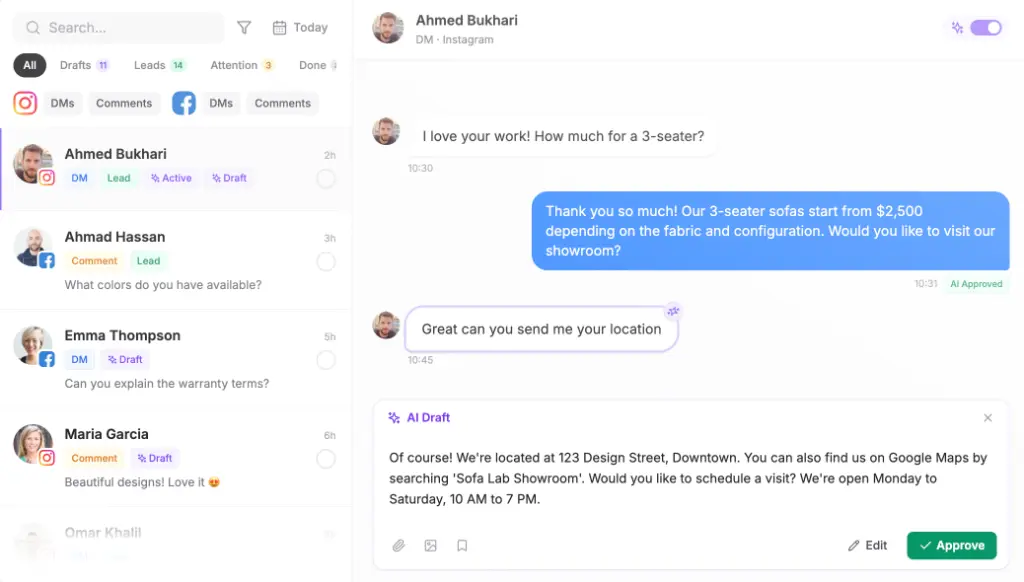
The mistake. The broadcast goes out at 6pm. The replies come in at 6:05pm. Nobody is watching.
Why it hurts. WhatsApp shows each reply as a normal individual message in your Chats screen. A broadcast that lands well creates a wave of one-to-one conversations, and every unanswered one is a buyer asking someone else.
The fix. Plan for the replies before you plan the send. On Maxbound’s broadcasting, the client’s agent answers every reply from the client’s own sources, qualifies the buyers and hands a conversation to a person with its history when it should. If you want a human on every word at first, set the agent to draft replies for a person to approve.
Mistake 5: Thinking a sent broadcast can be taken back
The mistake. The wrong price goes out. Someone says, “just edit it.”
Why it hurts. According to WhatsApp’s guide to business broadcasts and their insights, editing or deleting a broadcast means choosing Create editable copy or Delete broadcast, and neither one reaches people who already received it. The wrong price stays on their phone.
The fix. Check before, not after. In Maxbound, nothing goes live until someone at the agency approves it, and approval can stay on for as long as the agency wants. Use this pre-send checklist:
-
Right client workspace?
-
Right list, opted-in contacts only?
-
Price, date and link checked against the client’s site today?
-
Template approved by Meta?
-
Agent briefed on the offer, so it can answer the replies?
-
Send time agreed with the client?
Mistake 6: Ignoring what each message costs
The mistake. The retainer was priced when broadcasts felt free.
Why it hurts. Since July 1, 2025, WhatsApp Business Platform messages are billed per message, priced by category and country. From October 1, 2026, replies inside the 24-hour window are billed too, after 1,000 free per phone number each month. An agency that broadcasts blindly is spending the client’s money, or its own margin.
The fix. Send fewer, better broadcasts to smaller, opted-in segments. Agree with the client up front who pays the messaging bill, and put it in the proposal as its own line.
Mistake 7: Long messages sent at the wrong hour, reported on read rate alone
The mistake. A 600-character essay sent at 10am on a Tuesday, then a report that says “high read rate.”
Why it hurts. Practitioners at Enchant Agency say concise messages between 50 and 160 characters tend to see higher engagement, and that WhatsApp use peaks during commutes, lunch breaks and the evening wind-down. And a read rate doesn’t tell the client what they got. WhatsApp’s own insights show replies and average read rate. The client wants to know about bookings and leads.
The fix. Keep it short and send when people are on their phones. Copy this retention template and adjust it per client:
Hi [first name], your [service] with [Client] is due this month. Want us to hold a slot for you this week? Reply with a day.
Then report on what the broadcast turned into. Maxbound’s analytics show qualified leads and what people asked about for every client, and a branded PDF report per client can be set as a scheduled automation, such as a monthly report emailed to the client.
| Need | Maxbound broadcasting | WhatsApp Business app list |
|---|---|---|
| Many clients | One workspace per client, nothing shared | One phone per number |
| Team access | Role-based, per client workspace | Whoever holds the phone |
| Who receives it | The list you filter from the client’s CRM | Only contacts who saved the number, 256 per list |
| Replies | Agent answers, hands off to a person | Land in one person’s Chats |
| Before sending | Agency approval, Meta-approved template | Send button |
What should an agency do this week?
Pick one client. Audit their list for opt-ins. Brief the agent on the next offer. Write one short message. Turn approval on. Send to a small segment first and watch the replies.
Maxbound doesn’t send SMS or run voice, and it isn’t the right fit for a business that only ever broadcasts to a few dozen saved contacts. For an agency running WhatsApp for several clients, it’s built for exactly that job. Pricing is per workspace with AI credits included, and you can test it on one client with the 7-day free trial.