How to Set Up Click to Messenger Ads for Clients
Set up click to Messenger ads for a client: objective, conversion location, welcome message, icebreakers, and who answers the conversations the ad starts.
To set up click to Messenger ads, create a campaign in Meta Ads Manager with one of the objectives that support them: traffic, engagement, leads or sales. Then set the conversion location to Messenger, choose placements, and write the welcome message and icebreakers people see when the chat opens.
Before you publish, decide who answers the conversations the ad starts. Click to Messenger ads only pay off when the reply is fast and the lead gets saved. Maxbound covers that half for agencies: the ad can be created from the client’s workspace, and the agent briefed for that client answers, qualifies and saves every lead the ad brings in.
What are click to Messenger ads?
Click to Messenger ads are Facebook and Instagram ads whose button opens a Messenger conversation with the business instead of a landing page. The customer taps, a chat opens, and the first message is already waiting.
There’s one hard requirement on the customer’s side. A person must have Messenger installed on their device to see the ad at all.
You’ll also see older guides tell you to choose the Messages objective, select Click to Message as the ad type, and pick Messenger under Messaging Apps. In the current Ads Manager, you start from traffic, engagement, leads or sales and set Messenger as where the conversation happens.
What does an agency need before setting up the ads?
An agency needs four things in place before building click to Messenger ads for a client: access, a region check, a written offer and someone to answer.
-
Access without passwords. Get access to the client’s Page and ad account through Meta Business Suite. Never ask the client for a Facebook password.
-
A region check. Certain messaging ad campaigns, metrics and features for ads delivered to and from Europe and Japan are unavailable. If the client sells there, check what’s still possible before you promise a campaign.
-
One offer per ad. A price list, a booking, a quote. The welcome message and icebreakers are written around it.
-
Someone, or something, answering. Decide this now, not after launch. More on it in step 6.
Which objective should you choose for messages ads?
Choose the objective by what the client counts as a result. All four objectives work with ads that click to Messenger, so the choice is about what you want Meta to optimise for, not whether Messenger is allowed.
| Client goal | Objective | Use it when |
|---|---|---|
| More people starting a chat | Engagement | The sale happens in conversation, such as clinics, dealerships, estate agents |
| Qualified leads | Leads | You want to ask questions first and filter out poor fits |
| Orders | Sales | The client sells online and tracks purchases |
| Reach for a new offer | Traffic | You’re testing interest and the chat is a secondary step |
If the campaign falls under a special ad category, such as housing or credit, expect fewer options. Special ad category and pharmaceutical campaigns may not have access to all Advantage+ features.
How to set up click to Messenger ads, step by step
How to set up click to Messenger ads for a client
- Create the campaignIn Meta Ads Manager, create a campaign with the traffic, engagement, leads or sales objective.
- Set the conversion locationAt ad set level, choose Messaging apps and select Messenger, or Instagram if the client's conversations live in Instagram Direct.
- Choose placementsUse feed placements and leave out right side placements, which are not supported.
- Write the message templateReplace the default greeting with a welcome message under 300 characters and add icebreakers with titles under 80 characters.
- Qualify with a leads templateFor lead campaigns, ask questions first so you can disqualify poor fits.
- Decide who answersConnect the Page to an inbox where an agent or a person replies within minutes and saves every lead.
Step 1: Create the campaign and pick the objective
Open Ads Manager inside the client’s ad account and create a new campaign. Pick the objective from the table above. Name the campaign with the client and the offer, for example “Clinic | Check-up offer | Messenger”, so it reads clearly in reports when you run twenty clients.
Step 2: Set the conversion location to Messenger or Instagram Direct
At the ad set level, choose messaging apps as the conversion location and select Messenger. If the client’s customers live on Instagram, click to Instagram Direct ads follow the same structure with Instagram as the destination, and the chat opens in the client’s Instagram inbox.
Pick one destination per ad set while you’re learning what works for a client. Splitting the same budget across destinations on day one makes the results hard to read.
Step 3: Choose placements
Right side placements are not supported for these campaigns, so leave them out. Feed placements on Facebook and Instagram are the safe default.
If you plan to use the Messenger Inbox placement, check the client’s market first. Ads in the Messenger Inbox are unavailable in the United States, Canada, Australia and France.
Step 4: Write the message template
The message template is what the customer sees the moment the chat opens. Skip it, and the default message a customer sees is “Hello! Can I get more info on this?” That’s vague, and it hands the business a question it has to answer from scratch.
Write your own, inside Meta’s limits:
-
Message text: 300 characters or fewer.
-
Icebreaker titles: 80 characters or fewer.
-
Icebreaker responses: 300 characters or fewer.
The template below is an illustration for a dental clinic client. Copy the structure and swap the offer.
Every icebreaker should be a question your client’s customers actually ask. Pull them from the client’s last month of DMs, not from a brainstorm.
Step 5: Qualify with a leads template
For the leads objective, use the Generate Leads template. It lets you ask questions first and disqualify people based on their answers. For a lead-generation agency, that’s the difference between handing a client buyers and handing them a list of names.
Keep it to two or three questions. Budget, timeline, location. Anything longer and people stop answering.
Step 6: Decide who answers before you publish
Ads that start conversations create a promise: someone is there. Customers don’t wait long for brands on social media.
According to Manychat, 40% of consumers who reach out to a brand on social media expect a response within one hour. A click to Messenger ad that runs over a weekend with nobody on the inbox fails that test for every chat it starts.
How do you answer the conversations click to Messenger ads start?
Connect the client’s Facebook Page and Instagram account to an inbox where every chat from the ad gets an answer within minutes and every lead is saved. For an agency, that inbox has to keep each client separate.
Maxbound gives each client its own workspace. The client authorises their own Facebook and Instagram accounts through a one-time Magic Link, using Meta’s official login, so no password ever passes through the agency. Maxbound is an approved Meta Tech Provider and connects only through official APIs.
Inside the workspace, you brief the agent in plain language, the way you’d brief a new hire: what the offer is, which questions qualify a lead, when to hand over. The agent works from the client’s own website, files, FAQs and past chats. It asks for the fields you list, such as name and phone, at the start, after its first reply or at the end, and saves them to the built-in CRM with what the person asked for.
When a conversation needs a person, the agent hands it over with its full history. Your teammate doesn’t ask the customer to repeat themselves.
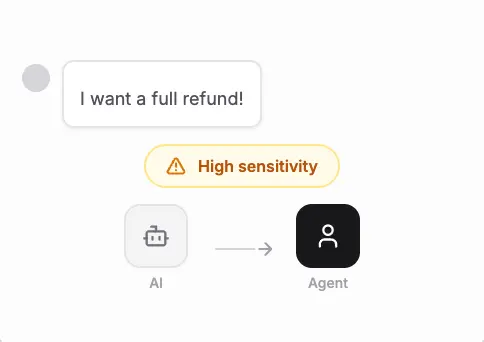
During a peak sale, two settings matter. Reply delay makes the agent wait a few seconds, so a customer who sends three messages in a row gets one answer. Avoid double replies makes the agent step back the moment someone on the team replies, so the customer never gets two answers.
You can also create the ad itself from the workspace. Maxbound creates Facebook and Instagram ads that start conversations on Messenger, Instagram or WhatsApp, or collect leads with a lead form, and shows spend, results, the top ads and the leads they brought in one place for that client. That’s the view advertising agencies need when a client asks what the money did.
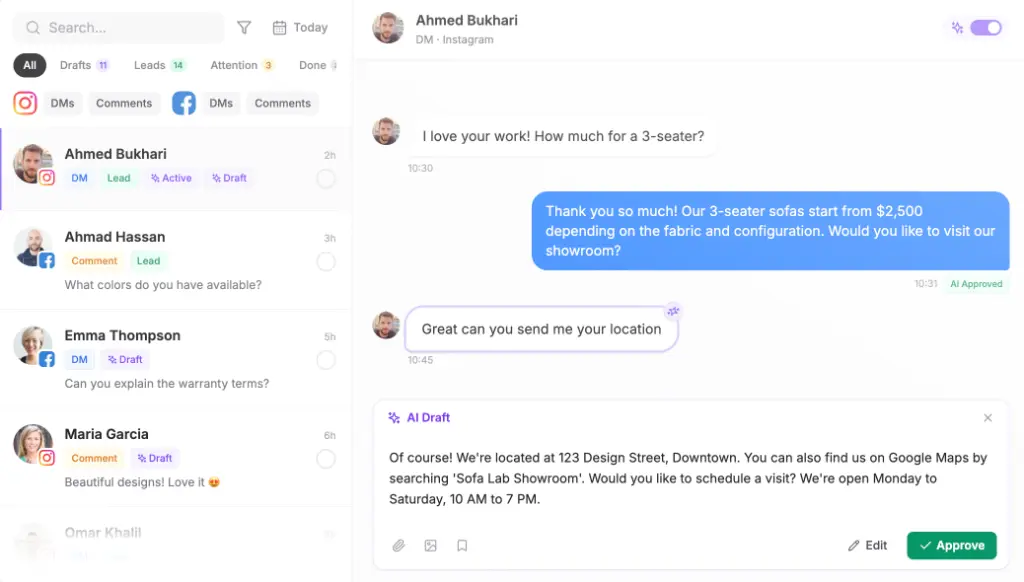
If you’re not ready to let the agent reply on its own, turn on drafts. The agent writes each reply and a person approves or edits it before it’s sent. Approval can stay on for as long as you want.
How can you rehearse the agent on past ad conversations before launch?
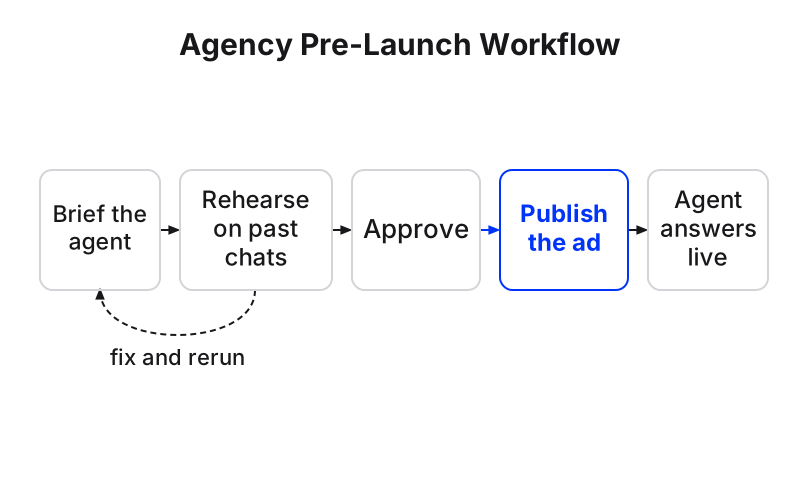
Run the agent against real conversations from the client’s previous campaigns before it answers anyone. In Maxbound, Simulations replay real past conversations through the agent and show what it would have said, without sending anything.
Read those answers the way the client would. Did it quote the right price? Did it ask the qualifying questions? Did it hand over when someone was angry or asked for something unusual? Fix the brief, run it again, then approve.
This matters most on a new offer. The agent might know last month’s prices perfectly and still fumble a question about a promotion it’s never seen. A rehearsal catches that before the ad spend does.
What about the comments under the ad?
Click to Messenger ads still collect public comments, and those need the same care as the chats. Some are buyers asking “how much?” in public. Some are spam or rivals pitching under your client’s ad.
In the same workspace, comment-to-DM turns a comment on the ad into a private message and a saved contact, with a short public reply under the comment. Comment moderation hides spam, abuse and rival pitches from every post and ad, so the ad isn’t selling for someone else.
Why is the cost per message high, and why does delivery drop?
High cost per message usually points to a mismatch between who sees the ad and what the chat offers. Before you change the budget, check these:
-
The welcome message is still the default. A generic greeting gets generic chats that go nowhere.
-
The icebreakers don’t match the creative. If the ad shows a price and the icebreakers ask about something else, people tap and leave.
-
Placements are wrong for the market. Right side placements aren’t supported, and Messenger Inbox ads don’t run in the United States, Canada, Australia or France.
-
The audience is in Europe or Japan. Some messaging campaigns and metrics are unavailable there, which can look like a delivery problem.
-
Chats go unanswered. Judge the campaign by the leads saved, not the conversations started. A cheap conversation nobody answered is still wasted.
When should you not run click to Messenger ads?
Skip click to Messenger ads when nobody, human or agent, can answer within the hour. Skip them when the client’s customers don’t use Messenger or Instagram, because the ad only shows to people with Messenger installed. And be careful with special ad categories, where some Advantage+ features may be missing.
One honest limit on our side: Maxbound answers on WhatsApp, Instagram, Facebook Messenger and comments, website chat and in-app chat. If a client wants ads that lead to a phone call or an SMS, Maxbound isn’t the tool for that conversation.
For everything else, set the ad up in Ads Manager or the workspace, brief the agent, rehearse it, and approve it. Then the ad does what it was paid to do: start a conversation that ends with a saved lead.