How to Take Bookings in Instagram DMs for Clients
A step-by-step playbook for Instagram DM booking: reply scripts, two-slot offers, handoff rules and approval settings for agencies running client accounts.
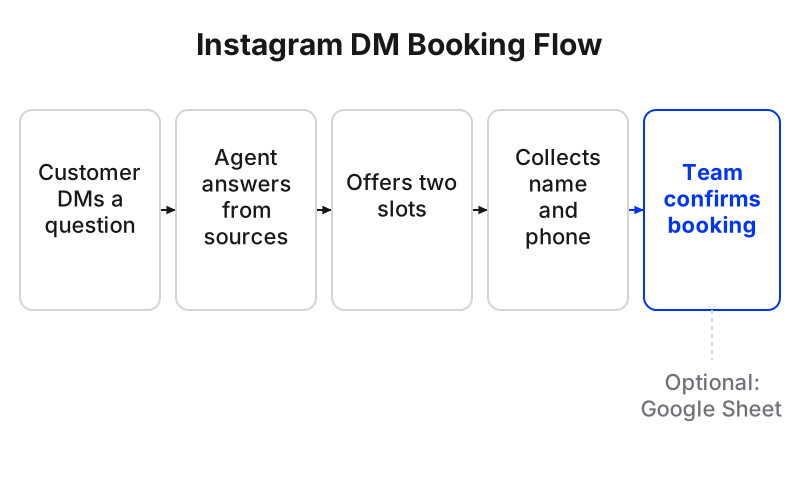
To take bookings in Instagram DMs, answer every booking question the same day, end each reply with two specific time slots, collect the customer’s name and phone number in the chat, and confirm the slot before the conversation ends. For an agency, that means one agent per client, trained on that client’s services and opening hours, with a person approving bookings until the agent has earned your trust.
Maxbound does this inside each client’s own workspace. The agent takes, changes and cancels bookings in the Instagram conversation against each branch’s opening hours, and your team confirms or cancels them in Maxbound. Bookings can also land in a connected Google Sheet if the client lives in spreadsheets.
Speed matters more than anything else on this list. When someone messages a salon on Instagram or WhatsApp to book, they are usually messaging other salons too, and they book with whichever one replies first. For an agency running DMs for several salon clients, a slow reply on one account means a lost booking for that client. Your client’s Saturday slot goes to whoever answers first.
Why book appointments in Instagram DMs instead of a bio link?
Booking in the DM beats a bio link because the customer is already talking to you. Sending them off to find a link adds a step, and every step loses people.
CalendarApp, which sells a DM booking tool, puts numbers on the gap: bio link booking pages usually turn 5 to 15% of clickers into bookings, while DM booking conversations turn 35 to 60% of incoming questions into bookings when they’re set up well. Treat those as vendor figures, not a promise. The direction is still clear.
| Approach | What happens | Where it breaks |
|---|---|---|
| AI agent booking in the DM (Maxbound) | Agent answers, offers slots, collects details, books against opening hours; team confirms | Needs good knowledge and clear rules per client |
| Manual replies plus chat labels | Staff answer by hand and label chats as Booked | Slow replies, missed evening messages |
| Bio link or Book Now button | Customer leaves the DM to book on a page | Customers who DM rarely go looking for the link |
The manual route still has its place for a very small client. On Instagram you can mark a chat as Booked and change it later by swiping left, tapping More and then tapping Edit label. That works at ten messages a week. It falls apart at a hundred, or at 11pm.
What do you need before you automate Instagram DM booking?
Instagram DM automation needs a professional account. The client has to switch to a Business or Creator account linked to a Facebook Page before any tool can answer their DMs through Meta’s official APIs.
The same rule applies to the native button: Instagram’s Book Now button is available for business and creator accounts, and personal accounts can’t use it. Keep the button if the client has one. The DM agent catches everyone who messages instead of tapping.
Before you brief anything, collect this from the client:
-
Services, with prices and how long each one takes
-
Opening hours for every branch, including holidays
-
Which services need a person to book (consultations, long treatments, groups)
-
The details staff need for a booking: usually name and phone number
-
Cancellation and reschedule rules
-
Who on the client’s side owns confirmations
How to set up Instagram booking automation, step by step
The setup below runs in one client workspace. Do it once, test it, then clone the workspace for the next client of the same type.
Set up Instagram DM appointment booking for a client
- Connect the accountSend the client a Magic Link so they authorise their Instagram professional account into their own Maxbound workspace.
- Train the knowledgeAdd the client's website, service menu, price list, FAQs and past chats as the agent's sources.
- Set opening hours per branchEnter each branch's hours so the agent only offers slots that exist.
- Brief the booking agentWrite the booking rules in plain language, including two-slot offers and which services go to a person.
- Choose the details to collectList name and phone as required fields and choose when the agent asks for them.
- Rehearse with SimulationsRun the agent on real past conversations and fix what it gets wrong.
- Approve and go live with drafts onKeep replies as drafts a person approves until the agent books cleanly, then let it answer on its own.
Step 1: Connect the client’s account
Create a workspace for the client and send them the Magic Link. Each client gets its own channels, knowledge, contacts and agents, and nothing crosses between clients, so a dental clinic’s hours never leak into a barber’s replies.
Step 2: Train the agent on the client’s sources
Point the agent at the client’s website, files, FAQs and past chats. Questions it can’t answer are gathered as knowledge gaps, so you answer each one once instead of every time. When the client changes prices on their site, the website is re-checked.
Step 3: Set opening hours for every branch
The agent books against each branch’s opening hours. Get these right before anything else. An agent that offers a Sunday slot to a branch that’s closed on Sunday costs the client a customer and you a phone call.
Step 4: Brief the booking agent in plain language
Brief it the way you’d brief a new receptionist. In Maxbound you can do this inside the app or from Claude, ChatGPT or Codex through the MCP server. A brief might read:
“When someone asks about prices or availability, answer the question, then offer two specific slots at the branch nearest them. Ask for name and phone before confirming. Hand consultations, group bookings and complaints to Sara.”
The agent asks what it still needs, such as which branch is the default, then builds the setup. Nothing goes live until someone at your agency approves it.
Step 5: Choose which details to collect
List the fields the client needs, such as name and phone, and choose when the agent asks: at the start, after its first reply, or at the end. For bookings, after the first reply works best. Asking for a phone number before answering “how much?” feels like a form.
Every answer is saved to the contact in the built-in CRM, with what they asked for and how close they are to booking.
Step 6: Rehearse before it answers anyone
Run Simulations on real past conversations from the client’s inbox. Look for three failures: slots outside opening hours, a booking confirmed without a phone number, and a consultation the agent should have handed over.
Step 7: Go live with drafts on
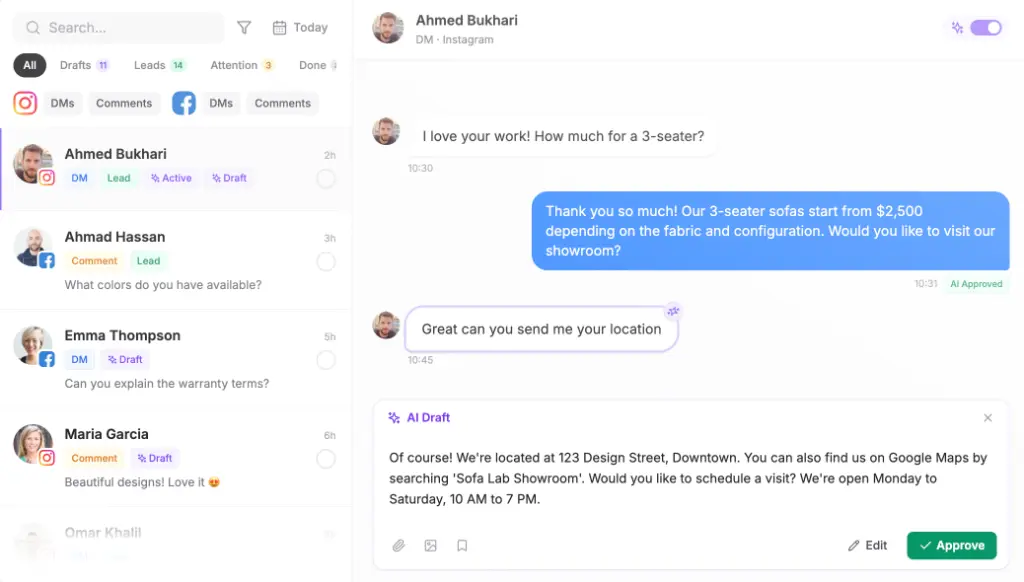
Set the agent to draft replies for a person to approve. Your team approves or edits each booking reply in the inbox, and the agent learns the brand’s tone from those edits. Switch to autonomous replies only when a week of drafts goes out unchanged.
What should an Instagram DM booking reply say?
A booking reply should answer the question asked, then propose two specific times. Naiva found that a reply ending with two specific slots converts on average 2 to 3 times better than one that only gives a price, and that “let me know when suits you” forces the customer to do all the work again.
Copy this script into the agent’s brief and adjust per client:
-
Question: “How much is a full colour?”
-
Reply: “A full colour is [price] and takes about [duration]. I can book you Thursday at 4pm or Saturday at 11am at our [branch] studio. Which works better?”
-
After they pick: “Great. Can I get your name and phone number to hold Thursday at 4pm for you?”
-
Confirmation: “You’re booked for Thursday at 4pm at [branch]. If anything changes, just message here and I’ll move it.”
One practical limit: when a business messages someone who doesn’t follow it, Instagram sends a message request that can only contain text until it’s accepted. Keep slot offers in plain text, never in an image of a price list.
When should the agent hand a booking to a person?
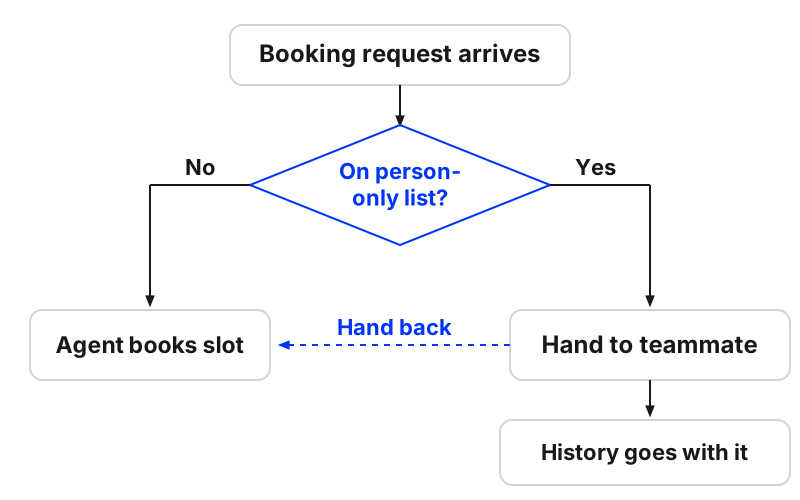
The agent should hand a booking to a person whenever the decision needs judgement the client hasn’t written down. Write the handoff rules as an SOP before go-live, not after the first complaint.
Use this handoff checklist:
-
The service is on the client’s “person only” list
-
The customer asks twice for something the agent can’t find in its sources
-
The customer is upset, mentions a bad experience or a medical concern
-
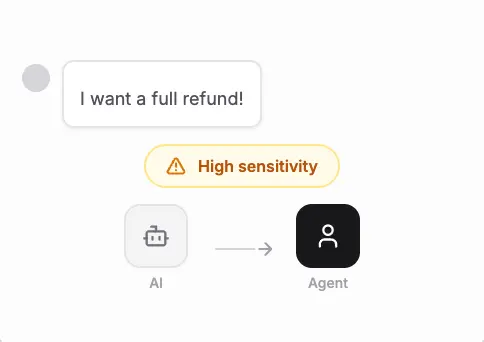
The customer wants to pay, discuss a refund or share card details
-
A group or multi-service booking that needs a staff call
When the agent hands over, the conversation goes to the named teammate with its full history, so nobody asks the customer to repeat themselves. When the teammate replies, the agent steps back so the customer never gets two answers, and the teammate can hand it back once the tricky part is done.
How do you stop answering repetitive DMs across many client pages?
You stop answering repetitive DMs and comments across several client Instagram and Facebook pages by giving each client an agent that handles the predictable questions, and routing everything else to one inbox your team watches. Most of what fills those inboxes is the same few questions about price, hours and availability, which is exactly what a trained agent answers well.
In Maxbound, every client’s WhatsApp, Instagram, Facebook, website and app chats sit in one inbox, with the agent answering first. Any conversation can be assigned to a teammate, taken over and handed back to the agent, noted for the team and translated with one button. Once one client’s booking setup works, clone that workspace as the starting point for the next client in the same industry, then swap in the new client’s hours, prices and sources.
That’s the part that matters for marketing agencies running every client from one place: you build the booking playbook once and reuse the structure, not the answers.
Comment-to-DM fits the same flow. When someone comments “price” or “available?” under a client’s post, Maxbound replies publicly, opens a DM and the booking conversation starts there, with the contact saved to the CRM.
What are the common mistakes with Instagram DM appointment booking?
The common mistakes are slow replies, vague availability, missed evening messages and no reminder. CalendarApp lists relying only on the bio link, slow replies, missing messages at night and skipping reminders as the habits that kill Instagram bookings.
Agency-specific ones to add:
-
Turning the agent loose without Simulations, then finding it booked a closed branch
-
Briefing one agent for two clients to save time, which mixes prices and hours
-
Asking for every detail up front, so the chat reads like a form
-
No follow-up for people who picked a slot but never confirmed
For the last one, brief a follow-up for anyone who goes quiet: one message the next day, then stop. You can also brief appointment reminders as a scheduled automation in the same workspace.
When should a client not book in Instagram DMs?
Don’t take payments or card details in DMs. If the client needs deposits, send customers to the client’s own payment page and keep card numbers out of the conversation entirely; add “asks to pay” to the handoff list.
Skip DM booking for services that need a long intake, such as a medical consultation with history forms. Let the agent answer questions and hand those to a person.
And be clear on scope. Maxbound books in Instagram DMs, Facebook Messenger, WhatsApp, website chat and in-app chat. It doesn’t take bookings by phone, voice or SMS. If you’re weighing ManyChat Instagram DM automation against other tools, ManyChat suits a single brand that wants to draw keyword-triggered flows itself; Maxbound fits the agency running many clients’ conversations, with a workspace per client and a person approving what goes out.
Pricing is per workspace with AI credits included, and every account starts with a 7-day free trial. Set up one client’s booking agent this week, keep drafts on, and see how many Saturday slots it fills before you clone it.