24/7 Social Media Replies: Covering Nights and Weekends
Three ways to answer a client's comments and DMs when your team is offline: a rota, scheduled checks or an AI agent. What each costs, what goes wrong, and how
There are three ways to answer a client’s comments and DMs when your team is offline: put people on a rota, check the inbox at fixed times, or let an AI agent answer and pass the rest to the morning. A rota is the most expensive and the least reliable at 3am. Scheduled checks are cheap but leave hours-long gaps. An agent answers in seconds but has to be told clearly what it may not decide.
Most agencies end up combining them: an agent answers routine questions all night, one person is reachable for anything urgent, and the team starts the day with a short review of what happened. This post shows how to set that up for one client, what the agent should and shouldn’t answer after hours, and how to show the client it’s working.
Why the evening matters more than it looks
Customers don’t keep office hours, and neither do the comments under a client’s ads. When we read 1,788 public comments on the Instagram and Facebook posts of 178 businesses, more than half of the comments nobody answered had arrived outside 9am to 6pm local time (Maxbound comment response study).
Even during the day, waits were long: when a page did answer, the typical wait was 2 hours 42 minutes. And 29% of the comments left unanswered were someone asking to buy, asking a question or complaining.
There is also a deadline that isn’t obvious. A tool replying through Meta’s API has 24 hours from a customer’s message. A DM sent at 8pm on Friday and picked up at 9am on Monday is past that window for anything automated, and the person has usually bought somewhere else by then.
Three ways to cover the hours
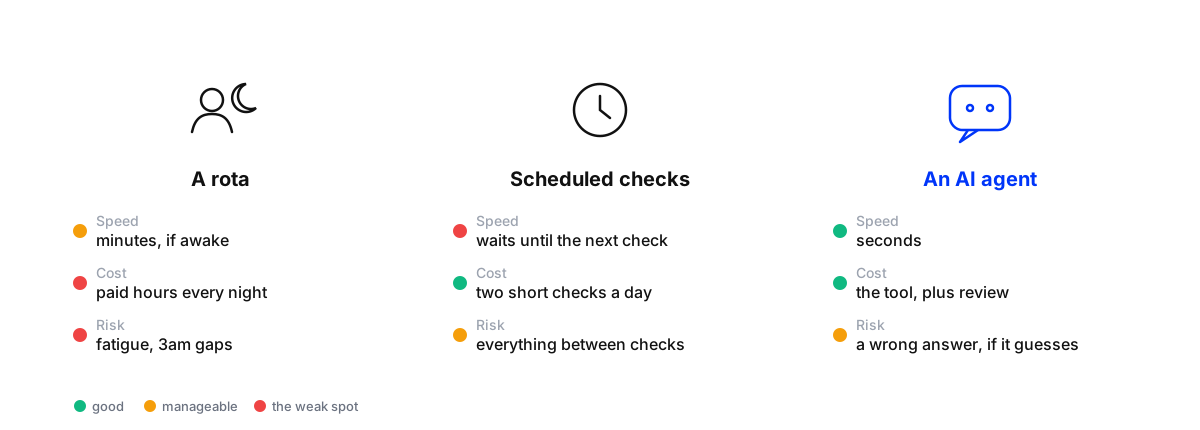
The agent’s weakness is the one you can design out: decide what it answers, what it holds, and who it wakes up. The rota’s weaknesses don’t go away with planning.
A night on one client account
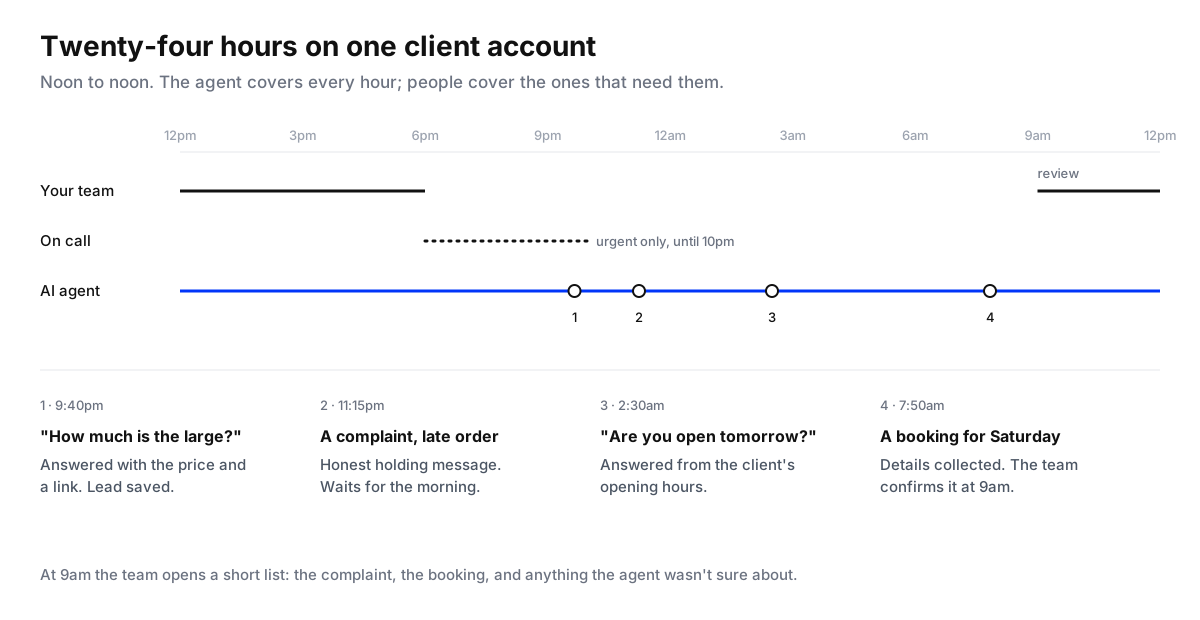
Here’s how the combined setup behaves on a typical evening:
- 9:40pm, “How much is the large?” The agent answers with the price and a link, and saves the person as a lead.
- 11:15pm, a complaint about a late order. The agent replies with a short, honest holding message (“Sorry about this. Our team will look at your order first thing tomorrow.”), and the conversation goes to the morning queue with the thread attached. It doesn’t promise a refund.
- 2:30am, “Are you open tomorrow?” Answered from the client’s opening hours.
- 7:50am, a booking request for Saturday. The agent asks the questions it needs, then saves the booking request for the team to confirm.
At 9am the team doesn’t open a feed of overnight messages. It opens a short list: the complaint, the booking to confirm, and anything the agent wasn’t sure about.
What the agent answers after hours, and what waits
Write this down for every client before switching anything on. It’s the most important document in the setup.
Answer straight away: prices, stock and sizes, opening hours and locations, delivery areas and times, how to book or order, anything with one correct answer in the client’s own material.
Answer with a holding message, then hand off: complaints, late or wrong orders, refund requests, anything angry. A holding message buys you the night without promising anything.
Never answer, hand off at once: medical, legal or financial advice, press enquiries, anything about a staff member, threats or safety concerns. If it’s urgent, this is what the on-call person is for.
Hide: spam, abuse and competitors dropping links, so they don’t sit under the post all night.
Testing is covered in how to test an AI agent before it answers customers, and the rules for handing off are in smart escalations for AI agents.
Setting it up for one client
Set up night and weekend coverage for a client
- Measure the gapFor one week, count the comments and DMs that arrive outside office hours and how long each waited. This is the number that justifies the change to the client.
- Write the after-hours rulesList what the agent answers, what gets a holding message, what it never answers, and what it hides. Agree the list with the client.
- Train the agent on the client's factsLoad the website, price list, policies, opening hours, delivery terms and past conversations, so answers come from the client's own material.
- Test it on real past messagesReplay a week of the client's real comments and DMs without sending anything, including a bad day, and fix every wrong answer at its source.
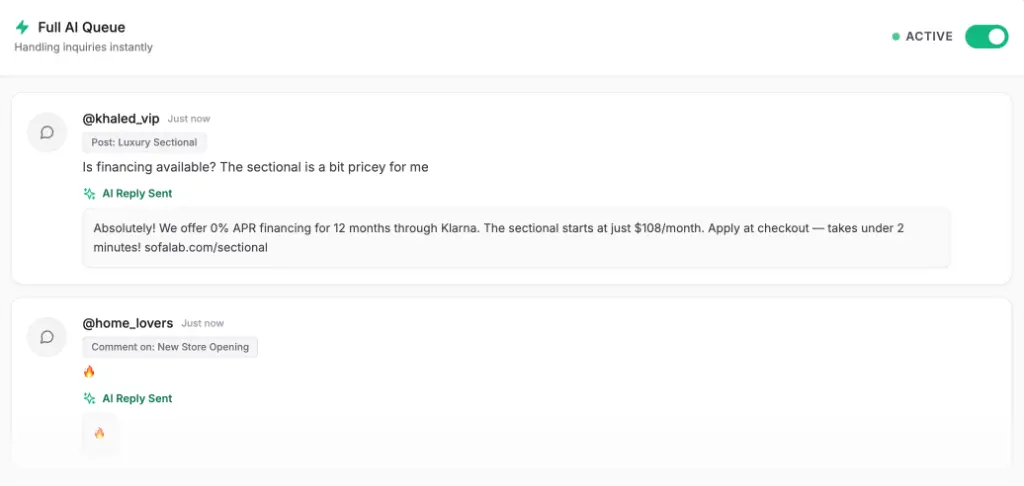
- Start with drafts in the eveningFor the first week, let the agent draft evening replies for a person to approve before bed and first thing in the morning. Then let it send routine answers on its own.
- Name the on-call personDecide who gets told about urgent escalations, until what time, and how. Everything else waits for the morning review.
- Review every morningSpend fifteen minutes on the escalations, the held conversations and anything the agent got wrong. A question it keeps handing off is a fact missing from its knowledge.
Starting with approved drafts is the safest route to letting it run alone; setting up a human-in-the-loop workflow covers how to decide when it’s ready.
Make the replies feel like the client
Two settings matter more at night than during the day. A reply delay of a few seconds lets someone who sends three quick messages get one answer instead of three. And when a team member replies in a conversation, the agent should step back so the customer isn’t answered twice: in Maxbound, the agent pauses for an hour after a person replies.
The voice matters too. The agent learns each brand’s voice from the edits and approvals your team makes, so the first weeks of review are also training (self-improving AI that learns your brand).
Weekends, holidays and other time zones
The same setup covers the weekend, which is often the busier problem: two full days where scheduled checks leave the longest gaps. Write separate rules for public holidays and sale days, when volume jumps and complaints about delivery arrive with it.
For clients selling into several countries, “after hours” depends on whose hours. Set the review time by the client’s main market, and check that the agent answers in the language the customer wrote in. In the Gulf, customers often switch between Arabic and English in one conversation, so include mixed-language messages in the test set.
Show the client it’s working
Add three lines to the monthly report for each client: comments and DMs answered outside office hours, the median time to a first answer at night, and leads saved overnight. Include one real overnight exchange with the name hidden. It’s the clearest way to show what a client is paying for, and it’s the service most agencies can’t offer with a team alone.
Where Maxbound fits
Maxbound is an AI operating system for agencies. Its AI agents answer comments and DMs on Instagram and Facebook, plus WhatsApp, website chat and in-app chat, at any hour, trained on each client’s own material. They can run in a mode where a person approves each reply, or answer on their own and pass conversations that need a person to your team in one inbox, with the thread. You can rehearse a client’s agent on real past chats in simulations before it answers anyone. Each client is its own workspace with its own report. More on how agencies run it is on the marketing agencies page.