Why an AI Operating System for Agencies Starts Per Client
An AI operating system for agencies gives each client its own workspace, plain-language briefs and human approval. Why per client beats one central AI brain.
How many client logins did your team open before lunch today? Every one of them is a place where a reply gets missed, a brand voice gets mixed up, or one client’s price list ends up in another client’s DM.
An AI operating system for agencies is one platform where each client runs in its own workspace, with its own channels, knowledge, contacts, agents and posts, and where work is briefed in plain language and approved by a person before it goes live. Maxbound is built that way. Agents answer, qualify and follow up on each client’s conversations, the agency’s team works alongside them in the same place, and a workspace that works can be cloned as the starting point for the next client.
The pressure behind the category is real. AI is now part of how most advertising agencies work, yet many agency teams still name inefficient processes among their biggest challenges, and many say their profits are shrinking. Adding AI tools has not, on its own, changed how the work for each client gets done.
So adoption isn’t the gap. Agencies already use AI. The gap is where the AI sits, and most of the advice puts it in the wrong place.
What is an AI operating system for agencies?
An AI operating system for agencies is the layer where client work is briefed, built, approved and run, by people and AI agents together. It replaces the pile of logins, spreadsheets and copy-pasted prompts with one structure that every client follows.
In Maxbound, that structure has four parts:
-
A workspace per client. Each client gets its own channels, knowledge, contacts, agents and posts. Nothing crosses between clients.
-
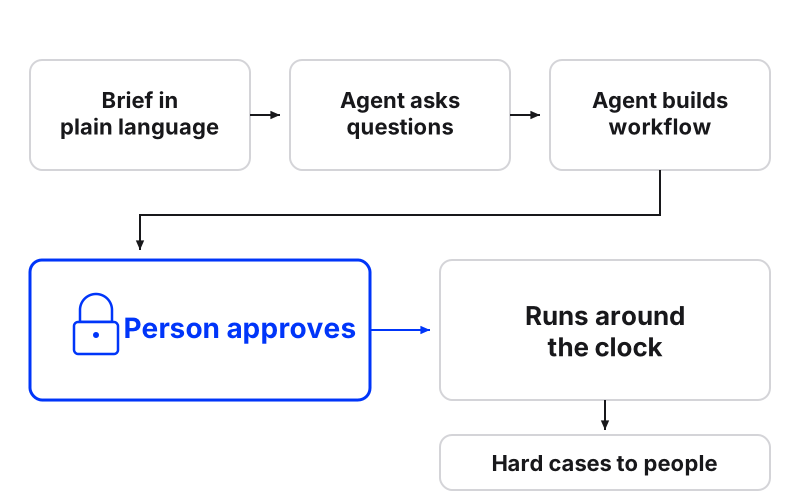
Plain-language briefs. You brief work the way you’d brief a new hire, inside Maxbound or from Claude, ChatGPT or Codex. The agent asks what it needs to know, then builds the agent, the automation or the schedule.
-
An approval gate. Nothing goes live until someone at the agency approves it, and approval can stay on for as long as the agency wants.
-
A team layer. Team chat and tasks for the agency’s own people, with Maxbound’s agents and the team’s Claude and ChatGPT agents working in the same channels and projects.
Inside each client workspace, the agency runs the actual client work: one inbox for WhatsApp, Instagram, Facebook, website chat and in-app chat; a built-in CRM that saves every lead from the conversation; comment-to-DM-to-CRM; comment moderation; follow-up sequences and broadcasts; bookings taken in the chat; Facebook and Instagram ads; post scheduling to Instagram, Facebook, TikTok and YouTube; and branded PDF reports per client.
Why the central AI brain is the wrong place to start
The popular advice says an agency should build one central AI that sees everything: every client, every channel, every number, joined into one graph. For agency finance, that advice is right. Profitability, utilisation and retainers are agency-level questions and should be answered at agency level.
For client-facing work, a single brain is the wrong design. An agent answering a dental clinic’s WhatsApp has no business knowing a car dealership’s discount rules. When knowledge is pooled, context bleeds, and the agent sounds confident while quoting the wrong client.
Three problems follow a central design:
-
Context bleed. One client’s prices, offers or tone leak into another client’s replies.
-
Muddy permissions. You can’t give a freelancer access to one client without exposing the rest.
-
No unit to copy. When everything lives in one place, there’s no clean workspace to clone when you sign client number eleven.
The better order: isolate first, then report across. Maxbound’s inbox shows the team what needs attention across every client, while each agent works only from its own client’s sources.
Why does every client need its own agency workspace?
Every client needs its own agency workspace because client data, client IP and client liability are separate, and your system should be too. A workspace per client is the simplest way to prove to a client that their customers’ messages never touch anyone else’s.
Maxbound handles access through official channels. Maxbound is an approved Meta Tech Provider and connects only through each platform’s official APIs and login (OAuth); it never asks for, sees or stores a social password. A client authorises their own accounts through a one-time Magic Link, so no password passes through the agency. Data is encrypted in transit (TLS, not end-to-end), Maxbound is GDPR compliant, and the team gets role-based permissions, with each teammate given access only to the client workspaces they work on.
Knowledge needs the same discipline. Each Maxbound agent answers from the client’s own website, files, FAQs and past chats, and the questions it couldn’t answer are gathered as knowledge gaps. Keep that knowledge fresh, because outdated context can produce confident but incorrect answers. Maxbound re-checks the website when the client changes its prices, but the agency still owns the review.
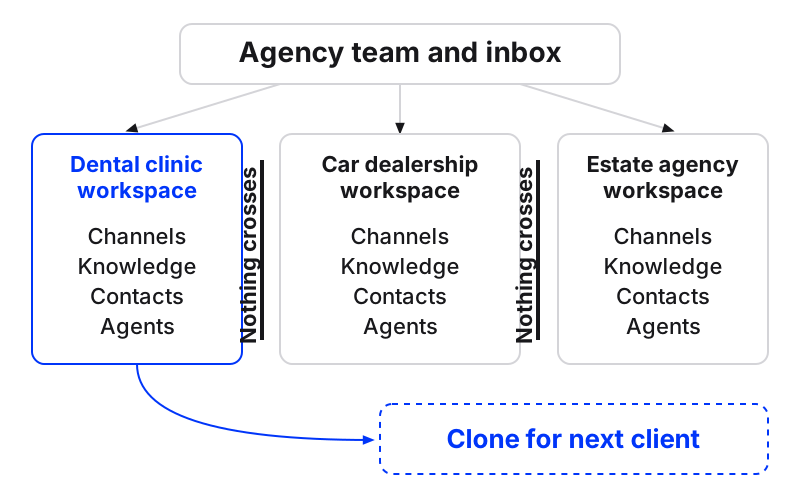
Once one client’s workspace runs well, cloning it is the payoff. The channels and accounts get reconnected by the new client through their own Magic Link, and the agents, automations and structure start from something that already works. More on that in our guide to managing multiple client workspaces.
How should human approval work in an AI agency?
Human approval in an AI agency should sit between the build and the go-live, and stay there until the agency decides otherwise. In Maxbound, a brief becomes a workflow that waits for approval, and an agent can also be set to draft each reply for a person to approve or edit before it’s sent.
Some practitioners graduate actions from approval to automatic on a measured rule. One published approach starts every automation as a suggestion and makes it automatic only after a 90% approval rate over a week with at least 10 human decisions, then switches it back off if more than 10% of automatic actions get rejected or reverted. The same writer drafts weekly client reports with AI but never sends them without a person.
That’s a sensible discipline to borrow. Count the edits you make to drafts. When a client’s agent goes days without a meaningful edit, you have evidence, not a feeling.
I wouldn’t switch approval off on a new client. Not in week one, not in week two. Rehearse first: Maxbound’s Simulations run an agent on the client’s real past conversations before it answers anyone, so the first mistakes happen where no customer sees them.
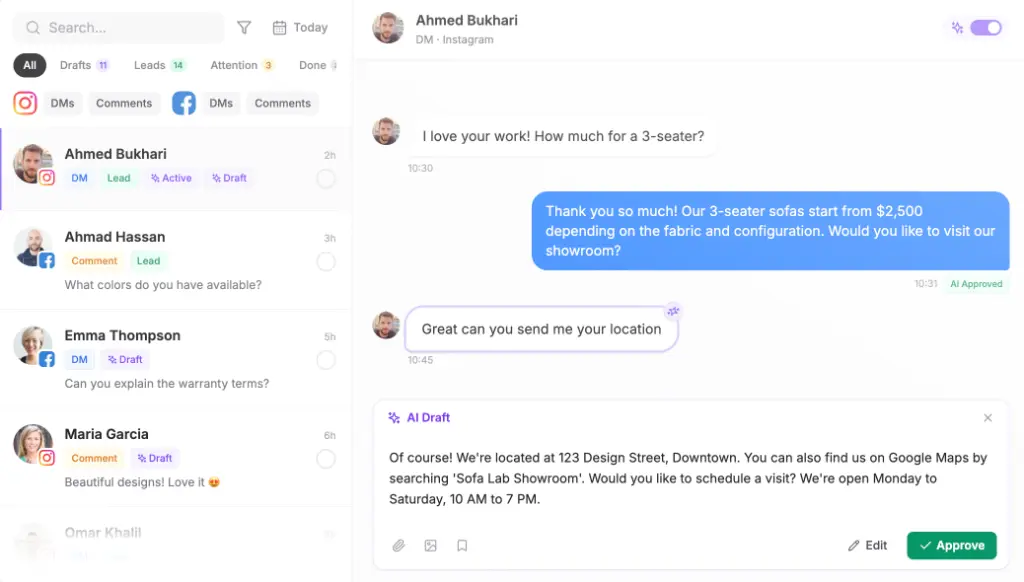
The edits aren’t wasted either. Maxbound’s agents learn each brand’s tone of voice and improve from the client’s own conversations, so every correction your team makes feeds the next draft.
How do you move off ClickUp or Asana without disrupting retainers?
You move off ClickUp or Asana one client at a time, not in a weekend. Practitioners who build these systems say you don’t need to replace every tool on day one, and that single-feature tools for time tracking, invoicing or project tasks typically get absorbed and removed over 6 to 12 months.
In Maxbound, each client workspace holds spaces (for example Shoots or Post ideas), spaces hold projects, and projects hold tasks, each given to a teammate or an agent, with access set per page. Run your existing PM tool for internal work while the pilot client’s conversations, CRM and tasks move in. Retire the old board for that client only when the new one is the one people actually open.
Pilot an AI operating system on one client
- Pick the pilot clientChoose one client with steady DM and comment volume and a patient point of contact. Avoid your newest or most fragile account.
- Send the Magic LinkHave the client authorise their WhatsApp, Instagram and Facebook accounts through the one-time Magic Link, so no password changes hands.
- Train the knowledgeAdd the client's website, FAQs, price files and past chats as the agent's sources.
- Brief the first agentWrite the brief in plain language and answer the questions the agent asks back about channels, offers and who owns hot leads.
- Rehearse in SimulationsRun the agent on real past conversations and fix the answers you would not send.
- Go live with approval onApprove the workflow, keep reply drafts on, and review edits daily for the first weeks.
- Clone for the next clientWhen the workspace runs without heavy edits, clone it as the starting point for the next client and repeat the training step with their sources.
Here’s a brief you can copy for step four, written the way you’d brief a new hire:
Answer every DM and comment on the clinic’s Instagram and WhatsApp. Use only the prices on the website and the FAQ file. Ask for name and phone before offering a booking. If someone asks about a complaint, a refund or a medical emergency, hand the conversation to Sara with its history. Follow up once the next day if they go quiet, then stop.
Central AI, CRM-first stack or per-client workspace?
The right setup depends on what most of your agency’s work is. If it’s client conversations, ads that start conversations and the posts that drive them, a per-client workspace is the better home.
| Question | Per-client workspace (Maxbound) | One central agency AI | CRM-first stack with AI added |
|---|---|---|---|
| Where client knowledge lives | Separate per client | Pooled | Depends on how you build it |
| Who builds automations | Agent from a plain-language brief | Your team or a developer | Your team, workflow by workflow |
| Approval before go-live | Built in, on as long as you want | You have to add it | You have to add it |
| Starting the next client | Clone a working workspace | Re-scope the shared setup | Rebuild or copy by hand |
| Best fit | Agencies running many clients’ conversations | Agency-level finance and reporting | Simple, stable workflows with an owner |
Should you build custom AI automation in GoHighLevel instead? If your agency already runs funnels there, your workflows are simple, and someone owns their upkeep, building there can make sense. Once you’re running many clients whose conversations need human review, a dedicated multi-client workspace with approvals is the cleaner design. We set out the differences in Maxbound vs GoHighLevel.
Can my agency brief agents from ChatGPT or Claude via MCP?
Yes. Maxbound’s MCP server connects Claude, ChatGPT, Codex, Cursor or any MCP client at app.maxbound.ai/api/mcp to read and act on a client’s workspace. You can schedule a client’s posts, ask what came into the inbox overnight or brief a new automation from the chat you already work in.
What changes is where you type, not the rules. Anything built through the MCP server still waits for approval in the client’s workspace, so connecting ChatGPT doesn’t create an unattended path around your team.
What does an AI operating system cost an agency?
Maxbound is priced per workspace, with every feature in every workspace and the price per workspace falling as the agency adds more. Each workspace includes 100 AI credits a month, with extra credits priced in brackets. AI agents, team seats and connected accounts are unlimited, and every account starts with a 7-day free trial; there is no free plan.
The maths that matters is per client. One workspace sits against one retainer, so you can see exactly what each client costs to run. Current numbers are on the pricing page.
When is an AI operating system the wrong call?
An AI operating system for client conversations is the wrong call when your agency’s work isn’t conversational. Maxbound has no voice, SMS or Slack agent, and it publishes to Instagram, Facebook, TikTok and YouTube only, not LinkedIn, X, Threads or Pinterest. An SEO shop or a cold-email outfit needs different tools.
The common mistakes, for agencies it does fit:
-
Piloting on your hardest client. Start where the stakes are moderate and the volume is steady.
-
Switching approval off early. Earn autonomy with edit counts, not optimism.
-
Skipping the knowledge review. An agent trained on last quarter’s prices will quote them happily.
-
Pooling clients to save setup time. Cloning gives you the speed without the bleed.
Pick one client. Run the seven steps on the 7-day trial. If the drafts need fewer edits each day, you’ll know what the next nine clients look like.