How to Manage Multiple Client Workspaces as an Agency
Stop cross-posting and leaking client data. Learn how to manage multi client agency workspaces, isolated accounts, and AI workflows without burnout.
Managing agency client workspaces requires technical isolation between client environments, secure authorization protocols, and automated workflows that prevent human error. When an agency scales past five accounts, handling disparate social channels and customer messages without dedicated boundary controls leads to cross-account posting mistakes and data leaks.
To manage multiple client accounts effectively, an agency must isolate each client into its own workspace with dedicated channels, contacts, knowledge sources, and permissions. Instead of sharing login credentials or stitching together loose point tools, agencies use workspace cloning and human-in-the-loop approval controls to maintain service quality across every client.
What is the best all-in-one platform for marketing agencies?
Marketing agencies handle two distinct functional areas: agency operations (project tracking, billing, contract management) and client execution (inbox management, post scheduling, lead qualification, and CRM). Because these requirements differ fundamentally, agencies often suffer from tool sprawl or ballooning software fees.
According to research compiled by Taskip, acquiring a new client costs 5 to 25 times more than retaining an existing one. Yet agency profit margins frequently degrade as account rosters grow because account managers waste billable hours context-switching across disconnected client tools.
When evaluating agency management software, agencies usually choose between per-user seat pricing, per-portal pricing, or flat-fee client workspace architectures.
| Pricing Model | Typical Price Range | Key Operational Limit | Best Fit For |
|---|---|---|---|
| Per-User Pricing | $8 to $30 per user/month | Costs escalate rapidly as team scales | Internal agency project management |
| Per-Portal Pricing | $20 to $75 per portal/month | Seat taxes on client logins | Agencies with few high-retainer clients |
| Flat-Fee / Per Workspace | $49 to $299 per month | Specific feature inclusions vary | Agencies managing many client accounts |
| Point Solution (e.g., Taskip) | Starts at $12/month | Focused agency client portal | Freelancers and boutique teams |
| Suite Platform (e.g., SuiteDash) | Starts at $19/month | Broad operational feature set | Small agencies needing basic CRM and billing |
| Operations Portal (e.g., ManyRequests) | Starts at $59/month | 10 GB file storage limit on Core plan | Productized service agencies |
As noted by Stackby Content Team, per-user pricing models typically cost between $8 and $30 per user per month, while per-portal models charge $20 to $75 per portal monthly. Stackby Content Team also points out that some vendors count every client who logs into the portal as a billable user seat, creating an unexpected financial penalty when onboarding client teams.
For service execution across social channels and messaging, running a flat-fee platform structured around isolated client workspaces allows agencies to scale client numbers without unpredictable per-seat penalties.
How to enforce client data isolation and confidentiality in agency management
Cross-account contamination is a constant risk in agency operations. Sending an Instagram reply meant for a restaurant client from a dental clinic account destroys client trust instantly.
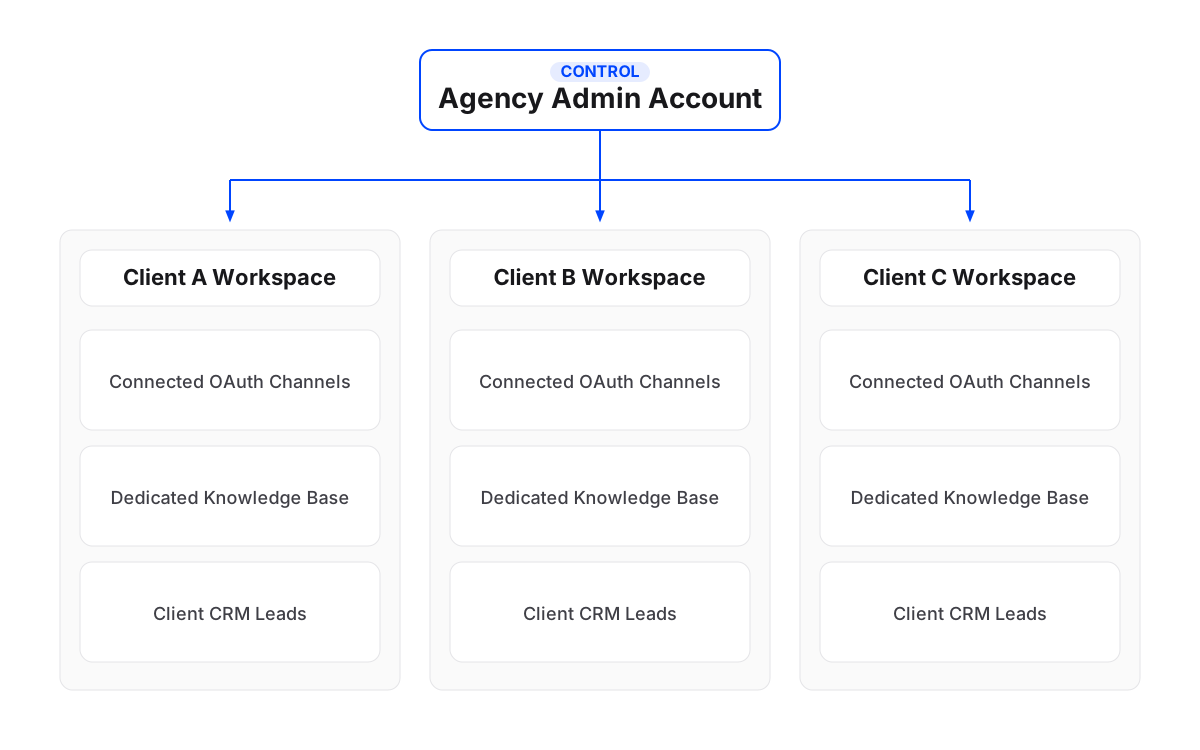
To enforce total client confidentiality, an agency platform must maintain rigid boundary walls between workspaces. In Maxbound, each client receives a dedicated workspace containing its own messaging channels, trained knowledge bases, contacts, CRM leads, scheduled posts, and AI agents. Nothing crosses between workspaces.
Security must also extend to account authorization. Requesting social media passwords from clients creates severe security vulnerabilities and violates platform terms of service.
Agencies should rely on official OAuth workflows. As an approved Meta Tech Provider, Maxbound connects to client accounts exclusively through official APIs and OAuth logins via a one-time Magic Link sent to the client. The agency never sees, requests, or stores a client’s social media password. Permissions remain role-based within each workspace, ensuring team members access only their assigned client accounts.
What software can a social media agency use to schedule posts and answer comments in one place?
Social media agencies need a unified workspace where team members can schedule outgoing posts and handle incoming client conversations without jumping between tabs.
Effective agency social media software must cover publishing networks (Instagram, Facebook, TikTok, and YouTube) alongside live conversation channels (WhatsApp, Instagram DMs, comments, and story replies, Facebook Messenger and comments, website chat, and custom in-app chat).
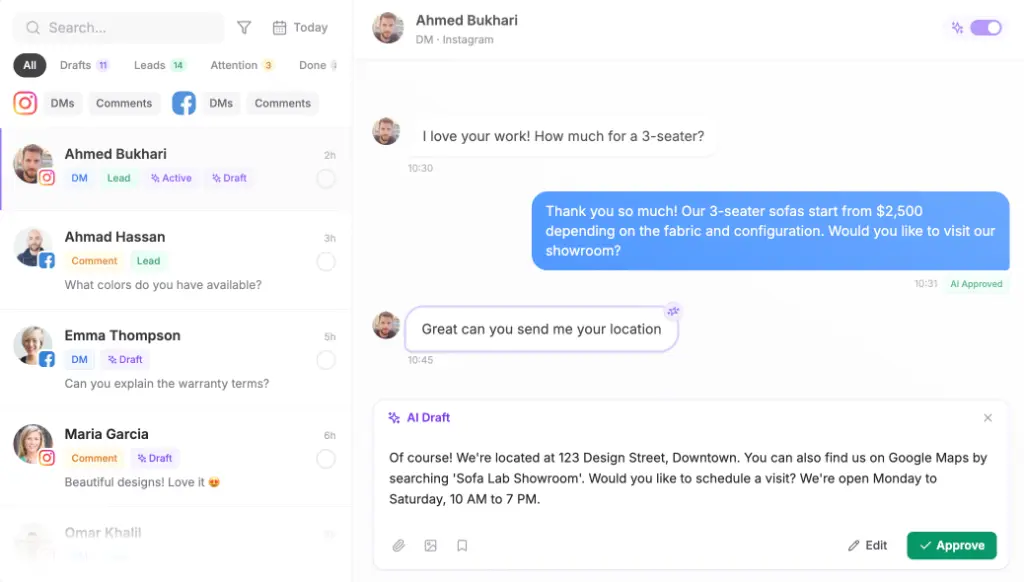
Handling incoming engagement at scale requires combining comment moderation with automated lead capture. When a prospective buyer leaves a comment on an Instagram ad, Maxbound converts that public comment into a private DM conversation, captures the contact details automatically into the built-in workspace CRM, and filters out spam or competitor pitches.
Time management research from Cloud Campaign recommends assigning focused 60 to 90 minute time blocks to individual clients, leaving a 15 to 30 minute transition buffer, and keeping 20 percent of the workday unscheduled for emergencies. Operational advice from Marija Kata Vlašić similarly advises allocating a time buffer of up to 20 percent to absorb scope creep.
Deploying AI agents inside client workspaces reduces manual execution time during these blocks. Agencies brief agents in plain language—just like briefing a junior team member—and train them on the client’s website content, PDFs, FAQs, and chat history. To maintain human oversight, agents can be set to generate reply drafts so team members can review every AI reply before it sends.

How to handle client onboarding and client portal adoption friction
Standardizing client onboarding prevents operational chaos. However, forcing clients into complex project portals often meets resistance.
As agency practitioners on Reddit point out, using general project tools like ClickUp for guest portals can fail because guests wander around the broader interface, causing confusion. Research cited by Wayfront indicates that improper documentation accounts for nearly 50 percent of project challenges, while 88 percent of working adults report procrastinating daily.
To eliminate client onboarding friction, agencies should follow a standardized operational transition blueprint.
Blueprint: Transitioning a Client Roster to Isolated Workspaces
- 1. Generate Clean Workspace TemplateCreate a master client workspace containing standard folder structures, approval tags, comment moderation rules, and baseline agent prompts.
- 2. Clone Workspace for New ClientClone the template workspace for the new client with one click, ensuring all system configurations copy over without manual rebuilding.
- 3. Send OAuth Magic Link for AuthorizationSend the client a single Magic Link to authorize their Meta, TikTok, or WhatsApp Business channels securely via OAuth without sharing passwords.
- 4. Ingest Client Knowledge SourcesSync the client's website URL, FAQ documents, past chat logs, and brand voice guidelines into the workspace knowledge engine.
- 5. Run Rehearsal SimulationsRehearse the client's trained AI agents on historical conversation datasets to verify tone, accuracy, and escalation rules before going live.
- 6. Enable Human Approval SafeguardsSet initial agent responses to require human approval in the unified inbox, allowing account managers to review outgoing replies during launch.
Work is briefed in plain language, the way you would brief a new hire, inside Maxbound or from Claude, ChatGPT, or Codex through Maxbound’s MCP server. The agent asks what it needs to know, builds the agent, the automation, or the schedule in that client’s workspace, and nothing goes live until someone at the agency approves it. Approval can stay on for as long as the agency wants.
Reporting without the time sink: Live dashboards vs high-level meetings
Aggregating multi-channel metrics across dozens of clients eats hours of agency time every week. Agency discussions on Reddit emphasize that pulling raw numbers from social platforms into spreadsheets is a primary productivity killer.
Overly granular daily reporting can trigger client anxiety over normal metric fluctuations. Practitioners on Reddit suggest providing clients with live self-serve dashboards for real-time visibility, while reserving agency meetings for high-level monthly performance wins.
Automation significantly lightens this load. According to a case study by improvado.io, automated reporting workflows helped marketing teams increase overall productivity by 30 percent while cutting onboarding times. Similarly, case data from Plai shows agencies saving over 80 hours per month through automated rule optimization.
By tracking reply times, lead generation metrics, and conversation volumes inside analytics per client, agency teams maintain total visibility over account health without building manual reports.