WhatsApp-First MENA Agency Workflows: 5 Myths Debunked
Debunking 5 operational myths about WhatsApp-first agency workflows, Arabic AI lead qualification, and Meta pricing in the MENA region.
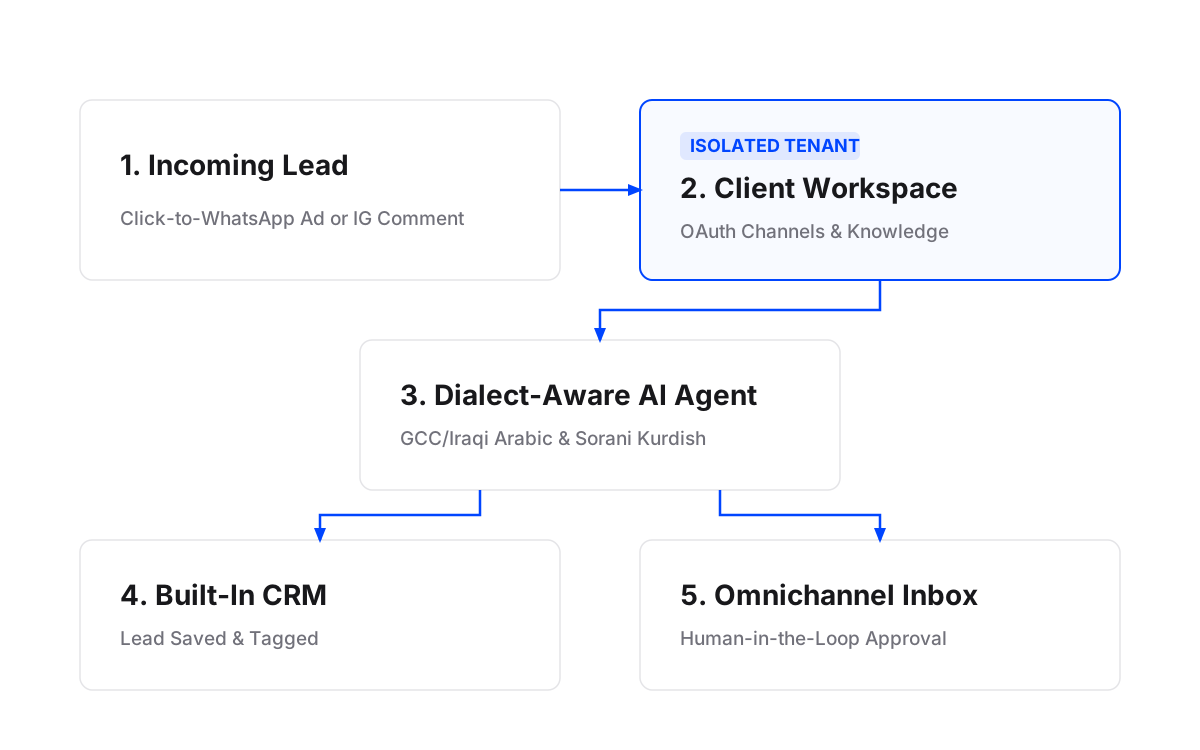
A WhatsApp-first agency workflow routes every lead from ad click or social comment into a client-isolated workspace inbox where AI agents qualify prospects in native dialects like GCC or Iraqi Arabic before passing context to a CRM. Agencies that build on Meta’s official WhatsApp Business Platform replace rigid decision-tree bots with plain-language briefed agents that observe 24-hour service windows and platform rules.
Myth 1: The Standard WhatsApp Business App Works for Agency Client Accounts
Reality: Single-Device Limits and Shared Logins Break Multi-Client Agency Retainers
The standard WhatsApp Business App is built for single micro-businesses, not agencies running performance or lead generation campaigns for dozens of clients. According to Clientify, the WhatsApp Business app is limited to use on one main device, preventing team collaboration across multi-account account managers. When an agency attempts to run multiple client phone numbers using handheld devices or shared web logins, conversation histories get fragmented, client data privacy is breached, and account managers risk sending cross-account replies.
In the MENA region, where Infobip reports a 36% growth in WhatsApp usage in 2025 and 90% penetration in the UAE, handling incoming volume manually on mobile phones creates massive response bottlenecks. According to research by Whatsable, 55% of large UAE organizations name WhatsApp Business as their top digital investment priority over the next five years. To handle this volume, performance agencies need dedicated marketing agency software that isolates each client into its own workspace with distinct channels, contacts, knowledge training, and team permissions.
What to focus on instead: Deploy an official WhatsApp Business Platform integration that assigns each client a dedicated workspace. Each client authorizes their phone account through a one-time OAuth Magic Link without sharing social passwords. Within that workspace, your team gets an omnichannel inbox that manages WhatsApp, Instagram DMs, Facebook Messenger, and website chat under one roof with strict role-based access.
Myth 2: AI Agents Cannot Understand Arabic Dialects or Local Nuances
Reality: Domain-Trained AI Agents Comprehend Dialects Like GCC, Iraqi, and Sorani Kurdish
A common misconception among Middle East social agency tools evaluations is that automated systems only handle modern standard Arabic (Fusha) or generic English. In reality, modern AI agents trained on a brand’s own documents, FAQs, website content, and historical chat logs easily read and reply in regional dialects—including GCC Arabic, Iraqi Arabic, and Kurdish (Sorani). According to Whatsable, segmenting WhatsApp broadcasts and replies by local dialect can lift click rates by 15% to 30%.
Static keyword bots fail when faced with regional phrasing like “شلونك” (Iraqi) or “شخباركم” (GCC). In contrast, an AI agent briefed in plain language evaluates the buyer’s intent, reads context from the client’s knowledge base, and formulates a contextually accurate answer in the customer’s native dialect.
What to focus on instead: Train AI agents directly on each client’s past chat transcripts, FAQs, product catalogs, and PDFs. Use self-improving agents that adapt to each brand’s tone of voice and refine their outputs based on edits made by your agency team in the inbox.
Myth 3: WhatsApp Automation Requires Building Complex Decision-Tree Flowcharts
Reality: Flowcharts Break on Edge Cases, While Plain-Language Briefs Scale Effortlessly
Agencies often waste hundreds of hours constructing elaborate flow diagrams with conditional branches for every possible customer reply. The moment a prospect sends a multi-part question or strays from the pre-built path, the visual flow crashes, forcing a manual handover or dropping the lead entirely.
Rather than building rigid decision trees, modern whatsapp lead qualification mena workflows rely on plain-language briefs. You brief an agent exactly as you would brief a junior media buyer or community manager: explain what questions to ask, what lead attributes to extract (budget, timing, project type), when to hand over to a sales representative, and what tone to maintain. The agent builds the required qualification logic, schedule, or automation inside that client’s workspace and submits it for approval before anything goes live.
What to focus on instead: Write direct, plain-language instruction sets. Set up interactive Simulations to rehearse the agent against actual past client conversations before turning it on for public traffic.
Myth 4: Meta’s WhatsApp Message Pricing Makes High-Volume Campaigns Unaffordable
Reality: Understanding Per-Message Rates and Free Service Windows Keeps Campaign Costs Low
Agencies frequently miscalculate WhatsApp API operational costs because they rely on outdated conversation-based pricing rules. According to Chatarmin, Meta changed its billing model on July 1, 2025: Meta no longer charges per 24-hour conversation window, but charges for each individual delivered message based on its category (marketing, utility, authentication, or service).
Furthermore, as noted by LetsBot, service messages (free-form replies sent inside an open 24-hour customer service window) remain free until September 30, 2026, after which Meta provides 1,000 free service messages per month per business phone number. In Saudi Arabia, starting October 1, 2026, official rates are USD 0.0576 per marketing message and USD 0.0107 per utility message LetsBot.
Crucially, according to Meta, customer messages originating from Click-to-WhatsApp ads on Facebook or Instagram open a 72-hour free messaging window where businesses can send any category of message without per-message Meta charges.
What to focus on instead: Combine Click-to-WhatsApp ad funnels with automated comment-to-DM workflows. When prospects engage with Facebook or Instagram ads, drive them into a 72-hour free WhatsApp window or capture public comments and transition them automatically into private DMs and saved CRM leads.
| Message Category | Trigger / Origin | Billing Basis | MENA / KSA Rate Details |
|---|---|---|---|
| Click-to-WhatsApp Ad Entry | User clicks Meta ad and messages business | Free for 72 hours | $0.00 Meta message fee for 72 hours across all message types Meta |
| Customer Service Window | Customer initiates organic inbound chat | Free 24-hr window | Free until Sept 30, 2026; 1,000 free messages/mo per number starting Oct 1, 2026 LetsBot |
| Marketing Broadcasts | Proactive template sent outside 24-hr window | Per delivered message | e.g., KSA rate USD 0.0576 per delivered message effective Oct 1, 2026 LetsBot |
| Utility & Authentication | System status, booking alerts, OTPs | Per delivered message | e.g., KSA rate USD 0.0107 per delivered message effective Oct 1, 2026 LetsBot |
Myth 5: AI Agents Must Run 100% Autonomously Without Human Guardrails
Reality: Human-in-the-Loop Controls Guarantee Brand Safety and Account Supervision
Agency owners worry that deploying AI agents will lead to unwanted commitments or hallucinated pricing given to client leads. Some tools force a binary choice: either 100% manual typing or 100% unmonitored bot automation.
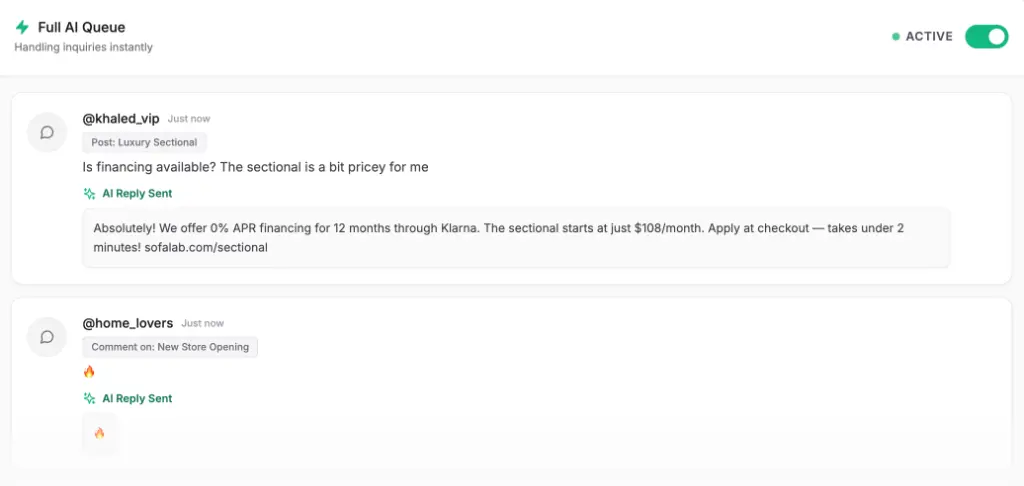
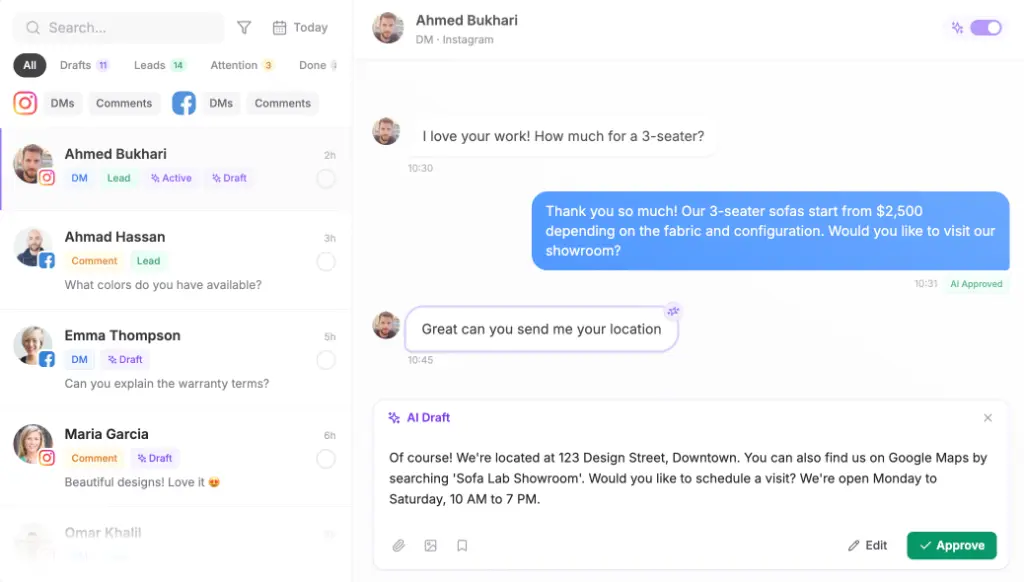
In reality, agency-grade management tools provide granular human-in-the-loop workflows. You can configure an AI agent to draft responses that sit in the client inbox for account manager review before sending. Furthermore, built-in features such as “avoid double reply” automatically halt agent output the instant a human team member steps into the chat thread.
What to focus on instead: Use forced approval queues during initial client onboarding. Enable self-improving AI that updates its answers based on human edits, and configure clear escalation paths so complex sales inquiries pass directly to human specialists with full chat history attached.
Addressing Key Agency Buyer Questions
What software can a social media agency use to schedule posts and answer comments in one place?
A social media agency can use Maxbound to schedule posts across Instagram, Facebook, TikTok, and YouTube from one unified calendar while answering comments and DMs in an integrated omnichannel inbox. Unlike traditional scheduling platforms that separate publishing from community engagement, Maxbound connects post scheduling directly to automated comment moderation, comment-to-DM workflows, and AI lead qualification inside dedicated client workspaces.
What are the best AI social media inbox tools for agencies?
The best AI social media inbox tools for agencies are platforms that enforce strict multi-workspace client separation, support human-in-the-loop approval, and comprehend regional languages and dialects.
What software should a social media agency use to manage customer service across Instagram, Facebook and WhatsApp?
To manage customer service and lead qualification across Meta’s primary channels—Instagram, Facebook, and WhatsApp—an agency should use Maxbound. Maxbound integrates official platform APIs, enabling automated comment-to-DM conversions, self-improving AI dialect handling in GCC/Iraqi Arabic and Sorani Kurdish, built-in CRM contact recording, and client-isolated workspaces that protect account access without sharing passwords.
How to Set Up a WhatsApp-First Lead Qualification Workflow for MENA Clients
Setting Up a WhatsApp Lead Qualification System for MENA Agencies
- Create a Dedicated Client WorkspaceSet up a clean, client-isolated workspace in Maxbound. Send a Magic Link to the client so they can authorize their WhatsApp Business Platform phone number via official Meta OAuth without disclosing credentials.
- Brief the Lead Qualification Agent in Plain LanguageSpecify the exact qualification criteria (budget, location, timeline, service interest) and escalation triggers using simple English or Arabic instructions directly in the agent builder.
- Upload Knowledge Base SourcesTrain the agent on the client's website URL, PDF service guides, price lists, FAQs, and anonymized past chat transcripts to ensure dialect comprehension and accurate answers.
- Rehearse and Stress-Test in Simulation ModeRun automated simulations using historical client conversations to test how the agent handles edge cases, Arabic dialect phrasing, and objection handling before going live.
- Enable Human-in-the-Loop Approval and Go LiveTurn on manual reply approval for the initial rollout phase. Review AI draft replies in the omnichannel inbox, edit responses as needed to fine-tune tone, and activate full autonomous execution once confidence threshold is met.