
Maxbound vs Buffer: Post Scheduling and Comment Replies
Schedule client posts to Instagram, Facebook, TikTok and YouTube and answer comments in one client inbox. How Maxbound and Buffer compare for agencies.
Yes. An agency can schedule a client’s posts to Instagram, Facebook, TikTok and YouTube and answer the comments those posts bring in from one place, as long as the calendar and the inbox sit in the same client workspace.
Maxbound gives every client its own workspace with one calendar for those four networks, one inbox for that client’s Instagram and Facebook comments, DMs, WhatsApp and website chat, and AI agents that answer from the client’s own sources. Nothing goes live, whether a post, an agent or an automation, until someone at the agency approves it.
Buffer suits a team whose work is mostly planning, approving and publishing posts, with people working through the replies.
Maxbound vs Buffer: the short comparison
| What decides it | Maxbound | Buffer |
|---|---|---|
| Separate workspace per client | Yes: own channels, knowledge, contacts, agents, posts; can be cloned | Check Buffer’s plans |
| Approval before anything goes live | Posts, agents, automations; optional approval on every reply | Team can edit and approve posts |
| Where customers’ messages are handled | IG DMs, comments, story replies; FB Messenger, comments; WhatsApp; website and in-app chat | Comment triage and replies from one dashboard |
| Rehearsal before launch | Simulations on real past conversations | Not described by Buffer |
| How AI is billed per client | 100 AI credits a month per workspace | See Buffer’s pricing |
| Comment to DM to CRM | Built in | Not described by Buffer |
| AI assistants | Brief from Claude, ChatGPT or Codex via MCP | Connects to Claude or ChatGPT |
| Publishing networks | Instagram, Facebook, TikTok, YouTube | Facebook, Instagram, TikTok, YouTube Shorts, LinkedIn, X and more |
What is Maxbound?
Maxbound is an AI operating system for agencies. Each client gets a workspace of its own, and nothing crosses between clients: not contacts, not knowledge, not posts.
Inside a workspace you get a post calendar for Instagram, Facebook, TikTok and YouTube, an omnichannel inbox, a built-in CRM, comment moderation, comment-to-DM, follow-up sequences, broadcasts and per-client analytics. AI agents answer, qualify and follow up on the client’s conversations, and hand a conversation to a person with its full history when they should.
Work gets briefed in plain language, the way you’d brief a new hire. You can do that inside Maxbound, or from Claude, ChatGPT or Codex through Maxbound’s MCP server. The agent asks what it needs to know, builds the agent, automation or schedule, and waits for someone on your team to approve it.
What is Buffer?
Buffer is a social media scheduling tool. Its site lists scheduling to Facebook, Instagram, TikTok, YouTube Shorts, LinkedIn, Threads, Bluesky, Pinterest, Google Business, Mastodon, X and Substack.
Buffer also says it helps teams triage and respond to comments from one dashboard, lets a team manage, edit and approve posts together, and can be connected to Claude or ChatGPT to run the workflow from a conversation. It’s a publishing-first tool with engagement features added around the posts.
How do you schedule posts natively on each network?
Every network has its own scheduler, and for one brand they’re fine. Native scheduling becomes the problem when you multiply it by fifteen clients.
-
Facebook and Instagram: Meta Business Suite schedules for both, and a Reddit thread on simple scheduling tools points out it does it for free. TikTok has scheduling built into its desktop upload, and the TikTok Studio app now schedules from a phone as well.
-
Instagram limits: you need a public account, and Instagram lets you schedule up to 25 posts a day, up to 30 days in advance.
-
Instagram exceptions: product tagging, collaborative posts, sponsored posts and fundraisers aren’t compatible with scheduled content. Plan those as manual posts.
-
TikTok Shop: shoppable videos can be scheduled from 30 minutes to 30 days ahead.
-
YouTube: uploads are capped at 15 minutes until the account is verified, then can run up to 12 hours or 256 GB. Verify a new client’s channel before you plan long videos.
That Instagram cap of 25 scheduled posts a day, up to 30 days ahead, is generous for a single brand. The real limit for an agency is attention. Four native tools per client means four logins, four calendars and zero shared view of the replies those posts create.
Why does scheduling and replying in separate tools cost agencies?
A scheduler publishes the post and walks away. The comments arrive in a different place.
So the person who planned the reel isn’t the person who sees “how much?” under it at 9pm. By morning, that buyer has asked someone else.
That difference matters once you’re past a handful of clients, because the setup for client sixteen should take minutes, not a week of rebuilding rules.
Where Maxbound is the better choice
Maxbound is the better fit for an agency that runs its clients’ conversations, not only their content calendar. Five reasons.
The post and the reply live in the same workspace
In Maxbound, post scheduling happens in the same client workspace that answers the replies. The calendar, the inbox, the agent and the CRM all belong to that client.
Why it matters: when a comment lands on Tuesday’s Instagram post, the agent answering it already knows the client’s prices, FAQs and tone, because it was trained on that client’s website, files and past chats. Nobody has to switch tools or copy context across.
Instagram comment to DM automation is built in
Instagram comment to DM automation means a public comment triggers a private DM, and the person who commented gets saved as a contact. In Maxbound, comments become DMs and saved leads in the client’s built-in CRM, with nobody typing details in.
You brief it in one sentence. For example: “When someone comments ‘price’ on this week’s reel, DM them the price list, ask if they want a quote, and save anyone who says yes.” The agent asks what it needs, such as whether to follow up and who owns the quotes, then builds it and waits.
Approval stays on as long as you want
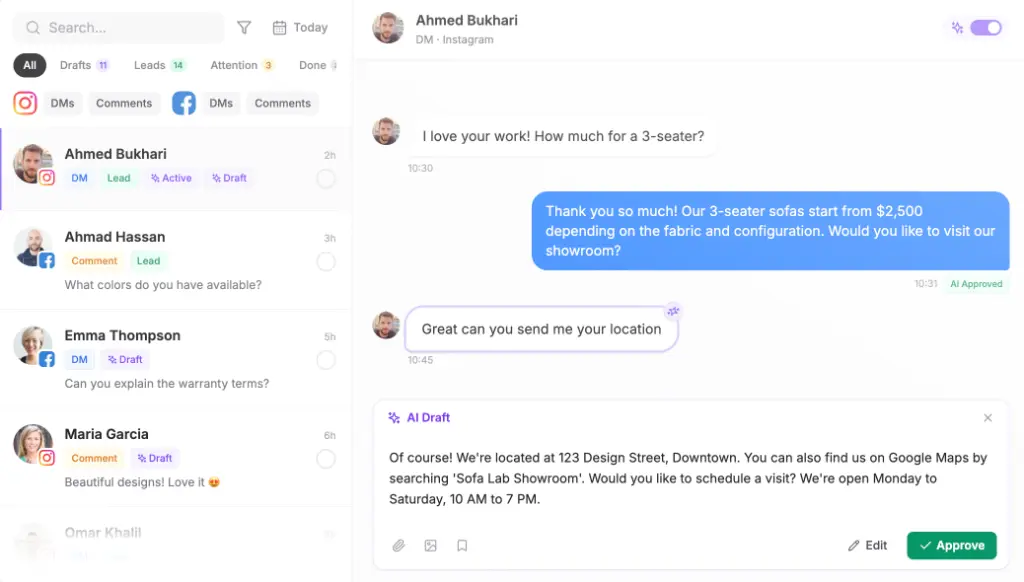
Nothing an agent builds goes live until someone at the agency approves it. Separately, an agent can be set to draft every reply for a person to approve or edit before it’s sent.
Watch the drafts for a week or two. Turn it off for the topics the agent gets right every time, and keep it on for complaints and pricing.
Rehearsal before the agent answers anyone
Maxbound’s Simulations run an agent against the client’s real past conversations before it talks to a single customer. You see how it would have answered last month’s comments and DMs, fix the gaps in its knowledge, and only then switch it on.
A wrong answer under a paid ad is public.
Each client stays separate, and a good setup can be cloned
Each client workspace holds its own channels, knowledge, contacts, agents and posts. Role-based permissions control what each team member can do. A reply meant for one brand can’t go out from another.
When a workspace works, a dental clinic say, clone it as the starting point for the next dental clinic. The calendar rhythm, the comment-to-DM rules and the agent structure come with it; you swap in the new client’s knowledge and accounts.
How to reply to Instagram comments for every client without a second tool
To reply to Instagram comments at agency scale, put each client’s comments, DMs and posts in one workspace, let an AI agent answer from that client’s sources, and route anything sensitive to a person.
A good Instagram comment management tool for agencies does four things in each client workspace:
-
Answers routine questions publicly in the brand’s voice.
-
Moves buying questions to DM and saves the lead.
-
Hides spam, abuse and rival pitches through comment moderation.
-
Hands complaints to a person, with the history attached.
If you want the manual mechanics first, our guide on how to reply on instagram dm covers replying to a comment by DM step by step.
A brief you can copy
Paste this into the client’s workspace, or send it from Claude or ChatGPT through the MCP server, and edit the parts in brackets:
For [client], answer comments on Instagram and Facebook posts using our website and FAQ. Keep replies under two sentences, in the customer’s language. If someone asks about price, availability or booking, reply publicly with “Sent you the details by DM” and DM them [price list / booking link]. Save anyone who asks for a quote to the CRM, owner [name]. Hide spam and competitor links. Send complaints, refunds and anything about [sensitive topic] to [name] without replying. Draft every reply for approval for the first two weeks.
Agents answer in the customer’s own language, including Iraqi Arabic and Kurdish (Sorani). When someone on your team replies, the agent steps back, so the customer never gets two answers.

A worked example (illustration)
Take an illustrative client posting five times a week to each of the four networks. That’s 20 scheduled posts a week on one calendar. The Instagram and Facebook comments and DMs those posts create all land in the same workspace inbox, where the agent answers first and your team sees only what needs a person. The same pattern repeats, separately, for every other client.
When Buffer fits better
Buffer fits better when the job is publishing to a wide spread of networks. If your clients need LinkedIn, X, Threads, Pinterest, Bluesky or Google Business posts, Buffer schedules to all of them. Maxbound publishes to Instagram, Facebook, TikTok and YouTube only.
The second honest difference: Maxbound’s agents answer comments on Instagram and Facebook, plus DMs, WhatsApp, website chat and in-app chat. It doesn’t answer TikTok or YouTube comments, and there’s no voice, SMS or Slack agent. If most of a client’s conversation happens under TikTok videos, plan for that.
And if your team wants to write every reply by hand and only needs a tidy publishing workflow with post approvals, a scheduling-first tool is the simpler buy.
Pricing, side by side
Maxbound is priced per workspace, so one client is one workspace. Every feature is in every workspace, each includes 100 AI credits a month, extra credits are priced in brackets, and the price per workspace falls as you add more clients. Team seats, connected accounts and agents are unlimited. Every account starts with a 7-day free trial; there’s no free plan. Current figures are on the Maxbound pricing page.
Buffer sets its own prices and plans; check them on Buffer’s site before you compare, as I won’t quote numbers I can’t stand behind.
Switching from Buffer for one client
Start with one client, not all of them. Pick the one whose comments and DMs cause the most late-night pain.
Move one client from Buffer to a Maxbound workspace
- Create the client workspaceCreate a workspace for the client in Maxbound and start the 7-day free trial.
- Send the Magic LinkSend the client a one-time Magic Link so they authorise their own Instagram, Facebook, TikTok and YouTube accounts through each platform's official login. Maxbound never asks for or stores a social password.
- Train the agentAdd the client's website, files, FAQs and past chats as knowledge.
- Rebuild the calendarRecreate the next two to four weeks of scheduled posts on the workspace calendar, then pause them in Buffer so nothing publishes twice.
- Brief the comment rulesPaste the comment brief, including comment-to-DM and escalation rules, and answer the agent's questions.
- Rehearse with SimulationsRun the agent on the client's real past conversations and fix any wrong answers.
- Approve and go liveApprove the schedule and the agent, keep reply drafts on approval for the first two weeks, then relax approval topic by topic.
When the first client runs cleanly, clone its workspace for the next similar client.
Common mistakes when combining scheduling and comment replies
-
Scheduling a post type Instagram won’t schedule. Product tags, collabs, sponsored posts and fundraisers need a manual post.
-
Planning long YouTube videos on an unverified channel. Verify first or the 15-minute cap bites.
-
Turning off reply approval on day one. Earn autonomy topic by topic.
-
Skipping the escalation rule. Every brief needs a line that says who gets complaints.
-
Running two schedulers at once. Pause the old calendar the day the new one is approved.
When not to do this: if a client’s audience mostly talks on LinkedIn or X, or only on TikTok comments, Maxbound isn’t the right home for that client’s engagement.
Verdict: which should an agency pick?
For a marketing agency running clients’ social accounts and the conversations they create, Maxbound fits better. The post, the comment, the DM, the lead and the follow-up all sit in one client workspace, agents answer from that client’s sources around the clock, and nothing goes live without your approval.
Buffer fits teams whose work is mostly publishing across many networks, with people handling the replies themselves.