How to Turn Social Media Comments Into Sales
Buying questions arrive as comments under posts and ads. How to spot them, answer in public and in a DM, move the person to a purchase, and measure the sales
Comments turn into sales when the buying questions get an answer quickly and the conversation moves somewhere it can finish. Spot the comments that ask about price, stock, sizes or delivery, reply briefly in public, answer properly in a private message with one question back, send the link or the booking, and save the person so the conversation doesn’t end with the reply.
Most pages lose these sales by not answering at all. In our study of 1,788 public comments on the Instagram and Facebook posts of 178 businesses, 14% of the comments left unanswered were someone asking to buy: a price, stock, “how do I order” (Maxbound comment response study).
Spot the buyers
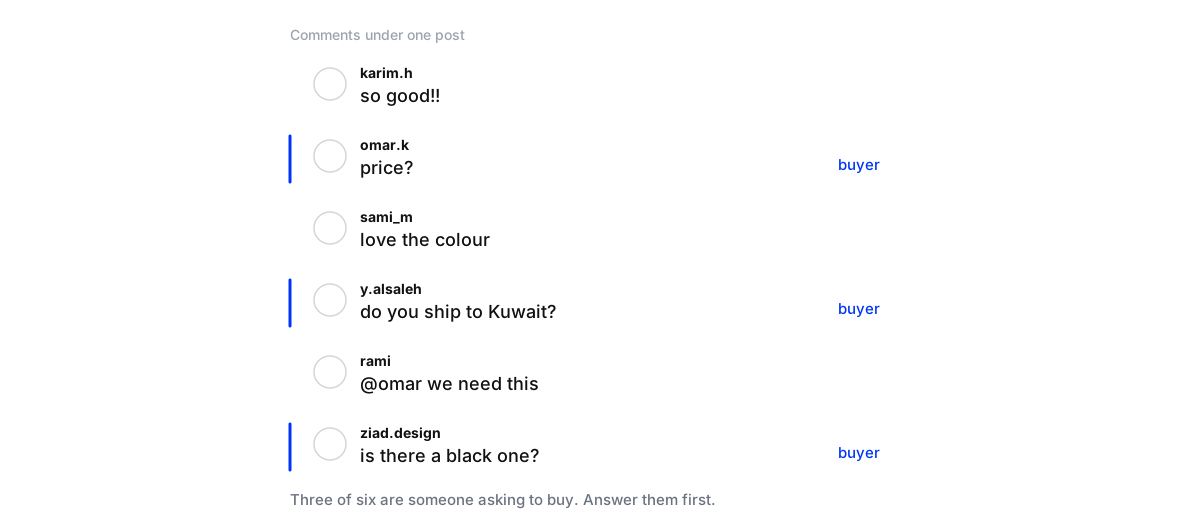
Buying comments are short and easy to miss among the praise: “price?”, “link”, “do you ship to Kuwait?”, “is there a black one?”, “how long does it take?”. Some are just a tagged friend with “we need this”. They’re worth more than the rest of the section together, and they’re the ones a keyword rule mostly misses, because nobody types the keyword.
Answer these first, every day, before anything else in the comments. A tagged friend is worth a light reply too (“Let us know if you’d like the details!”), because either of them may be ready to buy.
From comment to sale
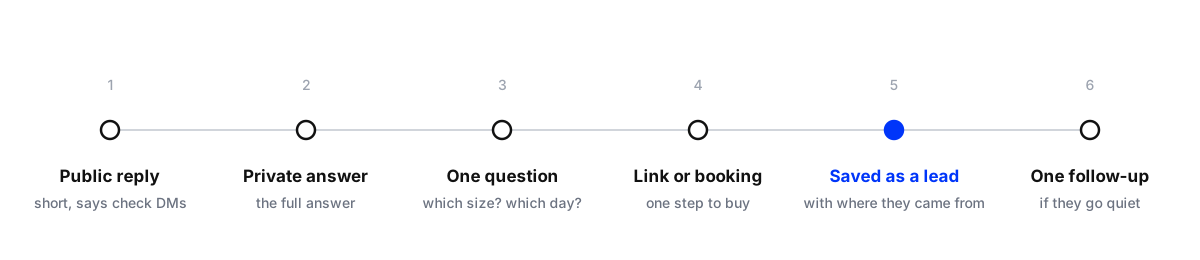
1. A short public reply. “It’s 240 AED, sent you the details by message!” Everyone reading sees the business answers, and the person knows to check their messages. If they don’t follow the account, Instagram puts the message in their Requests folder, so say so.
2. The answer, privately. Meta allows one private reply to a comment, within seven days, so the first message must carry the full answer, not “want to know more?”.
3. One question back. “Which size are you after?” or “Which day suits you?”. A question invites a reply, and once they reply the conversation is open for 24 hours.
4. Make buying easy. The product link with their size, the booking slot, the order form. One step, not a tour of the website.
5. Save the person. Name, what they wanted, where they came from. A lead in a CRM can be followed up; a chat log can’t.
6. Follow up once, kindly. If they go quiet, one message within the open window: “Still interested in the black one? Happy to hold one for you until Friday.” Then leave it.
Replies you can adapt
For a comment asking “price?” under a post for a linen set:
Public: It’s 240 AED! Sent you the sizes and link by message, check your requests if you don’t follow us.
Private: Hi! The linen set is 240 AED and comes in S to XL, with delivery across the UAE in 2 days. Which size are you after?
After they answer: Here’s the medium: [link]. Order before 2pm and it ships today.
Three short messages, each doing one job: show the answer in public, give the full answer in private, and make the purchase one tap.
Comments under ads
Ads reach people who don’t know the brand yet, so the comments under them are often questions, and sometimes complaints. The comments sit under the ad itself, so make sure whoever answers for the client can see them; Meta lets you manage ad comments from Ads Manager. An unanswered “price?” under an ad is paid-for interest left on the table. More on this in how to reply to Instagram comments on client ads.
Keep it from feeling like a sales funnel
People asked a question; they didn’t ask to be sold to. A few rules keep it human:
- Answer exactly what they asked first. The price question gets the price, not a pitch.
- No DM to people who didn’t ask. A compliment gets a thank-you, not a sales message.
- Never copy-paste the same reply to every comment. It reads as spam to everyone scrolling.
- Complaints go to a person. A complaint under an ad is read by thousands. Answer it carefully, in public and in private.
Doing it at volume
By hand, each buyer takes a few minutes: reply, open their profile, write the message, find the link, note the lead. For one post a day that’s fine. For a client running ads, or for several clients, it isn’t, and the comments that arrive at night wait until morning.
That’s where automation fits, as long as it answers the actual question rather than a keyword. An agent trained on the client’s catalogue and policies can do all six steps, any hour, and hand the conversations that need judgement to your team. For running big comment-for-a-link campaigns safely, see running high-volume Instagram DM campaigns.
Turn a client's comments into sales
- Read a week of commentsMark the buying ones: price, stock, sizes, delivery, how to order. Note how many got an answer and how fast.
- Write the answersPrices, sizes, delivery areas and times, links. Agree what the public reply says and what goes in the private message.
- Answer buyers first, every dayPublic reply, private message with the answer and one question, then the link or booking.
- Save every buyer as a leadName, what they wanted and which post or ad they came from.
- Track the salesCount leads from comments and purchases they made, by post and by ad.
Measure it in money
Report three numbers per client each month: buying comments received, how many were answered (and how fast), and sales or bookings from people who came through a comment. Tagging each lead with the post or ad it came from shows which content sells, which is the number a client cares about most.
Where Maxbound fits
Maxbound’s comment to DM to CRM does these steps on Instagram and Facebook with an AI agent trained on each client’s business: it answers the comment, sends the private reply with the actual answer, asks the next question, and saves the person in the CRM with where they came from. Complaints and sensitive conversations go to your team, and every reply can wait for approval until you trust it. See Instagram automation.