How to Add AI Chat to a Mobile App Without Leaking Keys
Never put an AI chat key inside a mobile app: anyone can pull it out of the bundle. Keep the secret on your server, hand the app a short-lived session token,
To add AI chat to a mobile app securely, keep the chat provider’s secret key on your own server, never in the app. When a signed-in user opens the chat, the app asks your server for a short-lived session token, your server checks the user and requests the token with the secret, and the app opens the chat with that token. Anyone who unpacks the app finds nothing worth stealing.
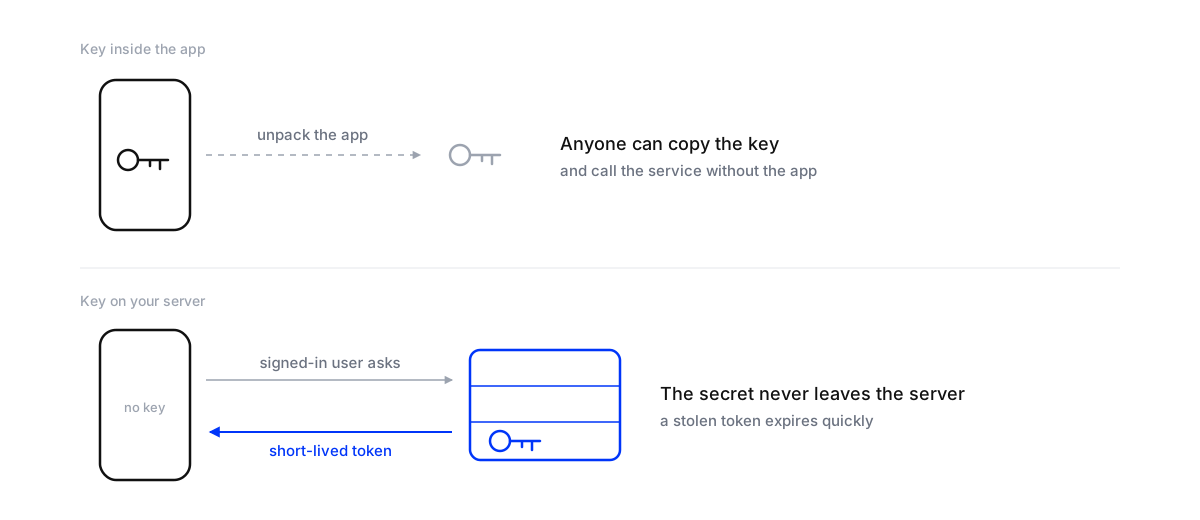
The reason is simple: everything shipped inside an app can be read by someone determined. A website widget can be locked to a domain, because browsers send the page’s origin with each request. A mobile app has no domain, so a key hardcoded in the app is effectively public.
Why a key in the app is a problem
App bundles can be unpacked with freely available tools, and strings inside them, keys included, can be read. Once someone has the key they can skip the app entirely and call the chat service directly: running up the client’s usage, or reading responses meant for real users.
The general rule from the OWASP Mobile Application Security Cheat Sheet applies: authenticate and authorise on the server side instead of trusting the client. The app is the client. Obfuscating the key, splitting it into pieces or hiding it in a native library only slows someone down; the app still has to put the key back together to use it, and whatever the app can do, a person with the app can do too.
The session token flow
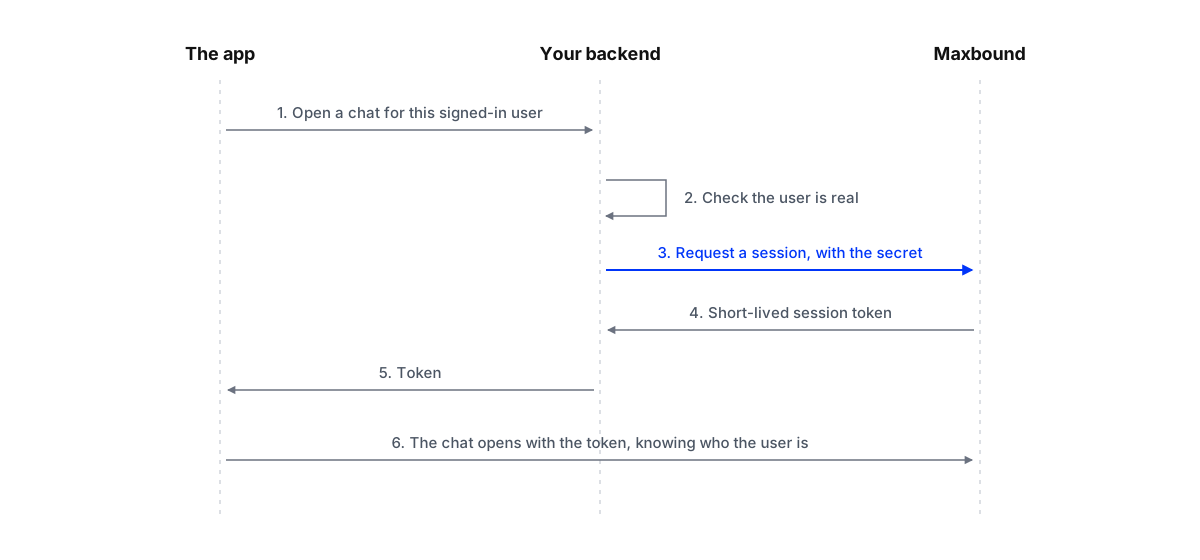
- The user opens the chat in the app. They’re already signed in to the app.
- The app asks your backend for a chat session, sending the user’s own app login as usual.
- Your backend checks the user is real and signed in, then asks the chat service for a session token, using the secret key stored on the server.
- The token goes back to the app, which opens the chat with it. The token is short-lived and tied to that session.
If someone intercepts a token, it expires quickly and works for one session. The secret never leaves the server.
Setting it up with Maxbound
Add Maxbound's AI chat to a mobile app securely
- Create the mobile secret keyIn the client's Maxbound workspace, open the deploy settings for the mobile widget and generate a secret key for that agent.
- Store it on the server onlyGive the key to the client's backend team to store as an environment variable or in a secrets manager. It never goes into the app's code or repository.
- Add a session endpointCreate an endpoint on the client's backend that checks the signed-in user, then requests a chat session token using the secret, as described on the mobile setup page.
- Open the chat with the tokenWhen a user opens the chat, the app calls that endpoint and starts the chat with the token it gets back, passing who the user is.
- Allow the chat to loadAdd Maxbound to the app's allowed domains so the chat screen isn't blocked by the app's own security policy.
- Test before releaseRun the agent on the client's real past questions without sending anything, then test the flow on a device with a real signed-in account.
A minimal backend endpoint looks like this; the session address comes from the mobile setup page in the workspace:
app.post('/api/chat/session', requireSignedInUser, async (req, res) => {
  const response = await fetch(process.env.MAXBOUND_SESSION_URL, {
    method: 'POST',
    headers: {
      Authorization: `Bearer ${process.env.MAXBOUND_AGENT_SECRET}`,
      'Content-Type': 'application/json'
    },
    body: JSON.stringify({ userId: req.user.id })
  });
  if (!response.ok) return res.status(502).json({ error: 'Chat unavailable' });
  const { token } = await response.json();
  res.json({ token });
});
requireSignedInUser is whatever the app already uses to check its own logins. That check is the point: only real users get a chat session.
Pass the signed-in user
Because the backend knows who the user is, the chat can too. Maxbound’s in-app chat takes the signed-in user, so the agent can answer with their account, orders and past chats in mind: “Order 4821 is out for delivery” rather than “Can I have your order number?”. Only pass what the agent needs to answer, and nothing it doesn’t.
If a key has already shipped in an app
It happens, often in a quick first version. Treat the key as public from the moment the app went out, because you can’t recall copies of an app that people have already downloaded. Generate a new secret, store it only on the server, and switch the app to the session-token flow in the next release. Once most users have updated, revoke the old key, so the copy inside old versions stops working. Watch usage in the meantime: a sudden jump in conversations with no matching rise in app activity is the usual sign that someone else is using the key.
Don’t put tokens in URLs
When the chat screen loads, pass the session token in the way the setup page describes, not as part of a web address. Addresses end up in logs, analytics tools and crash reports, and a token written into one is a token stored in places nobody is watching. The same goes for the user’s details: send them when the session is created, from your server, rather than adding them to the chat’s address in the app.
Who owns what, on an agency build
When an agency builds or runs chat for a client’s app, write down who holds what. The client’s backend team usually owns the secret, the session endpoint and the user check, because they own the servers and the logins. The agency owns the agent: its knowledge, its voice and the rules for what goes to a person. Keep separate keys for the test and live versions of the app, so a test build can never use the live agent by mistake, and make sure someone on the client’s side knows how to rotate the key if a developer leaves.
Other basics for in-app chat
- HTTPS everywhere. Mobile devices often join untrusted networks; Android’s own security tips recommend HTTPS wherever the server supports it.
- Rotate the secret if it might have leaked, and whenever someone with access leaves the project.
- Separate keys per client app. One leaked key should affect one client, not all of them.
- Decide who answers. The agent can answer on its own or draft replies for a person to approve, the same as on other channels.
Where Maxbound fits
Maxbound’s in-app chat puts the same AI agent that answers Instagram, Facebook, WhatsApp and website chat inside a client’s iOS or Android app, with every thread in the same inbox. Its AI agents are trained on the client’s own material and hand anything sensitive to a person. Connections are encrypted in transit with TLS, and each client is its own workspace; the details are on the security page. Before release, test the agent on real past conversations.