How to Turn Social Comments into Direct Sales on Autopilot
Learn how Maxbound’s autonomous agents turn Instagram/WhatsApp comments into leads and sales 24/7, with brand‑voice learning and GDPR compliance.
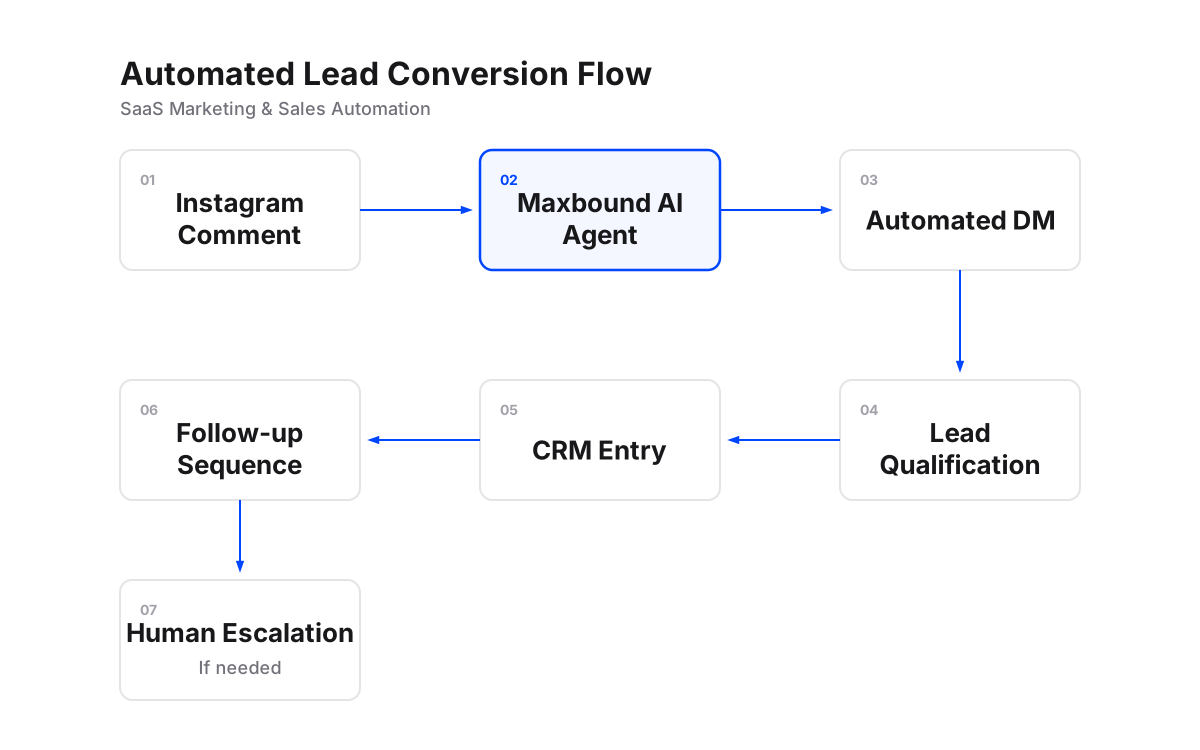
Maxbound turns social comments into direct sales on autopilot by deploying autonomous agents that monitor comments 24/7, instantly convert them into private DMs, qualify leads, and route only the complex ones to your team for approval.
Today, 89% of customers expect a reply in under an hour, yet the average brand takes 12 hours to respond. This gap kills opportunities, but Maxbound closes it with AI‑native workflows that learn your brand voice and stay GDPR compliant.
Step‑by‑step: Turn comments into sales with Maxbound
Step 1: Connect your social channels
Link WhatsApp, Instagram, Facebook and your website widget in the Maxbound dashboard so every comment and DM flows into a single omnichannel inbox. See the platform overview for details.
Step 2: Train the agent on your brand voice
Upload your website, FAQs and past conversations as training sources. Enable Knowledge Autopilot so the agent learns your tone and improves over time.
Step 3: Enable comment‑to‑DM automation
Turn on the Comment to DM workflow. When a user comments on a post, the agent replies publicly and immediately starts a private DM with pricing or offer details.
Step 4: Set up lead qualification rules
Define keywords and score thresholds that turn a chat into a lead. Qualified contacts are saved to the built‑in CRM with full contact enrichment.
Step 5: Configure human‑in‑the‑loop approvals
Choose Draft mode for sensitive replies. The agent drafts the message, you review and approve before it sends; each correction becomes permanent knowledge.
Step 6: Monitor analytics and optimize
Use the analytics dashboard to track response time, resolution rate and lead conversion. Adjust triggers and tone to keep improving ROI.
How to make a WhatsApp AI chatbot
Create a WhatsApp AI agent in Maxbound by connecting your WhatsApp Business account, uploading your product FAQs as training sources, and enabling the comment‑to‑DM workflow to turn public comments into private chats that capture leads.
How to create an AI chatbot for WhatsApp
In Maxbound, open the WhatsApp channel, click “Create Agent”, select your business, and paste your FAQs and product details into the training sources. The agent will begin replying in your brand voice right away.
How to reply to comments on Instagram via DM
Enable the Comment to DM workflow in Maxbound. When a user comments on an Instagram post, the agent sends a private DM automatically, captures the lead, and follows up based on your qualification rules.
What is DM automation in Instagram?
DM automation on Instagram uses software to send, receive and manage direct messages without manual typing. Maxbound’s AI agents handle this 24/7, convert public comments into private chats, and log every conversation in your CRM.